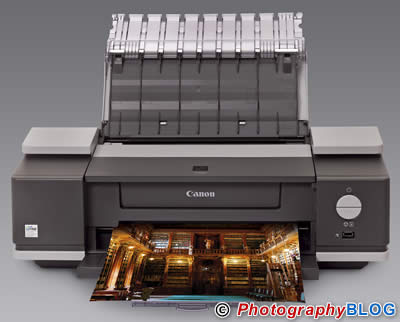
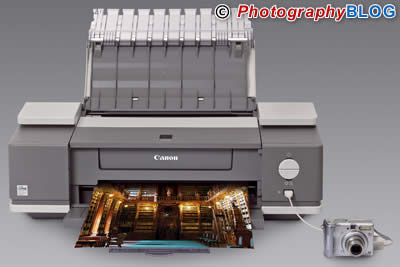
Canon PIXMA iX4000 and Canon PIXMA iX5000
 PMA 2006: The Canon PIXMA iX4000 and Canon PIXMA iX5000 A3+ printers are announced today. The PIXMA iX4000 and iX5000 are aimed at the SoHo market and will be available from April 2006, priced at around £249.00 / €360.00 and £329.00 / €475.00 respectively.
Canon UK Press Release
Canon targets small business market with new PIXMA iX4000 and iX5000 A3+ printers
Canon is pleased to announce the launch of two new A3+ printers aimed at the small business market: the PIXMA iX5000 and PIXMA iX4000. The new products are designed to meet office requirements – delivering rapid, high quality prints for documents and graphics, while also continuing in the PIXMA tradition of producing high speed lab-quality photo prints. These are achieved with Canon’s FINE (Full-photolithography Inkjet Nozzle Engineering) technology , which lies at the heart of PIXMA’s photolab performance. In addition to the new printers, Canon also launches two multifunctionals that also target the small business market: the PIXMA MP830 and PIXMA MP530. The new products strengthen the PIXMA range by bringing the sub-brand’s core values – designer styling and advanced technology for high quality, high speed photo printing – into the important small office and home office segment. “We are now strengthening the PIXMA sub-brand by focusing on the small business market,” said Mogens Jensen, Head of Canon Consumer Imaging Europe. “Canon’s strategy is to drive the market by providing class–leading business devices that excel at producing high quality image prints, fast.”
The PIXMA iX5000 and PIXMA iX4000 feature:
- Fast document print speeds – 25 ppm/17 ppm with the PIXMA iX5000 and 18 ppm/14 ppm with the PIXMA iX4000 for mono/colour A4 output
- Efficient single ink tanks for minimum ink wastage
- FINE print heads with 2pl droplets2 and 4800 x 1200 dpi resolution for photo lab quality, high-speed prints
- ChromaLife1002 system for long lasting, beautiful photos
- PictBridge2 for direct photo prints
The new models update and expand Canon’s range of A3+ business printers, with the PIXMA iX5000 replacing the i6500. The PIXMA iX4000 is a new model.
Crisp business documents in a flash
For professional business documents without delay, the new PIXMA models each benefit from the FINE print technology speed advantage. Sharp, crisp text printing is achieved with a pigment black ink.
Both printers’ USB 2.0 Hi-Speed connection ensures the high speed print engines are always at full productivity.
Photolab quality, without the wait
Businesses are becoming increasingly reliant on digital images to provide instant global communication without the need for translating. Incorporating FINE technology the new PIXMA printers deliver photolab quality prints at exceptional speeds. Ink droplets of 2pl, together with the maximum 4800dpi x 1200dpi print resolution, provide virtually grain free photos with an image quality comparable to that of a conventional 6-colour photo printer.
Capable of printing on A3+ photo paper, the PIXMA iX5000 and PIXMA iX4000 take only 166 seconds3 to produce an A3+ photolab quality print (28 x 36cm photo on A3+ photo paper). Borderless 4 x 6” photo prints are generated in as little as 51 seconds by both printers.
Design for business
The new printers continue in the PIXMA tradition of advanced, contemporary designs – providing offices with a stylish yet robust device, light years away from the traditional ‘beige box’ office printer. Easy-access, large operation keys add to the printers’ locational freedom in the office.
Software
A comprehensive range of quality software is bundled with the PIXMA iX5000 and PIXMA iX4000, allowing users to make full use of the printers’ functionality. For details see Additional Information.
Media
Canon’s growing range of media extends the creative and practical applications of the printers. For details see Additional Information.
Pricing and availability
The PIXMA iX4000 and iX5000 will be available from April 2006, priced at around £249.00 inc. VAT/ €360.00 inc. VAT and £329.00 inc. VAT/ €475.00 inc. VAT respectively.
Reader enquiries
UK – 08705 143723 / www.canon.co.uk
Eire – (01) 2052400 / www.canon.ie
Software
Each printer comes bundled with the following software:
- Easy-PhotoPrint – provides three easy steps to printing photos. Assisting with options such as media selection and scaling, it includes features such as Face Sharpening for out-of-focus face correction, Red Eye Correction and Digital Face Smoothing to reduce the appearance of wrinkles.
- Easy-WebPrint – (Windows only) sits on the Explorer toolbar and takes the frustration out of web page printing, saving time, ink and paper by correctly scaling output to prevent the common problem of having the right-hand side of web pages cut off.
- PhotoRecord – (Windows only) guides users through printing a personalised photo album, including assistance with printing on Canon’s double-sided media.
- Easy-Print Toolbox – (Windows only) Always-at-the-ready desktop menu bar used to instantly launch common applications such as PhotoRecord and Easy-Photo-Print.
Compatibility
All four products are compatible with Windows 98/Me/2000/XP, Mac OS X v10.2.8 or later.
Matching media
Canon’s competitive advantage in printer hardware technology is fully realised when genuine Canon photo grade media and inks are used. The diverse and growing range of Canon media is developed specifically to work in combination with Canon’s FINE ink jet print technology. Photo papers and media are available in a wide range of formats (including mini stickers), finishes (from matt to semi-gloss to super-high gloss) and sizes (from credit card to the new A3+ size). As well as A3+, other new sizes include 8 x 10” (20 x 25cm) and 10 x 12” (25 x 30 cm) SG-101 and PR-101. Photo Paper Pro (PR-101) is the flagship paper for the highest grade, ultimate durability professional results. A double-sided photo paper (PP-101D 5 x 7cm and PP-101D A4) is also available.
Technologies Explained
FINE
Canon’s patented FINE semi-conductor manufacturing technique creates extraordinary print speeds for both photo as well as document printing by producing exceptionally long print heads with exceptionally high nozzle count and density. These get more ink on the page in less time than is possible with traditional inkjet technology, delivering fast borderless photo prints up to A3+ size.
FINE also achieves virtually grain free photolab quality by delivering millions of microscopic 2 picolitre droplets each second with extremely high consistency and accuracy from 10 ?m diameter Micro-Nozzles.
ChromaLife100
For improved fade resistance, the printer supports Canon’s ChromaLife100: a system of genuine Canon dye-based inks, which deliver exceptionally broad colour gamut, and specialised photo paper designed to work together with FINE print heads. This technology ‘triangle’ of nozzle design, ink and media produces prints that rival silver halide quality and longevity. Prints resist fading for 100 years when album-stored, 30 years when displayed under glass and 10 years when exposed to the effects of the air .
Single Ink
The PIXMA iX5000 and PIXMA iX4000’s individual ink tanks ensure that only those inks which run out need to be replaced. They feature LEDs that only light when the tanks are installed correctly. To provide ink level monitoring information during stand-alone use that would normally be displayed on the computer screen, LEDs flash slowly to warn when the tank runs low, and more rapidly to indicate when the cartridge is empty.
PictBridge
Both the PIXMA iX5000 and PIXMA iX4000 support the vendor independent PictBridge standard for direct cable connection photo printing with contemporary digital cameras and digital video cameras, without the need for a PC.
About Canon (UK) Limited
Canon is a world-leading innovator and provider of imaging and information technology solutions for the home and office environments.
Canon has a global philosophy of Kyosei - living and working together for the common good, which clearly demonstrates commitment to customers, staff and the environment shared by all.
Canon (UK) Ltd is the UK marketing and sales operation for the US$33 billion global company based in Tokyo, Japan. In the UK Canon employs over 2,000 people in various locations including Ireland and has achieved sales of £522m in 2004.
The main business focus for Canon (UK) Ltd, covers two clearly defined market segments: Business Solutions covering both the office and professional printing environments (including: multifunctional printers, IT consultation and peripherals: photocopiers, printers, fax machines, document management hardware & software, multimedia LCD projectors) and Consumer Imaging (input solutions: film and digital cameras, camcorders, binoculars and scanners; and output solutions: Ink Jet printers, fax machines, desktop multifunctionals and multimedia projectors).
PIXMA iX5000 Specifications
Up to 4800 x 1200 dpi 1
4-ink FINE print head with 2 pl Micro-Nozzles
ICM, ColorSync, Exif Print
“Borderless 10 x 15cm: Approx. 51 seconds (Std)
A3+: Approx. 166 seconds (Std)”
Up to 25ppm (Max.), 12.2ppm (Std)
Text & Graphics: Up to 17ppm (Max.), 9.5ppm (Std)
A4 Full Page: Approx. 97 seconds (Std)
See Media Compatibility Worksheet
Sheet feeder: 64 to 105 g/m2 and supported
Canon special media up to 273 g/m2
Sheet feeder: 150 sheets
Sheet feeder: A3+, A3, LDR+, LDR, A4, B5, A5, Letter, Legal, Envelopes (DL size or Commercial 10), 25 x 30cm, 20 x 25cm, 13 x 18cm, 10 x 15cm Credit Card size
Available using Photo Paper Pro (A3+, A3, A4 & 10 x 15cm), Photo Paper Plus Glossy (A3+, A3, A4, 13 x 18cm & 10 x 15cm), Photo Paper Plus Semi Gloss (A3+, A3, A4 & 10 x 15cm), Glossy Photo Paper (A3+, A3, A4, 10 x 15cm & Credit Card), Matte Photo Paper (A3, A4)
Available by manual operation only using Photo Paper Plus Double Sided, Super White Paper or plain paper in A3+, A3, A4, B5, A5, Letter & 13 x 18cm sizes
Single Ink technology – 4 separate ink tanks (PGI-5BK, CLI-8C, CLI-8M, CLI-8Y)
PGI-5BK: 380 pages at 5% coverage2 PGI-5BK: 1400 pages (Printing ISO/JIS-SCID N5) 3
400 pages at 5% coverage per ink tank 2 Cyan: 710 pages, Magenta: 470 pages, Yellow: 460 pages, (Printing ISO/JIS-SCID N5) 3
USB 2.0 Hi-Speed 5
Direct Print Port: Camera direct photo printing from PictBridge compliant digital cameras & camcorders
“Camera: PictBridge
Compatibility: Exif 2.2 or earlier, DPOF compliant”
Windows: PC with Windows XP, Windows 2000, Windows Me or Windows 98, USB interface 4, CD-ROM Drive. Free hard disk space: TBC MB for Windows XP/2000 and Windows Me/98.
Mac: Macintosh computer with Mac OS X v10.2.8 or later, USB interface. Free hard disk space: TBC MB for Mac OS X v10.2.8 or later.
Windows: Photo Optimizer PRO, Image Optimizer, Photo Noise Reduction, Vivid Photo
Mac: Vivid Photo, Photo Noise Reduction
“Windows: Easy-WebPrint, Easy-PhotoPrint, PhotoRecord and Easy-PrintToolBox.
Mac: Easy-PhotoPrint”
AC 100 – 240V
Approx. 0.8W (standby), approx. 17W (printing)
5° – 35° C
10 – 90% RH (no condensation)
Approx. 37dB (A) (best quality mode)
601 x 317.6 x 193.2mm
Approx. 9.3kg
Ink droplets can be placed with a minimum pitch of 1/4800 inch
Print volume figures may vary with the content of the document and the print mode. Black calculation based on an average of four printers run continuously until ink out printing 1500 characters per page, normal text, in default mode on plain paper using Windows XP and Word 2003.
Print volume figures may vary with the content of the document and the print mode. Colour calculation based on an average of four printers run continuously until ink out printing the ISO/JIS-SCID N5 pattern in default mode on plain paper using Windows XP and Word 2003.
Using recommended adapter - not supplied.
USB operation can only be guaranteed on a PC with pre-installed Windows XP, Windows 2000, Windows Me, or Windows 98. USB 2.0 Hi-Speed performance requires Windows XP Service Pack 1, Windows 2000 Service Pack 4 or Mac OS X version 10.2.7 or later with pre-installed USB 2.0 port.
PIXMA iX4000 Specifications
Up to 4800 x 1200 dpi 1
4-ink FINE print head with 2 pl Micro-Nozzles
ICM, ColorSync, Exif Print
“Borderless 10 x 15cm: Approx. 51 seconds (Std)
A3+: Approx. 166 seconds (Std)”
Up to 18ppm (Max.), 11.3ppm (Std)
Text & Graphics: Up to 14ppm (Max.), 8.9ppm (Std)
A4 Full Page: Approx. 97 seconds (Std)
See Media Compatibility Worksheet
Sheet feeder: 64 to 105 g/m2 and supported
Canon special media up to 273 g/m2
Sheet feeder: 150 sheets
Sheet feeder: A3+, A3, LDR+, LDR, A4, B5, A5, Letter, Legal, Envelopes (DL size or Commercial 10), 25 x 30cm, 20 x 25cm, 13 x 18cm, 10 x 15cm Credit Card size
Available using Photo Paper Pro (A3+, A3, A4 & 10 x 15cm), Photo Paper Plus Glossy (A3+, A3, A4, 13 x 18cm & 10 x 15cm), Photo Paper Plus Semi Gloss (A3+, A3, A4 & 10 x 15cm), Glossy Photo Paper (A3+, A3, A4, 10 x 15cm & Credit Card), Matte Photo Paper (A3, A4)
Available by manual operation only using Photo Paper Plus Double Sided, Super White Paper or plain paper in A3+, A3, A4, B5, A5, Letter & 13 x 18cm sizes
Single Ink technology – 4 separate ink tanks (PGI-5BK, CLI-8C, CLI-8M, CLI-8Y)
PGI-5BK: 380 pages at 5% coverage2 PGI-5BK: 1400 pages (Printing ISO/JIS-SCID N5) 3
400 pages at 5% coverage per ink tank 2 Cyan: 710 pages, Magenta: 470 pages, Yellow: 460 pages, (Printing ISO/JIS-SCID N5) 3
USB 2.0 Hi-Speed 5
Direct Print Port: Camera direct photo printing from PictBridge compliant digital cameras & camcorders
“Camera: PictBridge
Compatibility: Exif 2.2 or earlier, DPOF compliant”
Windows: PC with Windows XP, Windows 2000, Windows Me or Windows 98, USB interface 4, CD-ROM Drive. Free hard disk space: TBC MB for Windows XP/2000 and Windows Me/98.
Mac: Macintosh computer with Mac OS X v10.2.8 or later, USB interface. Free hard disk space: TBC MB for Mac OS X v10.2.8 or later.
Windows: Photo Optimizer PRO, Image Optimizer, Photo Noise Reduction, Vivid Photo
Mac: Vivid Photo, Photo Noise Reduction
“Windows: Easy-WebPrint, Easy-PhotoPrint, PhotoRecord and Easy-PrintToolBox.
Mac: Easy-PhotoPrint”
AC 100 – 240V
Approx. 0.8W (standby), approx. 17W (printing)
5° – 35° C
10 – 90% RH (no condensation)
Approx. 37dB (A) (best quality mode)
601 x 317.6 x 193.2mm
Approx. 9.3kg
Ink droplets can be placed with a minimum pitch of 1/4800 inch
Print volume figures may vary with the content of the document and the print mode. Black calculation based on an average of four printers run continuously until ink out printing 1500 characters per page, normal text, in default mode on plain paper using Windows XP and Word 2003.
Print volume figures may vary with the content of the document and the print mode. Colour calculation based on an average of four printers run continuously until ink out printing the ISO/JIS-SCID N5 pattern in default mode on plain paper using Windows XP and Word 2003.
Using recommended adapter - not supplied.
USB operation can only be guaranteed on a PC with pre-installed Windows XP, Windows 2000, Windows Me, or Windows 98. USB 2.0 Hi-Speed performance requires Windows XP Service Pack 1, Windows 2000 Service Pack 4 or Mac OS X version 10.2.7 or later with pre-installed USB 2.0 port.