

PhotographyBLOG


Holiday Gift Guide 2008

LATEST REVIEWS

Visual Similarity Duplicate Image Finder
Casio EX-FH20
PhotoFrame 4 Pro
Canon Powershot SX10 IS
Adobe Elements 7
Nikon Coolpix P6000
Canon Powershot G10
Ricoh R10
FocalPoint
Nikon D90

All Reviews
Best Digital Cameras

LATEST COMMENTS

Nikon Number One for DSLR
Date: Dec 01, 2008
Name: Paul

Nikon D3x Photos
Date: Dec 01, 2008
Name: teila

Nikon D3x Photos
Date: Dec 01, 2008
Name: Horrible

Nikon D3x Photos
Date: Dec 01, 2008
Name: Rasmus

Nikon D3x Photos
Date: Dec 01, 2008
Name: Chunky

Nikon D3x Photos
Date: Dec 01, 2008
Name: Dominique Dierick

Nikon D3x Photos
Date: Dec 01, 2008
Name: John R. Spurr

Canon EOS 5D Mark II Photos
Date: Dec 01, 2008
Name: Mark Goldstein

Kodak 5500, 5300 and 5100 All-in-One Printers
Date: Dec 01, 2008
Name: dave kendrick

Canon EOS 5D Mark II Photos
Date: Dec 01, 2008
Name: Eric Vaughan

Latest Threads

MOST COMMENTS

Panasonic DMC-LX1 Announced (791)

Panasonic Lumix DMC-LX2 (478)

Ricoh Caplio R3 Announced (421)

Panasonic DMC-FZ30 Announced (360)

Canon G7 (222)

Fujifilm Finepix E550 Review (214)

Sony DSC-H5 and Sony DSC-H2 (204)

Samsung S800, Samsung S600 and Samsung S500 (188)

Canon EOS 400D (186)

3 Megapixel Nokia N80 Cameraphone Announced (148)


ARCHIVES

December 2008
November 2008
October 2008
September 2008
August 2008
July 2008
June 2008
May 2008
April 2008
March 2008
February 2008
January 2008

Latest News Stories

AFFILIATES

Digital Photography Blog
Digital Wedding Forum
Everyday Eye
Mark Goldstein
Mobile Phones
ShutterPoint
 

Olympus SP-550 UZ

Olympus SP-550 UZPMA 2007: The Olympus SP-550 UZ is the first digital camera to offer an 18x optical zoom lens, equivalent to 28-504mm! As you’d expect with such a massive focal range, the SP550 offers a Dual Image Stabilization system to help avoid the effects of camera shake. Also on offer is a 6.4cm LCD sceen, Super Macro mode (Icm focusing), PASM exposure modes and 23 scene modes. The Olympus SP-550 UZ will be available from February 2007 at around £375.

Olympus Press Release

Hamburg, 25 January 2007 – Get up close and personal in a whole new way. With the world’s first wide 18x optical zoom, the Olympus SP-550 UZ accepts no limits, bringing photographers closer to far-away subjects. Capture candid street scenes from a discreet distance, or snap the details of a football game from way up in the stands – then even use the wide angle lens to see and shoot more within closer range: This model’s focal length spans an amazing 28-504mm (35mm camera equivalent)! Enjoy double protection against blur with Dual Image Stabilization. Even at high magnifications or when capturing fast-moving objects, this technology ensures that results are significantly sharper. Packing 7.1 Megapixels of detail-capturing power, the SP-550 UZ opens up a new realm of creative possibility – because if it’s in your life, it’s in your Olympus SP-550 UZ.

Come in close from afar
Explore the possibilities of this kind of magnification power. With an 18x wide zoom lens (equivalent to 28-504mm on a 35mm camera) there’s no need to disturb a subject, whether it be an animal wandering through the wilderness or people lounging in a city park. Since telephoto shots can be more prone to blur caused by camera shake, the SP-550 UZ features Dual Image Stabilization to help deliver the clearest results possible. Get a front-row view from a safe distance in high-action situations – and even make use of the phenomenally-high burst rate to take great sequential shots at speeds never before seen in this category: Up to 15 frames per second*!

See more all around
Experience a lens that’s simply more versatile. On top of astounding ultra-zoom attributes, its wide-angle capabilities reach to 28mm (35mm camera equivalent). The SP-550 UZ therefore offers photographers a broader perspective to see and do more. And with a 6.4cm LCD it’s easy to frame and capture shots without having to squint and make guesses about how the image will turn out.

Go for the details
See the world from a different point of view with Super Macro mode – making shots possible from as close as 1cm! From the tiniest wonders nature has to offer to the simple details of everyday life: The most unique photographic opportunities are at hand with the SP-550 UZ.

Capture the night
Don’t let low light ruin a photo-op: Count on integrated BrightCapture Technology to add brightness to any shot, even in movie mode! With the help of an extra-bright LCD, framing dim shots is no problem, making high-quality photo and video capture a reality in virtually any low-light situation.

Comfortable, creative control
Thanks to an ergonomic design plus the intuitive menu and button layouts, the SP-550 UZ is a delight to hold and just as much fun to operate. With P/A/S/M exposure modes and 23 scene modes available, there’s a perfect setting for every user. And 25 languages on board ensure that just about anyone can enjoy the camera’s user-friendly menus.

The versatile Olympus SP-550 UZ turns creative dreams into reality. Featuring the world’s first wide 18x optical zoom, this compact camera will be available from February 2007.

The SP-550 UZ main features:

* 18x wide optical zoom (equivalent to 28-504mm on a 35mm camera) 1:2.8-4.5
* Dual Image Stabilization
* 7.1 Megapixels
* 6.4cm/2.5” LCD with 230,000 pixels
* High burst rate (up to 15fps*)
* Super Macro mode (from as close as 1cm)
* P/A/S/M exposure modes
* BrightCapture Technology for better low light photography – also available in movie mode
* 23 scene modes (including Portrait, Sports, Night Scene)
* 25 languages on board
* Internal memory plus xD-Picture Card slot
* Supplied with Olympus Master software and four AA batteries

* In 1.2 Megapixel mode
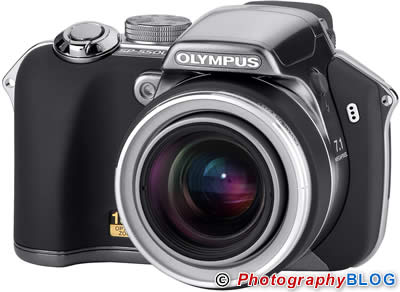
Olympus SP-550 UZ

Olympus SP-550 UZ

Published: Thursday, January 25, 2007

Compare Prices

Support PhotographyBLOG: Buy this product from one of our affiliate retailers (US first/red, UK second/blue):


Reader Comments

  1. For those that never print their photos, 1.2 mp is plenty enough. They can fill a whole monitor with a 1280x960-pixel picture, and 15fps is blazingly fast. Movies used to be 15 or 16fps, so for a still camera, that is world class.

    The Dual Image Stabilisation feature - combining mechanical image stabilisation with ISO boosting - seems a little worrying. Hope you can switch the ISO boost off. A small sensor is bound to yield noisy images at full resolution when the sensitivity is cranked up. Of course as stated above, those that do not print their photos can use a reduced resolution and enjoy the benefits of binning on the noise levels.

    Zoltán at 12:35pm on Thursday, January 25, 2007

  2. No one can "enjoy" any "benefits" of pixel binning because there are none.

    Pixel binning destroys a digital image. It renders details as smudges.

    phule at 02:47pm on Thursday, January 25, 2007

  3. now , Olympus is the only one company sticking with the ridiculous Xd format card .

    But still, this seems so promising.

    Derek at 06:48pm on Thursday, January 25, 2007

  4. I hope the image review times are instantaneous, unlike other Olympus products.

    Wonder what Sony will respond with.

    Its nice having them 'fight' over us photographers.

    Nicholas at 10:43am on Friday, January 26, 2007

  5. Concern over Xd card. I have a camera with OUTDATED card format (SM). Will have to think hard & long before considering this camera (using XD) One of the new camera from olympus has DUAL card slots (Xd & CF).
    Is the writing on the wall???

    stanmilz at 06:36pm on Saturday, January 27, 2007

  6. Just as I feared.
    Regarding image review:

    Today from DigitalCameraInfo.com:

    "One of the biggest drawbacks of the playback mode is the delay that occurs when entering or navigating through the images. There is also a blinking red LED on the back of the camera that blinks at an alarming rate when the camera is "thinking."

    Olympus must be missing the boat due to lack of patents?

    As great as the specs are this could be a deal breaker. I can't waste time reviewing images.

    Nicholas at 12:22pm on Sunday, January 28, 2007

  7. okay,does anyone out there know of a great compact camera ideal for niteshots,antishake,8-10mgpxls,zoom-topshelf model short of an SLR?..i need it for art/photoshop purposes-blowup to canvas size!

    bret polok at 01:50am on Friday, March 02, 2007

  8. I just purchased this camera and am quite happy with it. It does have a couple drawbacks, one of which is that the extra lens attachment accessory (which does not come with the camera) prevents taking any wide angle pictures, so forget using it with filters unless you are zooming in or hand holding them. This is due to the length of the lens and the need for the attachment to be longer than it.

    The other is that the Bright Image LED screen will turn a slight pinkish color in bright sunlight. This does not affect the final image at all, but does make exposure difficult. Otherwise, it is an amazing camera for the technology.

    The 18x zoom is amazing and the macro really does let you get as close as 1cm. Images are very sharp. There are a multitude of manual features, including the ability to reprogram the IS button to do other things.

    Color is great and very adjustable, with saturation, white balance, and even individual red/blue adjustments included. Pictures are sharp and clear and in low light it is amazing. You can even purchase a remote cable release. Great camera for the price imho.

    As to the xD card. (Which btw Fuji uses as well.) With a 2GB card you can take up to 480 some odd jpegs, 180+ on RAW. Here's a link to some samples I've taken recently. http://tinyurl.com/2s3d55

    As to the question of the LED light, it is very small and not distracting at all. The only time I have seen it blinking it when running in the pictures from the camera itself.

    Suzanne Williams at 11:55pm on Friday, March 16, 2007

  9. I just recently purchased the sp550 uz and I have no complaints except that for some reason I can't use the panorama mode and I have an XD card like it says I need but I don't know what the deal is. Can somebody help me out?

    JJ at 10:03am on Saturday, July 07, 2007

  10. JJ, panorama mode requires an Olympus-branded xD card

    Peter at 04:48pm on Tuesday, July 10, 2007

  11. Actually right after I posted my last post I realized that I didn't even look at the xd card I was using from my other camera and realized that it was a fuji xd card.

    JJ at 05:59am on Thursday, July 12, 2007

  12. I've read this blog and I still have no answer to my 'lack of panarama' mode on my sp550. *I have an Olympus 2gig xd card* in the camera and still can't find, or use, any panarama mode. The Olympus Master guide only addresses the software editing for panarama mode, not how to find and use it in the camera's menu.

    Robert Maskell at 12:18pm on Monday, August 20, 2007

  13. Select Program (P) mode, then hit the Menu button, select Camera Menu and scroll down to Panorama. Once you click "Ok" you will see a number of blue lines. Notice which direction the Arrows are pointing on the line down the center. This is the direction you need to take the pictures in. The photos will NOT stitch in reverse. In other words, if you go left to right, then realize you took them right to left, you are out of luck. The Olympus software will NOT stitch them in reverse order. I prefer to not use Panorama Mode, but to use Manual instead and a 3rd party software for stitching.

    Suzanne at 09:32pm on Monday, August 20, 2007

  14. Thank you Suzanne, for the rapid response to my inquiry...and the solution. It's obvious I have to dig deeper into the camera's sub-menus to find what the owner's manual should be directing me to. Thanks again...

    Rob at 11:34pm on Monday, August 20, 2007

  15. What's better the sony h9 or this camera with the 18X?

    Help at 08:30pm on Friday, August 24, 2007

  16. THANK YOU FOR THE PANARAMA TRICK, I'M SURE THE 3RD PARTY IS BETTER, BUT THIS IS FANTASTIC REGARDLESS OF THE SHORTFALLS IN MISTAKES wink

    MSBLUEION at 07:11pm on Wednesday, September 19, 2007

  17. Does the olympus SP550/560 have true manual focus? I take wildlife pictures and they are often behind or in branches or bushes. Useing the prefocus on another object estimated to be at the same distance does not cut it.

    Walt Schenkel at 03:37am on Tuesday, December 11, 2007

  18. I find the manual focus to be sadly lacking. The manual focus ring on my previous Fuji digital camera was way better. It is one of the drawbacks of this camera, for sure.

    Suzanne at 01:10pm on Tuesday, December 11, 2007

  19. Just be thankful that the Olympus uses four AA cells as I've just had an annoying upset with a flat battery on a Panasonic FZ20. Why do manufactures ruin good cameras by using weirdo batteries? As its too big to fit in ones pocket anyway an enlarged grip holding 4AAs would not have hurt one tiny bit. Whilst I wouldn't go so far as to say "Uses more electricity than General Motors" - a facetious comment made by some wag about an old Hewlett Packard camera, battery life is often a sore point on this type of equipment.

    Davey at 10:10pm on Wednesday, February 27, 2008

  20. I have Suzanne's problem with my new Olympus sp-560: no panorama selection from the menu. I have followed the manual instruction to no avail. The next thing to try is to upgrade the sotware from the Olympus web using Olympus master. If this fixes it, I'll report it here.

    Rene at 12:22am on Sunday, March 02, 2008

  21. Panarama mode only works with Olympus brand memory cards. Are you using Fuji memory or generic?

    P12 at 09:24pm on Friday, June 27, 2008

Add Your Comments

Please keep your comments relevant to this article. All spam postings will be removed. To create a live link, simply type the URL (including http://) or email address. You can include up to 2 URLs. Please use TinyURL or a similar service for longer URLs. Line breaks and paragraphs are automatically converted - you don't need to use <p> or <br> tags.

Name (required):

Email (required, not displayed):

Website (optional):

Enter your comments:

Remember me

Email me when someone replies to this comment

Enter the word you see below:


Pixmania Logo

Discover a wide range of digital cameras at low prices. Buy cheap cameras from Sony and Canon. Share your photos thanks to digital photo frames.


Varnam Logo

Varnam offers digital photo frame with built-in memory & battery.


© Copyright 2003-2008 Photo 360 Limited
Best Viewed at 1024x768 Screen Resolution