« Back to news

Panasonic Lumix DMC-TZ4 / TZ5 Firmware Update 1.2
Mark Goldstein | Digital Compact Cameras | June 24, 2008 | 5 Comments

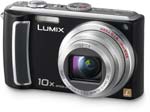
Panasonic Lumix DMC-TZ5Panasonic have released a new firmware update for the DMC-TZ4 / TZ5 digital cameras. Version 1.2 simply “improves auto focus performance”.

Website: Panasonic Lumix DMC-TZ4 / TZ5 Firmware Update 1.2



Your Comments

5 Comments so far | Newest Oldest first | Post a comment

#1 Vittorio Neri

Good morning. I updated my DMC-TZ5's firmware from ver. 1.0 to ver. 1.2 following Panasonic's procedure. Upgrade came to the end with no errors, camera's firmware version check displays ver. 1.2 and everything seems to work properly. Photo EXIF data and PhotoME, on the contrary, still indicate ver. 1.0!
Questions:
- is this an upgrade bug by Pana or firmware is actually NOT updated?
- how can this be checked?
Any suggestion is wellcome!
Thanks and best regards.
Vittorio

2:16 pm - Monday, August 4, 2008

#2 PJ

I am having trouble updating the firmware. I go to check my current version of firmware but my camera doesnt display it. Also what is the "root directory of the camera? Maybe im putting it in the wrong location?

1:28 am - Wednesday, August 6, 2008

#3 Vittorio Neri

Hi PJ! To check version and upgrade follow Pana's instructions at http://panasonic.jp/support/global/cs/dsc/download/TZ4_5/index.html

If you don't read any version (??) see
"STEP 1: Reading the current firmware version.
Panasonic recommends that you update the firmware in your camera if either of the following conditions exists:
A: If the firmware version is not displayed on the LCD using the following procedure, please update firmware.
B: If the firmware version etc. etc."

ROOT DIRECTORY is where are DCIM and MISC folders! You have to transfer there TZ5_V12.bin file.
Vittorio

6:25 am - Wednesday, August 6, 2008

#4 jozsef

Hi!

I have upgraded my TZ5, the CAF much better in daylight, but inside, or late afternoon, after sunset the focus is hunting, better to turn off it.
Maybe the next update vill solve it.
What are your experiences ?

8:23 am - Thursday, August 7, 2008

#5 bert

Ok, just finished updating to 1.2 firmware on the Lumix TZ5 on a Mac. Had some difficulty finding where to drag the TZ5 bin file on the formated SD card. First you need at least one picture left in your DCIM folder. The Panasonic site says to create a folder to hold the bin file. This did not work for me. The only way it worked was placing the bin file in the DCIM folder, I tried at leat 6-7 different places and combinations before finally being succesful in getting the update window on the cam and not just the pics on the card.
Good luck yall !

2:09 am - Tuesday, July 7, 2009

WIN! I'm a caption. WIN! I'm a caption. Win a Sony VAIO Laptop!
Pixmania Logo

Discover a wide range of digital cameras at low prices. Buy cheap cameras from Sony and Canon. Share your photos thanks to digital photo frames.