Reviews: 2Flyer Screensaver Builder Pro (v5.0.0)
Introduction
In order to create the screensaver that is currently available as a free download to all PhotographyBLOG members, I evaluated several popular screensaver programs, and eventually bought one of them. This review briefly outlines the programs that I considered, then looks in detail at the program that I purchased, 2Flyer Screensaver Builder Pro.
Before I start, you may have already noted that I purchased a screensaver program. There's usually a free alternative to everything on the Web, but when it comes to screensaver builders it seems that there's a price to pay. If anyone knows of a free program then let me know and I'll take a look.
Products Evaluated
I visited Cnet.com and downloaded the trial versions of 5 screensaver builder programs that looked promising. Which I guess is pretty similar to what most people would do. I installed each product and took them for a test drive. Price was as critical a factor to me as features, so I was basically looking for that winning combination of low price and high-perfomance.
- Axialis Screen Saver Producer 3.56
http://www.axialis.com
This was by far the most polished and professional of the programs that I tested. It's User Interface and supporting website both looked the part, and it was extremely straightforward to construct a working screensaver.
Unfortunately, as stated on the website:"The Personal Edition of the program is intended to be used by one user for his private use only. The user of a Personal Edition can compile screen savers and distribute them for non-commercial purpose only. Companies can't use the Personal Edition and must purchase the Corporate Edition."
I fully intended to distribute the PhotographyBLOG screensaver to more than one person and for commercial use, which meant that the only option left was the Corporate Edition, costing $59.95. Ultimately this was the reason why I bought 2Flyer and not Axialis's offering.
-
PYSoft Animated Screen
http://www.pysoft.com
Animated Screen had the most shareware-like appearance of all these programs, and a frustrating 30 minutes proved that appearances weren't deceptive. At the end of that time I basically gave up, having failed to create anything that remotely resembled a screensaver. -
Consulting Nation Screensaver XP 1.0
http://www.consultingnation.com/
This program was in the running initially. It offered the same functionality as the other programs and was competitive in terms of the look and feel of the interface. But ultimately it was rejected because of exactly the same reason as Axialis. You can buy the Personal Edition for $19.95, but to actually be able to distribute the screensaver, you have to buy the Professional Edition, again costing $59.95. -
Screentime Photo and Video
http://www.screentime.com/
I soon went off this program when I found out the minimum commercial price; $199 for distributing less than 10,000 copies of a screensaver! Once again there was an affordable personal version, but once again you could only use it for your own personal use. -
2Flyer Screensaver Builder
http://www.2flyer.com
And so onto 2Flyer. This was the last product that I installed, and this is the product that I chose to purchase. You can find out why by reading the rest of this review...
Price

(out of 5 stars)
At only $30 for the Professional version, 2Flyer is one of the most competitively priced screensaver programs on the market. The equivalent competitors are shown below:
- Axialis Screen Saver Producer 3.56 - Corporate - $59.95
- PYSoft Animated Screen - $49.00
- Consulting Nation Screensaver XP 1.0 - $59.99
- Screentime Photo and Video - $199 (commercial licence)
The Standard version can create screensavers with images, music files and transition effects. Registration fee is $20.
The Professional version has all the functions in standard version, and can also create flash, video or web screensavers, and supports more advanced options.
The reason that I chose the Professional version instead of the Standard was the support for Flash, a program from Macromedia that can be used to create animated and interactive movies, which you can then use in your screensaver.
2Flyer also comes with a 100% unconditional 30 day money-back guarantee and lifetime free updates for registered users.
Full pricing details can be found here: http://www.2flyer.com/buy.asp?d=
Features

(out of 5 stars)
These are the key features of 2Flyer Screensaver Builder (as listed on their website):
- Creates Windows 98/ME/2000/XP compatible screen savers.
- Collects up to 1000 JPG/JPEG, GIF, BMP or WMF, EMF images and 2flyer will merge them into a screen saver.
- Adds MP3, WMA, WAV or MID sound and music files to your screen savers to be played while the images are displayed.
- Displays images from 240 transition effects that can be customized to create unlimited unique effects.
- Creates a single .exe screen saver installation file - email and share the screen saver with your friends at any time.
Additional benefits for Profession Version include:
- Plays Flash files or online Flash resources in screensavers.
- Plays movie clips in screensavers, support RealPlayer, MediaPlayer or QuickTime formats (RM, RA, RMJ, RAM, RMM; MPG, MPEG, MPE, MOV; ASX, ASF, WMV, AVI); You can even play online channels (Audio or WebTV).
- Plays web pages in screensavers, support offline mode, display interval setting and other 10 features.
The first important benefit for me and the one that made me purchase 2Flyer is shown in bold; the option to create a screensaver with its own installation program. All of the other screensaver builders that I looked at only included this feature at twice the price of 2Flyer. Instead they offered the lesser option of creating an .scr file, which the user must manually copy to the correct directory on their computer in order to successfully "install" the screensaver. I wanted to create a screensaver that my site visitors' could quickly download and install with the minimum of trouble.
The second important feature that attracted me to 2Flyer is listed on their FAQ page:
- Do you require royalties on screensavers created with 2Flyer Screensaver Builder?
We do not require royalties or any kind of rights on the screensavers you create. All the screensavers you create with 2Flyer own entirely to you. If you are a REGISTERED user you are entitled to distribute all the screensavers you make. You can use, distribute and sell them freely.
Unlike all of the other screensaver builders, 2Flyer allows you to send or sell your screensavers to whoever you like, without having to pay more for a so-called commercial version.
So in summary, 2Flyer has all of the features that I required from a screensaver builder program, with the very important added option of being able to freely distribute an installable version of the screensaver.
And it doesn't stop there. A quick glance at the Professional Version's feature list shows that 2Flyer can incorporate Flash files, movie clips and even Web pages into a screensaver. I haven't had the opportunity to try these features out yet, but 2Flyer potentially offers even more functionality than its rivals.
Ease of Use
(out of 5 stars)
Although not as polished as Axialis Screensaver Producer (which has a nice WYSIWYG editor), 2Flyer allowed me to create a screensaver in less than 30 minutes, without having to resort to the help file or website for support.
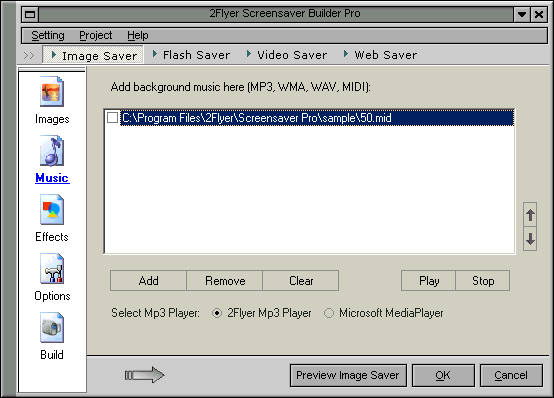
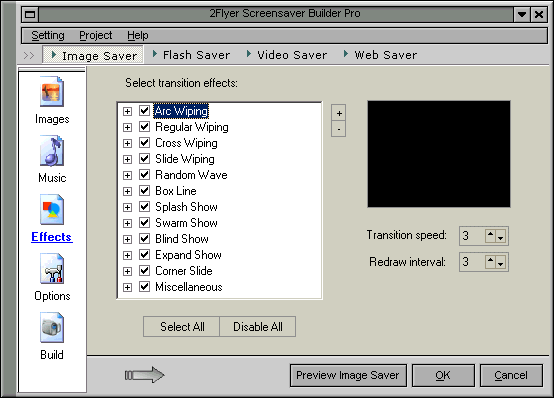
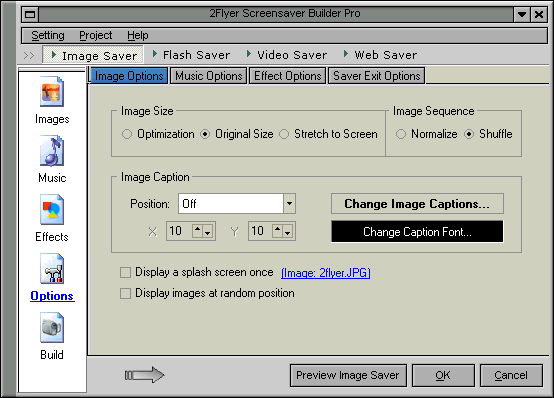
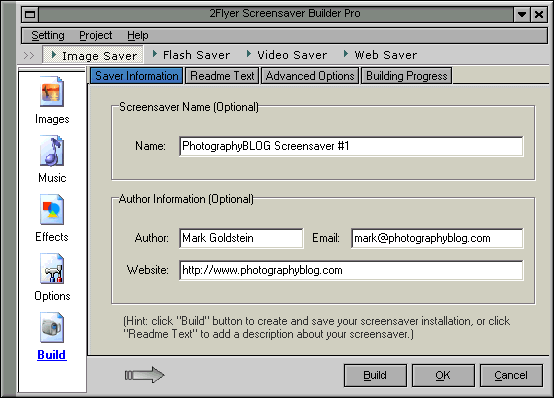
Using 2Flyer to build a screensaver is a step-by-step approach. There are five options on the left-hand side of the interface which allow you to configure the various aspects of your screensaver; Images, Music, Effects, Options and Build. They are all pretty much as straightforward as they sound. You just have to click on each option and change the settings where necessary.
You can then save those settings as a 2Flyer project file. Note, however, that when you re-open a project file, you also have to reselect the images that you want to include; 2 Flyer only seems to retain the other project settings, which can be slightly annoying.
When I used 2Flyer to create the PhotographyBLOG screensaver, I initially thought that the program was a little limited in terms of what it could do. But I quickly realised that the streamlined interface was hiding its functionality, or making it easier to use. Ultimately 2Flyer allowed me to quickly and easily create exactly what I wanted.
Conclusion
(out of 5 stars)
Just when things were looking bleak and I was facing the prospect of having to spend $60 or more to be able to distribute a screensaver to a relatively small number of people, 2Flyer stepped in and saved the day. 2Flyer does everything that I require and does it well. It offers all of the functionality and ease-of-use of the other products that I tested, but crucially at only half the price. At the outset I was ideally looking for a free screensaver program, but I had no hesitation in buying 2Flyer Screensaver Builder after testing it out. And I think that's the best recommendation that I can make!
And if you don't believe me, then take a look at 2Flyer's Review page for
more opinions:
http://www.2flyer.com/review.asp?d=
Leave a Comment about this Review
Screenshots
These screenshots show the principal areas of the "Image Saver" part of 2Flyer Screensaver Builder.