
Canon Pixma Pro 9000 Review
Review Date: May 14th 2007
Author: Jon Canfield
Leave a comment about this review
Introduction
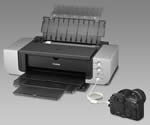
The new Canon PIXMA Pro 9000 replaces one of Canon's most successful A3/B size printers, the highly regarded PIXMA i9900. Known for excellent print quality and large color gamut, this dye ink printer has been a favorite among photographers for several years. About a year ago, Canon announced a new formulation of inks for their dye line that improves archival life and print quality on other media types. Hence, the i9900 has now been replaced by the new Canon PIXMA Pro 9000. Are the changes all good? Let's take a look and see how the new printer performs. Although the Canon PIXMA Pro 9000 printer looks very different, adopting the new square look of the Pixma line, many of the best features remain from the i9900, including 8 individual ink tanks, multiple feed paths, and high speed printing. The biggest change is the use of new ChromaLife 100 inks. While still dye inks, the ChromaLife 100 are formulated to give up to 100 year archival life on Canon gloss media, and much better archival life on other media types, such as Canon's Fine Art Papers in both Photo Rag and Premium Matte finishes.
Compare Prices
Support PhotographyBLOG: Buy the Canon PIXMA Pro 9000 from one of our affiliate retailers:Setup
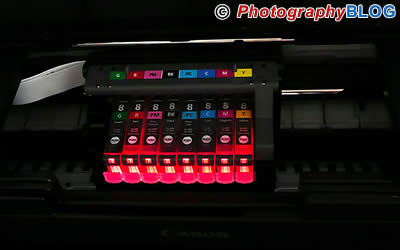
Setup for the Canon Pixma Pro 9000 is very straight forward. The replaceable printheads are installed followed by eight individual ink tanks (green, red, magenta, photo magenta, cyan, photo cyan, photo black, and yellow). As you install the ink tanks, a reassuring red light glows from the cartridge. When a tank need replacing, the light flashes, making it easy to see at a glance which tank is low (of course the software will tell you as well, but the light is a nice touch). Once inks are installed and the system charged, a calibration chart is printed, and you're ready to install software. Along with printer drivers, an on-screen manual, and an application that allows direct printing (more on that in a bit), the Windows software package also includes PhotoRecord, a program for creating scrapbooking type albums, and Easy-WebPrint, a plug-in for Internet Explorer to ease printing of web pages. Outside the USA, you'll also get a holder and software for direct printing on CD and DVD media (those of us in the USA can only get this feature on Epson printers).
Ease of Use
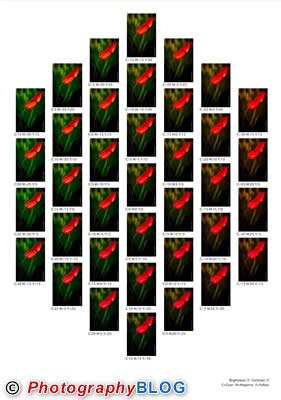
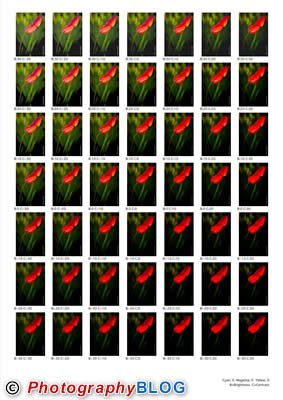
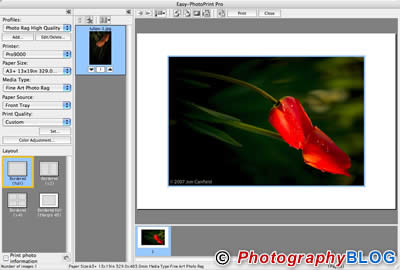
Once setup, the Canon Pixma Pro 9000 is very easy to use, as a printer should be. You can either print directly from Photoshop or your normal imaging application, or use one of the Canon provided applications to make printing even more intuitive. Easy-PhotoPrint Pro is a Photoshop plug-in that goes well beyond the basics with good template layout options, grayscale printing options, and a Pattern test print that helps you select the perfect toning or brightness and contrast settings. You can save frequently used settings for future use.
Comparing output from direct printing with Adobe Photoshop, and an identical print from Easy-PhotoPrint Pro shows no visible quality difference. I was happy to see this since I typically dislike the scaling algorithms used by most printer drivers. A stand alone application, Easy PhotoPrint, is also included but shouldn't be confused with the plug-in. This application is designed for quick output of JPEG files with very simple correction features such as red-eye removal, brightness/contrast, and sharpening. Most serious photographers won't find this particular application very useful.
Normal paper, and Canon's photo papers, like Photo Paper Plus and Photo Paper Pro can be fed through the auto sheet feeder at the top of the printer. Up to 10 sheets can be loaded at one time when using photo paper. For heavier media, such as Photo Rag, Museum Etching, and Premium Matte, a front tray feed is available. Rather than feeding sheets from the rear of the Canon Pixma Pro 9000, which seems to always entail an awkward lean over the printer to reach the back, the Pro 9000 feeds from the front of the printer, with the page being pulled in for you, and then fed back to the front. The output tray for the auto sheet feeder becomes the input tray for front feed.
Like other Canon printers, the Canon Pixma Pro 9000 is a speed demon, spitting out prints noticeably faster than either the Epson R2400 or the HP B9180 I have on hand (about 3:00 for a 13x19). Paper handling was flawless, and when printing to a fine art paper through the front feed there is no need to remove paper loaded in the auto sheet feeder. While printing, the Canon Pixma Pro 9000 is exceptionally quiet, only during maintenance operations is the volume high enough to notice.
Print Quality
I found most prints had a slightly warm tone to them, but in general prints were a very close match to my display. Dye inks still have an edge over pigments on saturation and vibrancy and the Canon Pixma Pro 9000 delivers here. Colors are rich, blacks are a true black, and landscape images have a near Velvia look to the greens. Skin tones look good, perhaps a touch warmer than I would normally print, but a pleasing tone to them that most people will appreciate.
Canon sent along an assortment of their fine art papers � Museum Etching, Photo Rag, and Premium Matte. Profiles included with the Canon Pixma Pro 9000 gave me excellent results with these papers, with the Museum Etching being an excellent choice for images that benefit from a textured surface. You can, of course, use other brands of paper but these may need to have profiles created for them. The Hawk Mountain Peregrine Velvet worked nicely, but printed with too much contrast when trying to use one of the Canon profiles for similar media.
Conclusion
 |
|
|
Ratings (out of 5) |
|
| Design | 4 |
| Features | 4 |
| Ease-of-Use | 3 |
| Image Quality | 4 |
| Value for Money | 4 |
The Canon Pixma Pro 9000 is an excellent option for anyone looking at dye ink printers. With the vibrancy and saturation advantage dye has over pigment inks, and the improved archival life of prints, the Pro 9000 is a viable option for anyone needing a A3/B size printer. The one drawback is page length, with no ability to print longer than 19�. Although print quality is very good on supported fine art papers, this printer truly stands out when using gloss and satin photo media.
Leave a comment about this review