
Epson Stylus Photo 1400 Review
Review Date: September 14th 2007
Author: Jon Canfield
Leave a comment about this Review
Introduction
The new Epson Stylus Photo 1400 is a A3+ six-colour photo printer that replaces the very popular Epson 1280/1290 model, which is a very old printer by today's standards. Although it does a great job with color prints, the 1280/1290 has been due for an update for some time now. With an outward appearance similar to the current R1800 and R2400 desktop printers, the Epson Stylus 1400 is a very nice update to the older models. This printer uses dye based inks rather than pigments, so it will appeal to anyone looking for richly saturated images up to A3+ size and at much faster speeds and longer print life. The Epson Stylus Photo 1400 supports Adobe RGB for a wide colour gamut and includes Pictbridge and USB 2.0 connectitivy as standard, with an optional Wireless Ethernet Print server also available. With a recommended price of �299.99 in the UK and $399.99 in the US, is the Epson 1400 a worthy successor to the venerable 1280/1290? Jon Canfield finds out.
Compare Prices
Support PhotographyBLOG: Buy the Epson Stylus Photo 1400 from one of our affiliate retailers:Setup
Out of the box the Epson Stylus Photo 1400 is very quick to setup. After removing the tape strips and packing materials, plug the printer in and power it up. You'll be prompted to insert the ink cartridges, and the printer will begin charging the ink lines, which takes several minutes.
The Epson 1400 uses the new Claria dye inks, also seen on the R260 and R380 letter size printers. Claria inks are much more archival than previous dyes used in the 1280 printers, with up to 200 year life when stored in an album. The new inks also have improved scratch and water resistance when compared to the previous generation.
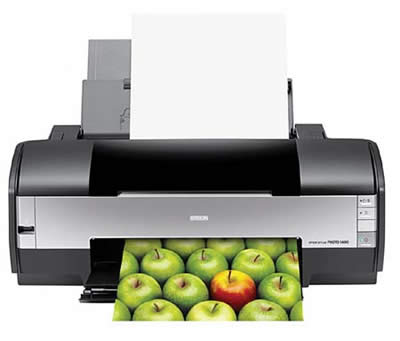
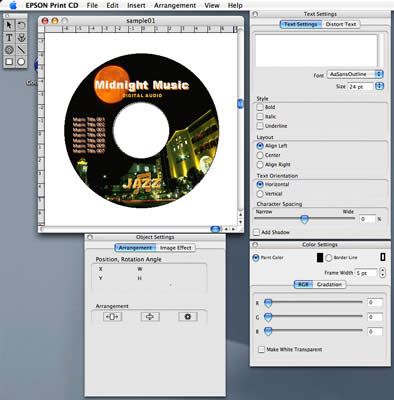
Typical for Epson photo printers, installation is very easy. The included CD has drivers for both Windows (2000, XP, and Vista) and Macintosh (OS X 10.2.8 and 10.3.9 and newer). You'll need your own USB cable as none is provided, and there is no networking option on the Epson Stylus Photo 1400. In addition to the drivers, the bundled software includes Photoshop Elements and Epson Print CD, an application that allows you to print directly onto CD or DVD (in the US, Epson is the only company that supports direct to CD printing).
The Epson 1400 uses six individual ink tanks: black, cyan, light cyan, magenta, light magenta, and yellow. Although Epson claims these are high capacity ink tanks, they don't publish a volume. They appear to me approximately the same size as the R2400 which is about 12ml. The printer uses variable drop sizes with a minimum size of 1.5 picoliters and a maximum resolution of 5760x1440 dpi. The end result is excellent reproduction with smooth tonal gradations and no visible banding on prints.
Ease of Use
If you've used any of Epson's photo printers in the past, you'll immediately be at home with the Stylus Photo 1400. The printer driver is similar on all of Epson's desktop models with the main screen showing quality options and media selection types, and an Advanced button where you'll set your color management preferences.
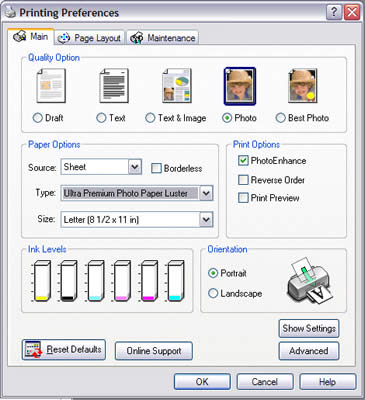
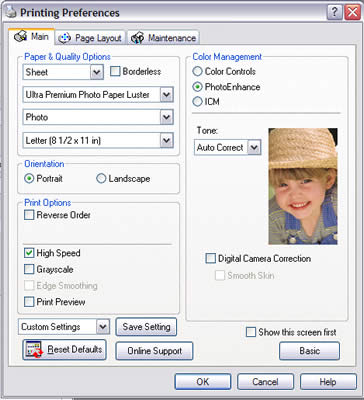
The included profiles are well done and produced accurate prints with no adjustment needed on my part. The printer supports gloss, semi-gloss, luster, and matte papers but I found that luster, and in particular the new Ultra Premium Luster gave exceptional results that rival anything I've produced on a digital printer.
Media support options are excellent with sizes from 4x6 through 13x19 (Super B) all able to print borderless. In a nod to the popularity of scrapbooking, Epson also has a 12x12 paper size available with borderless printing support.
All media is fed through the top tray unless you're printing to inkjet compatible CD/DVD media. In this case you'll use a carrier (included with the printer) and a special straight feed path. Epson includes software, EPSON Print CD, to assist with creating labels for your CDs that can include text and graphics.
Print quality is very good for color images. I was less happy with black and white prints though as all prints showed a color cast that I was unable to remove through adjustments in the print driver or with custom profiles I made. The custom profiles improved output, but I was still unable to produce a truly neutral toned black and white print.
Depending on the type of paper you're printing on, you can load as many as 100 sheets in the top tray. Photo papers like the Premium and Enhanced Matte will limit this to 20 sheets or less depending on paper size, while thick media such as Premium Matte double-sided will only handle one sheet at a time.
Print time is very reasonable, with 8x10 borderless prints taking about two minutes.
The online guide is complete and very useful when you need help with settings and using color management, as well as printing directly from a digital camera or camera phone that supports either PictBridge or USB Direct-Print. If you shoot JPEG images, you can select the files directly on your camera or phone and print with no computer connection.
Conclusion
 |
|
|
Ratings (out of 5) |
|
| Design | 4 |
| Features | 4 |
| Ease-of-Use | 4.5 |
| Image Quality | 4.5 |
| Value for Money | 4.5 |
The Epson Stylus Photo 1400 is a solid replacement for the older line of dye printers and will be welcomed by anyone looking for rich saturation in color prints, especially on gloss and luster media. There is no support for roll media, but the printer does handle a wide range of media thicknesses, including the ability to print on inkjet compatible CD and DVD media. Print speeds are good, and the variable droplet size does a very good job of minimizing any grain patterns that were a problem with the previous 1280 printer. If you're interested in fine art papers and/or black and white printing, you'd be better served with the Epson R2400. Of course you'll pay significantly more for that model than for the Epson Stylus Photo 1400, so carefully consider what type of printing you're really interested in before buying.
Leave a comment about this Review