
Epson Stylus Pro 3800 Review
Review Date: June 25th 2007
Author: Jon Canfield
Leave a comment about this Review
Introduction
There's a huge jump, both in size and price, from 13" wide printers to large format printers that can handle 17" or wider media. The new Epson Stylus Pro 3800 is an interesting addition to the Epson line-up that straddles the size and cost lines. Rather than replacing the existing Stylus Pro 4800, the Epson 3800 is designed to be a cost effective option for those that don't need the volume printing or roll feed options that the 4800 model provides. In return for that, you save a significant amount of money. The Epson Stylus Pro 3800 is a mix of new and old. While it uses the same UltraChrome K3 inks as the 4800 and other Epson pigment ink printers, it now has all nine inks on-board at once. But, in a touch of the old, the printer must still swap matte and photo blacks from a shared print head so there is some ink waste involved (much less than what you have with the 4800, and it's handled automatically by the printer). Epson has also tweaked the dithering pattern making the output slightly different than the 4800, with a smoother tonal gradation seen in black and white prints. Finally, there is no tray with the Epson Stylus Pro 3800. Feed options are similar to the R2400 with sheet fed, manual rear feed and manual front feed � only the roll paper support is different.
Compare Prices
Support PhotographyBLOG: Buy the Epson Stylus Pro 3800 from one of our affiliate retailers:Setup
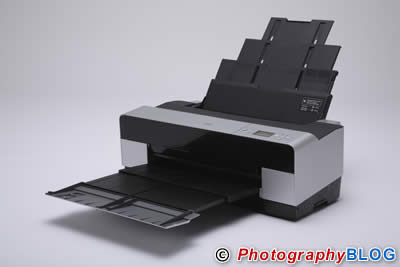
Setup of the Epson Stylus Pro 3800 is very straight forward, and thanks to the smaller size and lighter weight (about 43 pounds), it can actually be done by a single person. The printer dimensions are approximately 27.5" wide, 15" deep, and 10.5" tall. With the paper tray fully extended, the printer is about 38" deep. Epson includes a quick start guide with easy to follow directions and diagrams, making it an easy setup even for first time printer users.
After unpacking and removing all the blue tape strips, you'll turn the Epson Stylus Pro 3800 on. After about a minute, the ink cover will automatically unlock. From here, you'll be prompted to insert the ink cartridges. While the system is charging the ink lines, you can install the driver and the Epson LFP Remote Panel software which has options for monitoring the printer and making adjustments to media settings, paper feed, and firmware updates.
Ink cartridges on the Epson Stylus Pro 3800 are 80ml in size. While much larger than the 12-15ml size of the R2400, it's still quite a bit less than the 110ml and 220ml cartridges used in the 4800. But, you'll also spend less for a cartridge when it comes time to replace them � something that is an issue for many people. Overall costs of printing on the Epson Stylus Pro 3800 look to be about 35% less than on the R2400. So, if you do a fair volume of printing, the 3800 can more than pay for itself in reduced operating costs.

The Epson Stylus Pro 3800 includes both USB 2.0 and Ethernet ports, a nice change from the 4800 which requires an optional card to print via Ethernet. You'll need to go into the printer control panel to enable Ethernet, but this is well covered in the user manual.
Depending on the type of paper you use, the sheet feeder can hold up to 50 sheets, while the manual feed slots are for single sheets of heavier weight media like Ultra Smooth Fine Art and Velvet Fine Art. The front manual feed allows you to feed media up to 1.5 mm thick, making it possible to print on poster board or other stiff media.
Ease of Use
Using the Epson Stylus Pro 3800 will be immediately familiar to anyone that has used Epson printers before. If you'll be using the sheet feeder, extend the support to hold the paper in place, and place your media in the sheet feeder printing side up. For heavier media that will be using the rear manual feed, attach the provided feed guide and insert a single sheet of media. Here it's a bit tricky. Rather than letting go of the paper once you feel resisitance, you need to keep pressure against the feed mechanism until the paper is grabbed � about 3 seconds. Otherwise you'll see a feed error on the printer display.
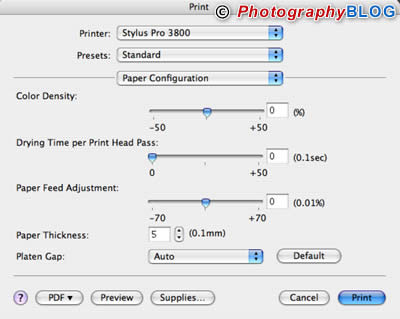
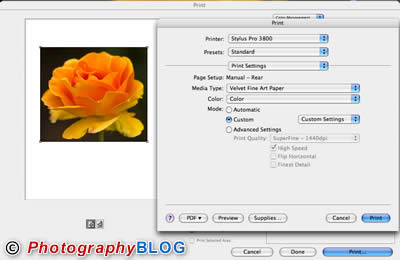
The printer will only enable certain media types depending on which method you're using to feed paper. For fine art media, such as Velvet Fine Art, you must use the rear feed, and until it's selected in the driver, the paper will be unavailable. Maximum print size is 17x37.4 inches, and when using the sheet feeder, the minimum size is 3.5x5. If you want to go longer than 37.4 you'll need to use something like ColorByte's ImagePrint to bypass the print driver.
Once you've selected the feed source and paper type, the printer will check to see which black is currently in use. If needed, the Epson Stylus Pro 3800 will automatically switch inks to either matte black or photo black. This ink switching does use some ink, although no where near the level of waste that the 4800 has. Epson claims switching from photo black to matte black uses about 1.52 ml of ink and takes about 2 minutes. Going from matte black to photo black consumes about 4ml and takes about 3 minutes. The work is all done automatically with no user intervention needed, and once the switch is done your print will start.
The print quality of the Epson Stylus Pro 3800 is very similar to that of previous Epson UltraChrome K3 printers like the 4800 and the R2400. The included profiles are very good in my experience, and I was able to improve output with custom profiles only slightly and then most noticeable in red accuracy and shadow detail. On the topic of color accuracy, I found that the Epson printed slightly warm with just a touch of red in skin tones. By itself it would be difficult to see this tone difference, but alongside a custom profile and output from a HP PhotoSmart B9180, it's visible. Printing in black and white using the color mode is very good with a slight green cast that is typical in Epson prints from this mode. For black and white printing, I highly recommend using the Advanced BW mode which generates excellent quality prints. For best image quality I find that the Dark tone setting works best.
Print speed is good, faster than the HP B9180, and slower than the Canon iPF5000. A 8x10 print in about 1:50 from start of printing to page eject using SuperFine 1440 as the quality setting. With my sample prints, I'm unable to detect enough difference between the 1440 and 2880 settings to make the later worthwhile.
On photo type papers you will see some bronzing, but it's very minor and certainly not enough to be concerned with. Gloss differential seems improved with the Epson Stylus Pro 3800. Dmax with photo black is an impressive 2.48 and a very good 1.82 with matte black ink.
Conclusion
 |
|
|
Ratings (out of 5) |
|
| Design | 4 |
| Features | 4 |
| Ease-of-Use | 5 |
| Image Quality | 4.5 |
| Value for Money | 4 |
The Epson Stylus Pro 3800 is a real value � giving you the ability to print up to 17" wide on a variety of media types. The UltraChrome K3 inks have a good track record and with the new dithering pattern in the 3800, tonal gradations are improved over earlier models. While ink swaps are still needed, Epson has thankfully made the process automatic in the Stylus Pro 3800 with greatly reduced ink loss in the change over. If you don't need roll paper support, and do an average amount of printing, the Epson Stylus Pro 3800 should be at the top of your list.
Leave a comment about this Review