
SanDisk ImageMate
Review Date: 25th November 2005
Introduction
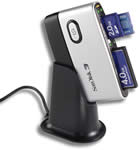 The
SanDisk ImageMate is a memory card reader / writer that supports
12 different memory card formats and which connects to your
computer via a high speed USB 2 port. The ImageMate is backwards
compatible with all USB 1.1 ports and no adapters are required
for any of the supported memory cards. The SanDisk ImageMate
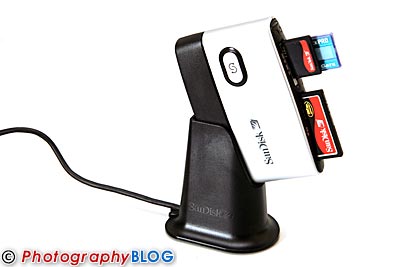
is supplied in both a dockable format (pictured) and stand-alone.
The former configuration is great for use at home on a desk,
whilst the stand-alone version is much more compact for traveling
with a laptop (a very short USB cable is supplied). If you
own lots of digital devices which all use different memory
card formats, a dedicated reader / writer is a very convenient
way of copying your data onto your computer - but is the SanDisk
ImageMate the right model for you? Read on to find out.
The
SanDisk ImageMate is a memory card reader / writer that supports
12 different memory card formats and which connects to your
computer via a high speed USB 2 port. The ImageMate is backwards
compatible with all USB 1.1 ports and no adapters are required
for any of the supported memory cards. The SanDisk ImageMate
is supplied in both a dockable format (pictured) and stand-alone.
The former configuration is great for use at home on a desk,
whilst the stand-alone version is much more compact for traveling
with a laptop (a very short USB cable is supplied). If you
own lots of digital devices which all use different memory
card formats, a dedicated reader / writer is a very convenient
way of copying your data onto your computer - but is the SanDisk
ImageMate the right model for you? Read on to find out.
Compare Prices
Support PhotographyBLOG: Buy the SanDisk ImageMate from one of our affiliate retailers:Features and Ease of Use
The SanDisk ImageMate allows you to write data to and read data from memory cards without having to connect your digital camera or other device directly to your computer. It is connected via a high speed USB 2 port which allows transfers up to a maximum speed of 480Mbps. It is also compatible with the older USB 1.1 standard, albeit at a maximum speed of 12Mbps. It's important to note that the actual transfer rate achieved is dependant on a combination of different factors: your computer's processor speed, the USB port or hub, and the speed of the flash memory device being accessed.
The SanDisk ImageMate supports the following memory card formats (with no need for an adapter):
- CompactFlash Type I
- CompactFlash Type II
- SD Card
- miniSD
- MultiMediaCard
- RS-MMC
- Memory Stick
- Memory Stick PRO
- Memory Stick Duo
- Memory Stick PRO Duo
- SmartMedia
- xD
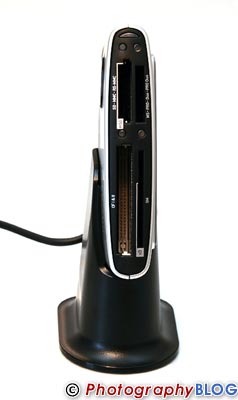
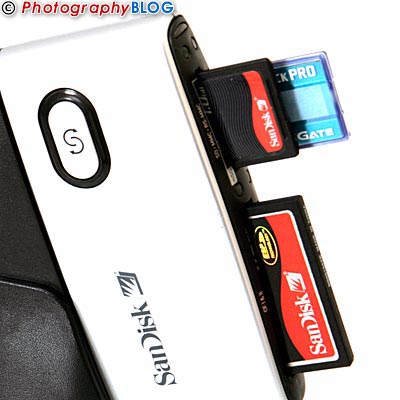
Each of the four memory card slots has its own LED activity indicator which lights up when a card is inserted. The SanDisk ImageMate is powered directly from the USB port, so no external power supply is required. No additional drivers are required for installation on Windows ME, 2000, XP and OS X v10.1.2 plus platforms - you just connect the SanDisk ImageMate and away you go. Windows 98SE and Mac OS 9.2.x plus do require a driver to be installed, which is supplied on the product CD.
When the SanDisk ImageMate is connected to your computer, the four memory card slots each appear as separate removable drives, allowing you to copy data from card to computer and also between the different flash memory devices that you have inserted into the ImageMate. In Windows XP, each slot appears with the label "Removable Drive" followed by the drive letter that Windows has allocated, which can get a little confusing. To solve this problem you can configure Windows XP to automatically open Windows Explorer when a memory card is inserted.
Minimum System Requirements:
Windows
- Pentium class PC with USB support
- Windows 98SE, 2000, ME, XP
- CD-ROM drive
- USB 2.0 port required for Hi-Speed transfer (full speed with USB 1.1)
Macintosh
- Macintosh computer with USB support
- Mac OS 9.2.x plus, OS X v10.1.2 plus
- CD-ROM drive
- USB 2.0 port required for Hi-Speed transfer (full speed with USB 1.1)
Installing the SanDisk ImageMate on my Pentium M 1.8Ghz laptop running Windows XP SP2 took about 1 minute. You simply connect it to any USB 2 port and wait for Windows to automatically recognise and configure the new device. The four memory card slots each appear as separate removable drives in Windows Explorer. On older operating systems you have to insert the setup disk and install some software drivers - this is clearly explained in the manual.
I have been using the SanDisk ImageMate for over 2 months now with a variety of different memory card formats, and have experienced no problems whatsoever. If you own lots of electronic devices which use a number of different cards, you will really appreciate the convenience and reliability of the ImageMate. You will no longer have to find the cable that came with each particular device, and the ImageMate is usually a lot quicker than directly connecting the device anyway. For users of older USB 1 card readers, a USB 2 device like the SanDisk ImageMate is also a worthwhile upgrade, saving you lots of time when transferring files.
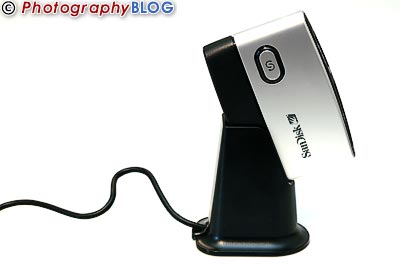
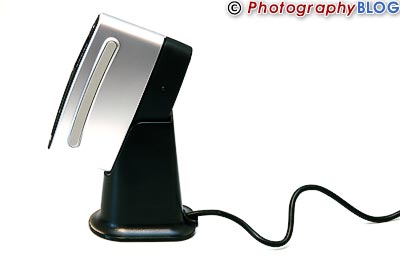
Design
 |
|
 |
|
 |
|
 |
|
 |
|
Conclusion

(out of 5 stars)
The SanDisk ImageMate has been sitting on my desk for a couple of months now, largely ignored and unnoticed, simply because it does the job so well. There have been no connection issues, no bad or slow transfers, nothing to cause any problems at all. This is probably the highest compliment that you can pay to a device like the SanDisk ImageMate. I guess you could claim that it is quite stylish, in a silver and black kind of way, and that it is relatively inexpensive, and also that it suits both desktop and laptop use alike. But ultimately performance and reliability are what really count, and the SanDisk ImageMate delivers on both counts. It may not be the most exciting gift that you could buy for a photographer this Christmas, but it will be one that he/she will be using when the holidays come round again next year.
Related Links
Leave a Comment about this Review