
Wacom Bamboo Review
Review Date: November 29th 2007
Author: Jon Canfield
Leave a comment about this Review
Introduction
Most serious digital photographers know that using a graphics tablet is the best way by far when it comes to editing and making selections in Photoshop and other imaging applications. Although there is a learning curve when switching from a mouse to a pen, after using one, I don't know of any photographers that would go back to the old method. Along with the finer control you have by holding a pen, and the more natural feeling of drawing compared to moving a mouse around (a method I compare to drawing with a bar of soap), you also gain functionality.
The most popular brand of pen tablet has long been the Wacom line, with the Intuos 3 being the serious user's choice, and the Graphire Bluetooth a good option for those needing a wireless device. The drawback for more casual users though has been the rather steep price point. With a price of $229.95 for the smallest (4x6) version of the Intuos3, justifying a graphics tablet is difficult for the casual user. In response to that, Wacom has introduced the new Bamboo and Bamboo Fun pen tablets.
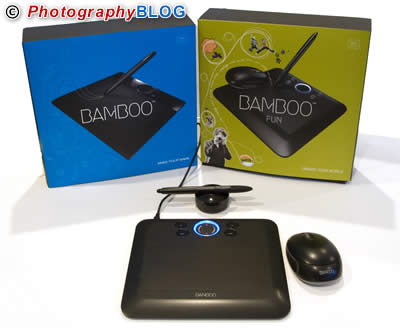
For digital photography, the Bamboo Fun is the better choice. The primary difference between the Bamboo and Bamboo Fun is the inclusion of a mouse on the latter, and more importantly, the addition of an eraser on the pen, making it easy to correct adjustments on the fly. The Bamboo Fun is also available in two sizes, with a 4x6 and 6x8 version. The standard Bamboo is available in 4x6 only.
Pen tablets have even more functionality today than previously thanks to built-in operating system support. Both Windows Vista and Mac OS X have native support for pen input allowing you to write when you'd typically need to type, or use the pen as a highlighter and annotation tool in Office or other applications, and to use the pen like a mouse to select icons, launch programs, etc.
Details
Bamboo $79 / �54.99 (4x6 only)
Bamboo Fun $99/ �69.99 (4x6) $199 / �139.99 (6x8)
Requires Windows 2000, XP, or Vista, or Macintosh OS X
10.3.9 or later, available USB port.
Compare Prices
Support PhotographyBLOG: Buy the Wacom Bamboo from one of our affiliate retailers:Ease of Use
Setup is very easy, and the tablets require only a USB port, with no batteries needed for pen or mouse. If you're installing the Bamboo Fun, you also have a nice software bundle included � Photoshop Elements, Corel Painter Essentials, and Nik Color Efex Pro 2 GE. Both Photoshop and Painter have full support for pens with pressure sensitive brushes. The Bamboo line has 512 levels of pressure sensitivity which helps to make fine selections and brush strokes possible and saves the need to constantly change your brush size from the toolbar.
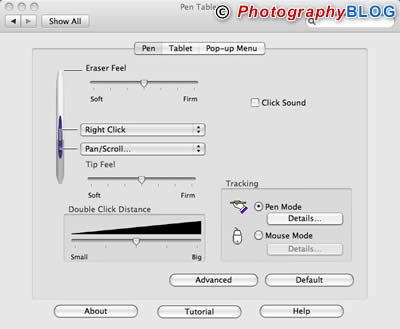
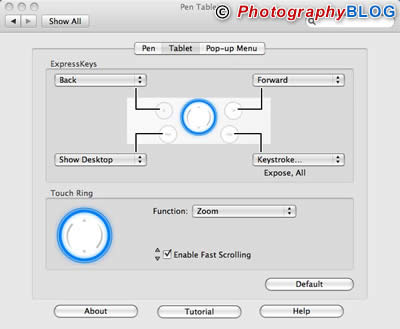
Both tablets have four ExpressKeys and a touch ring to minimize trips to the keyboard. The ExpressKeys are user defined shortcuts that you assign commands to frequently used commands. By default, they work fine with a web browser for forward and back, while the other two buttons are set for Journal and Switch Application (Vista), or Show Desktop and Expose All (Mac). The Touch Ring is set for Zoom, but it can be modified to scroll a window. You can also create a custom pop-up menu, which is selected by setting one of the tablet buttons to Pop-up Menu. This is a handy way to add common programs or commands which are available regardless of where you are or what program you're using at the time.
The included mouse is a typical two button and scroll wheel model, and like the pen and tablet, the buttons and wheel can be programmed in a number of ways. The mouse works only on the tablet surface, which can be a bit tight when using the smaller tablet size of 4x6. I do find that it's a nice way to work when traveling though as it gives me a stable surface and better control than a typical notebook mouse.
While the features available with Bamboo and the operating system are very nice, for photographers though, the key reason for picking up a pen is to have better control over image editing. Here, the Bamboo does a excellent job. After half an hour or so, using a pen becomes second nature and you find it difficult to go back to a mouse. Photoshop Elements and Corel Painter Essentials, included with the Bamboo Fun, are both pen aware with brushes that recognize how much pressure is being used to control width and transparency of strokes. The included Nik Color Efex filters also support pen input to allow you to fine tune the area and strength of the filter effect. There are four filters in this version of Color Efex. Of these, Brilliance/Warmth and Graduated Blue will be of the most interest to photographers, although Monday Morning Violet and Pastel can also create some interesting effects.

Conclusion
 |
|
|
Ratings (out of 5) |
|
| Design | 5 |
| Features | 4.5 |
| Ease-of-Use | 4.5 |
| Value for Money | 5 |
A graphics tablet should be considered standard equipment for anyone doing image editing. Although the Intous3 line is ideal for serious editing work, the price is too high for many casual users. With the new Wacom Bamboo and Bamboo Fun, there is no reason to not start enjoying the benefits of a tablet. And, if you use Vista or OS X, you have the advantage of handwriting support for other applications as well.
Leave a comment about this Review