
Canon Digital IXUS 75 Review
(also known as the Canon Powershot SD750)
Review Date: August 2nd 2007
Author: Mark Goldstein
Leave a comment about this Review
|
Introduction
Compare Prices
Support PhotographyBLOG: Buy the Canon Digital IXUS 75 from one of our affiliate retailers:Ease of Use
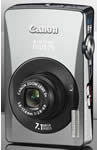
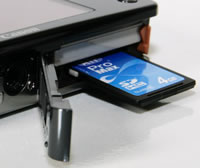
The Canon Digital IXUS 75 is a very well-made compact digital camera, with a stylish all-metal body and excellent overall finish. It has a pleasingly simplistic, clean overall design, reminiscent of the original IXUS designs. If you require a pocket camera that is both good-looking and hard-wearing, then look no further. The Canon Digital IXUS 75 is easily small enough to fit into the palm of your hand, weighing just 130g without the battery or memory card fitted. It's also one of the slimmest Canon digital compacts ever, although at 19.6mm deep, I have seen slimmer models from other manufacturers. Most aspects of the design and build have a quality feel with nothing really feeling flimsy or ill-thought out. There are a few minor criticisms that can be leveled at the Canon Digital IXUS 75, mostly concerning the various covers. The plastic A/V Out / Digital port cover on the side of the camera feels a little flimsy, as does the battery/memory card compartment cover.
The Canon Digital IXUS 75 is comfortable to hold, despite being such a small camera. Both thumbs naturally support the bottom of the camera, whilst operating the shutter button with your right index finger. You can also comfortably hold the camera and take pictures with one hand. Despite the smooth all-metal body, the camera is not too slippy when gripping it. The various buttons are well-made and easy to operate, and the camera feels well-balanced in your hands. There are no real innovative features here, but everything that the Canon Digital IXUS 75 does, it does extremely well. Overall the Canon Digital IXUS 75 is well constructed and designed with no obvious signs of corners being cut. Even the tripod mount, traditionally a last minute thought on a camera like this, is (nearly) positioned in the center of the bottom of the camera.
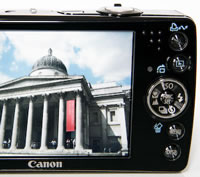
The Canon Digital IXUS 75 has relatively few external controls, just 9 in total, reflecting the fact that this is strictly a point and shoot camera in functionality terms. Cleverly you can directly access the various flash, macro and timer options by clicking on the navigation pad, and Canon have also dedicated the Up position to ISO speed, which is a commonly used feature. There is also a sub-menu accessed via the Func/Set button in the middle of the navigation pad, which allows you to set exposure compensation, white balance, image effects, metering and image size/quality settings. This system is a good compromise given the small size of the camera and therefore the limited space for external controls. Canon have moved the Movie / Scene Mode / Camera switch onto the top of the camera, which provides quick access to all the main shooting modes. All 9 external controls are clearly labeled using industry-standard symbols and terminology. Overall the camera body feels very well-designed and not at all cluttered, despite the presence of the large 3 inch LCD screen. As a result there is no room for an optical viewfinder, which would have been welcome for moments when it is difficult to use the LCD screen i.e. in very bright sunlight.
 |
 |
| Rear Controls | Menu System |
The Manual mode setting on the Canon Digital IXUS 75 may make you think that this camera offers full photographic control, but sadly it doesn't. Manual mode is just Canon's way of giving you access to more "advanced" features, like setting the ISO speed and White Balance. The Canon Digital IXUS 75 is purely a point and shoot camera with absolutely no control over aperture or shutter speed. It does, however, have some features that you won't find on other digital cameras. Press the Function button and select the My Colors option to reveal the Custom Color menu, which includes a number of pre-set looks, such as Positive Film and Vivid Green. These are a quick way of achieving a particular effect. More exciting are the Color Accent and Color Swap options in the shooting mode menu. Color Accent allows you to select one colour and render the rest of the image in black and white, whilst Color Swap lets you select a colour in the image and change it for another completely different one. As far as I know, Canon are the only manufacturer to offer what is quite an advanced feature directly in their cameras.
Face Detection is a new feature that's rather buried away. You have to press the dedicated Menu button and then choose face detection from the AiAF mode options. Rival compact cameras have a dedicated button for this feature, so it's a curious decision by Canon to bury it away within the menu system. The new face detection feature won't make a great deal of difference for the more experienced photographer, as there's the tendency for the user to pre-focus on the subject � and obviously a face if taking a portrait � before fully pressing the shutter button. It will prove more useful for the novice point and shoot user though. I didn't notice any notable difference between the AiAF On and AiAF Face Detection settings in terms of speed, so I just set the camera to the latter.
The new ISO Auto Shift function is more useful, providing a quick way to boost the ISO speed when the camera is struggling to provide a fast enough shutter speed for the prevalent lighting conditions. Turn this feature on, and when the IXUS 75 displays the red camera shake icon on the LCD screen, the round Print/Transfer button on the rear of the camera flashes blue. Press this whilst half-pressing the shutter button, and the camera sets a much faster ISO speed (typically ISO 800), which is usually enough to allow you take the shot and avoid camera shake. Quite a clever and quick way to access a more usable ISO speed. There are some notable limitations though, principally the inability to use it with flash. As an aside, you can also assign your favourite camera setting to the Print/Transfer button, with Exposure Compensation being a good choice.
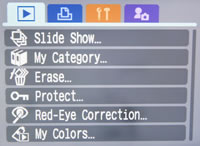
The menu system on the Canon Digital IXUS 75 is extremely straight-forward to use and is accessed by a dedicated button underneath the navigation pad. Quite a lot of the camera's main settings, such as white balance, exposure compensation and ISO speed, are accessed elsewhere, so the main menu system isn't actually too complicated. A row of 3 icons along the top of the LCD screen represents the various sub-menus, with most of them being the kind that you set once and then forget about. Due to the very large and bright LCD screen, the various options are easy to access and use, especially as only 6 are shown onscreen at one time. If you have never used a digital camera before, or you're upgrading from a more basic model, reading the comprehensive and fairly easy-to-follow manual before you start is a good idea. Unfortunately Canon have chosen to cut costs and only supply it as a PDF on a CD, rather than in printed format. Not much use if you're taking pictures and need to find out what a particular option does.
 |
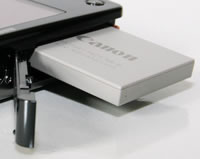 |
| Memory Card Slot | Battery Compartment |
The start-up time from turning the Canon Digital IXUS 75 on to being ready to take a photo is very quick at around 1/2 second, and it takes about 2 seconds to zoom from the widest focal length to the longest, and back again. Focusing is very quick in good light and the camera happily achieves focus indoors or in low-light situations, helped by a powerful focus-assist lamp. The visibility and refresh rate of the 3 inch LCD screen are perfectly acceptable, and the resolution is fine. It takes about 1 second to store an image, allowing you to keep shooting as they are being recorded onto the memory card - there is no LCD blackout between each image. In Continuous mode the camera takes 1.7 frames per second at the highest image quality, which is a about average for this class of camera, but best of all this shooting rate is maintained until your memory card is full. All in all the Canon Digital IXUS 75 is quite fast in terms of operational speed.
Once you have captured a photo, the Canon Digital IXUS 75 has an excellent range of options when it comes to playing, reviewing and managing your images. You can instantly scroll through the images that you have taken, view thumbnails, zoom in and out up to 10x magnification, view slideshows with lots of different user settings, delete, protect, and rotate an image. You can also add a sound clip to an image, set the print order and the transfer order. There's a new red-eye correction option, and you can apply any of the 10 different My Colors options to a photo after you have taken it. My Category allows you to sort your images into various preset categories, with 3 custom categories available. The Display button toggles detailed settings information about each picture on and off, such as the ISO rating and white balance, and there is a small histogram available during playback which is helpful in evaluating the exposure.
In summary the Canon Digital IXUS 75 is a stylish, very compact, well-built point and shoot digital camera with no notable flaws.
|
 PhotographyBLOG
is a member of the DIWA
organisation. Our test results for the Canon Digital IXUS 75 have been submitted to DIWA
for comparison with test results for different samples of
the same camera model supplied by other DIWA
member sites.
PhotographyBLOG
is a member of the DIWA
organisation. Our test results for the Canon Digital IXUS 75 have been submitted to DIWA
for comparison with test results for different samples of
the same camera model supplied by other DIWA
member sites.