
Canon Digital IXUS 960 IS Review
(also known as the Canon Digital ELPH SD950 IS)
Review Date: October 1st 2007
Author: Mark Goldstein
Leave a comment about this Review
|
Introduction
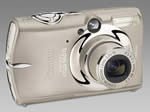
The Canon Digital IXUS 960 IS is the brand new flagship model of the Digital IXUS range of compact cameras. Also known as the Digital ELPH SD950 IS, this is a 12 megapixel model with a 2.5 inch LCD screen and an optical viewfinder, now an increasingly rare feature on compacts. The IXUS 960 IS features image stabilizer technology to help combat camera-shake, and the optical zoom lens is a 3.7x model, giving an effective focal length of 36-133mm. Under the all-titanium surface, the Canon Digital XUS 960 IS uses the same advanced DIGIC III processor as the company's latest digital SLR cameras for faster performance and image processing. Other notable features include an extended ISO range of 80-1600, time lapse movies and Face Detection. There are 18 different scene modes on offer for beginners and a more advanced Manual mode for those who desire greater control. VGA movies at 30fps, a My Colors mode that allows special in-camera colour effects, and PictBridge and USB 2 support complete the specification. With a recommended price of �369, does the Canon IXUS 960 IS offer enough to compete with high-end compacts and budget DSLRs? We spent a few weeks with the IXUS 960 IS to find out...
Compare Prices
Support PhotographyBLOG: Buy the Canon Digital IXUS 960 IS from one of our affiliate retailers:Ease of Use
The all-titanium Canon Digital IXUS 960 IS goes straight to the top of Canon's IXUS range, just above the very similar IXUS 950 IS model that we reviewed a couple of months ago. From a cursory glance at the top and front faceplate of the camera, complete with the very pronounced perpetual curve design, the two cameras are very similar. The subtle curves of the IXUS 960 IS' body mean that this pocket camera rests snugly in the palm and make even the IXUS models of a couple of years back seem horribly boxy by comparison. By law, all Canon IXUS must appear beautifully constructed at birth and this latest example is no rule breaker. As ever though, this impeccable design comes at a cost, and �369 in the UK is looking very pricey indeed. The IXUS 960 IS has a 2.5-inch LCD screen dominating the middle to left hand side, directly above which is a teeny window for the optical viewfinder. As was the case last year, this is now something of a rarity on a digital point-and-shoot aimed at the fashion conscious photographer. A couple of external controls have been moved in comparison with the IXUS 950 IS - the On/Off button is now on top of the camera, and the Mode dial has moved from the side to the back - but there are very few other notable design differences.
A 32MB SD card is included in the package, which isn't very big at all considering that this is a 12 megapixel camera. The larger resolution sensor does bring the IXUS 960 IS in line with recent models from other competitors. The 3.7x zoom lens provides a slightly shorter focal length than the 950 IS' 4x zoom, but it again features built in optical image stabilisation (hence the 'IS' suffix). The zoom range itself is fairly conventional as 36mm (in 35mm equivalent terms) is the widest the new Canon Digital IXUS 960 IS goes, extending up to 133mm at the telephoto end. The 960 IS also features the latest must have of face detection technology to ensure wherever there's a face in the frame it's sharply in focus, which is powered by the same Digic III image processor found in Canon's DSLRs. You also get (theoretically improved) low light sensitivity up to ISO 1600 this time around, and the ability to take time lapse movies and utilise creative light effects � including transforming a point of light into a heart or star shape, if that's your sort of thing.
Taking a look around the camera body itself, which boasts a smooth metallic front plate just slightly larger than a credit card in height and width, you find a large shutter button atop the Canon Digital IXUS 960 IS that is encircled by a pleasingly springy zoom lever � meaning that framing and firing off a shot is a commendably fast and fluid process. Shutter delay is negligible, while the wait between committing one full resolution JPEG to memory and the IXUS 960 IS being ready to fire off the next is less than a second. The camera is similarly quick to power up, with a wait of just a couple of seconds while the rear screen bursts into life and the lens barrel fully extends from storage flush to the body. The small on/off button is located to one side of the shutter button. Located on the faceplate are also the bulb for the flash, top right of the lens, plus a viewfinder window immediately above it and next to this again the lamp for the smaller AF-assist beam that also doubles up as an indicator for the self timer function and a red eye reduction lamp. A pinhole just below the viewfinder houses a built-in microphone.
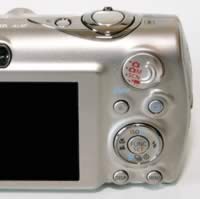
Flipping the Canon Digital IXUS 960 IS around to take a look at the rear, you find the 2.5 inch monitor screen, with the built-in speaker and viewfinder window. There are also some very small controls located to the bottom right of the LCD. These include a familiar four-way control dial veritably crammed with dual-purpose function icons, at the centre of which is the function set button. Press the latter in any of the shooting modes and an L-shaped menu appears to the left hand side of the screen. Not much has changed from the IXUS 950 IS, in that in all shooting modes, the essentials of resolution and file size are pre-determined here. Manual mode adds digital macro, colour accent, colour swap, stitch assist (to marry up panoramic shots), plus +/- 2EV exposure adjustment, the tweaking of white balance (unnecessary in practice unless aiming for a deliberate effect) plus access to the gimmicky 'My Colors' (including an even more 'vivid' vivid setting, plus separate control over RGB colour channels). In the same manual mode you can also access evaluative, centre-weighted or spot metering exposure modes.
 |
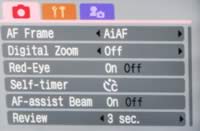 |
| Rear Controls | Main Menu |
As with a growing number of pocket compact cameras, the Canon Digital IXUS 960 IS has an anti-shake system in the form of an optical Image Stabilizer. Turn this feature on on and the IXUS 960 IS automatically compensates for camera shake, which is a slight blurring of the image that typically occurs at slow shutter speeds or long telephoto focal lengths when the camera is hand held. There are three different modes. Continuous is on all the time including image composition, Shoot Only is only on when you press the shutter button, and Panning only corrects vertical movement, so that you can horizontally pan the camera to track a moving subject. In practice I found that it does make a noticeable difference, as shown in the examples on the Image Quality page. You don't notice that the camera is actually doing anything different when anti-shake is turned on, just that you can use slower shutter speeds than normal and still take sharp photos. Thankfully leaving the anti-shake system on didn't negatively affect the battery-life, with the camera managing over 200 shots using the supplied rechargeable Li-ion battery.
Press the upper half of the control dial and, in shooting mode, you can tab through the available ISO options. In auto mode you're offered just auto ISO or high ISO auto for low light, while switching to manual affords adds a broader range of ISO 80, 100, 200, 400, 800, or 1600. In playback mode the same upper press allows you to leapfrog 10 or 100 images, display all images in a particular category (such as 'people') or only those taken on a certain date � particularly useful if you're shooting on a 4GB or 8GB SDHC card and thus have captured 100's of shots. A right press of the same dial meanwhile affords access to the flash options. These are either auto or off in auto mode, and on, auto and off in manual mode. The red eye function is � unusually � separately activated or deactivated via the on-screen menu. The result was that I left it switched on at all times.
Pressing the bottom of the control dial calls up a toolbar down the right hand of the screen that allows the choice of single shot, continuous shooting or access to the self-timer � while in playback this is the means by which images are earmarked for deletion. Finally a press of the left hand section of the dial switches between infinity and manual focus for close ups. To effect any changes, simply press that function set button again. The above operation is reasonably straightforward and quickly becomes intuitive, even if the miniature controls make options a little fiddly to navigate � and I don't have large hands.
Face Detection is a new feature that's rather buried away. You have to press the dedicated Menu button and then choose face detection from the AiAF mode options. Rival compact cameras have a dedicated button for this feature, so it's a curious decision by Canon to bury it away within the menu system. The new face detection feature won't make a great deal of difference for the more experienced photographer, as there's the tendency for the user to pre-focus on the subject � and obviously a face if taking a portrait � before fully pressing the shutter button. It will prove more useful for the novice point and shoot user though. I didn't notice any notable difference between the AiAF On and AiAF Face Detection settings in terms of speed, so I just set the camera to the latter.
 |
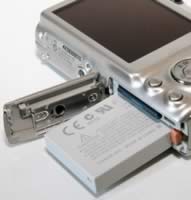 |
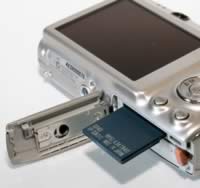
| Memory Card Slot | Battery Compartment |
The new ISO Auto Shift function is more useful, providing a quick way to boost the ISO speed when the camera is struggling to provide a fast enough shutter speed for the prevalent lighting conditions. Turn this feature on, and when the IXUS 960 IS displays the red camera shake icon on the LCD screen, the round Print/Transfer button on the rear of the camera flashes blue. Press this whilst half-pressing the shutter button, and the camera sets a much faster ISO speed (typically ISO 800), which is usually enough to allow you take the shot and avoid camera shake. Quite a clever and quick way to access a more usable ISO speed. On the IXUS 960 IS Canon have also added an "On" option to the ISO Auto Shift function, which automatically sets an appropriate ISO speed without any user interaction required via the Print/Transfer button. There are some notable limitations with ISO Auto Shift though, principally the inability to use it with flash. As an aside, you can also assign your favourite camera setting to the Print/Transfer button, with Exposure Compensation being a good choice.
Bottom left of the control dial is the tiny Display button, that either turns the screen off, or gets rid of the icons displayed thereon � including number of shots remaining, flash, ISO and shooting modes elected, plus image size, quality and metering. To the right of this button is a second, marked 'Menu'. Press 'menu' when in image capture mode and you get access to three folders. The first contains the shooting options � including the ability to call up a nine section compositional grid on screen, or set the stabilisation feature to continuous, shoot only, or for use while panning. The second controls the set up options and the third more superfluously allowing the tweaking of operational sounds and images. Above the four-way control dial is a third button � the print/share button familiar to any Canon user - and also a new Play button. In playback mode, you get the chance to sort images into categories, record a sound memo, plus effect some basic image editing such as red eye correction (if needed), as well as call up a histogram and key file info. Again, all options are easy to navigate and the camera responds quickly to your button presses.
Also located on the back of the camera is a small round Mode dial with a pronounced lip in the top-right corner to make thumb control easier. As you'd expect, this allows access to full auto shooting, manual shooting mode, pre-optimised scene modes and video clip capture. This dial is easy to locate and opoerate and has a definite click as you ratchet through the settings, though it is easy to slip a step past your preference if turning it hurriedly to snatch that blink-and-you'll-miss-it photo opportunity. Incidentally, the scene modes on offer are the regulars of portrait, night snapshot, kids & pets, indoor, the rather more usual creative light effect mentioned earlier, plus foliage, snow, beach, fireworks, aquarium, and underwater. There's also a new ISO 3200 mode for low-light shooting, but the resolution is automatically set to just 1600x1200 pixels. Frustratingly, and as we found with the IXUS 950 IS, the optical zoom is disabled in video clip mode, so you need to set the desired focal length before pressing the shutter button. On the positive side, there's a new High Resolution video mode which records 1024x768 movies, albeit only at 15 frames per second, and a Time Lapse option which captures changing scenes for accelerated playback as smooth video clips.
While the left hand side of the Canon Digital IXUS 960 IS � if still viewing from the back � is devoid of any catches or controls, the right hand side of the camera boasts a metal loop for attaching the supplied strap and a shiny plastic cover for the AV out/USB ports, while the base of the camera features a screw thread for attaching an optional tripod. Nestling next to this is a spring-loaded compartment that you slide open to reveal a housing for both slim-line lithium ion rechargeable battery � the life of which is fair to good � and the SD memory card in use.
In summary the Canon Digital IXUS 960 IS is a very stylish and well-built digicam with relatively few usability issues and a number of headline grabbing features, some of which work better than others.
|
 PhotographyBLOG
is a member of the DIWA
organisation. Our test results for the Canon Digital IXUS 960 IS have been submitted to DIWA
for comparison with test results for different samples of
the same camera model supplied by other DIWA
member sites.
PhotographyBLOG
is a member of the DIWA
organisation. Our test results for the Canon Digital IXUS 960 IS have been submitted to DIWA
for comparison with test results for different samples of
the same camera model supplied by other DIWA
member sites.