
Canon EOS 40D Review
Review Date: September 22nd 2007
Leave a comment about this Review
|
Introduction
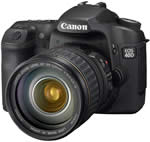
The Canon EOS 40D is the newest addition to Canon's extensive range of digital SLR cameras. Canon splits its DSLRs into three separate ranges, identified by the number of digits in the model name. The EOS 400D is the �amateur� model, the EOS 1D and 1Ds are the �pro� models, but in between is a series of semi-pro SLRs which are designed to appeal to keen enthusiasts, combining more advanced features and better build quality than the amateur models but without the expense of the pro cameras. The Canon EOS 40D is the latest of these semi-pro models, following on from the 8 megapixel 30D. It�s not before time, either, because Canon�s beginner-orientated EOS 400D has been out for some time now and, during that time, the more expensive 30D has had a lower resolution sensor. The 10-megapixel sensor in the new EOS 40D puts that right, and as well as being more robust and better-made than the 400D, it offers a number of other significant advantages. These include the ability to shoot at 6.5 frames per second, and a new Live View mode which enables you to compose shots directly on the bigger 3.0-inch LCD. Canon also claims to have improved the sensor design and incorporated its latest DIGIC III processing system to improve the image quality. But are the Canon EOS 40D�s images really that much better than the 400D�s? We found out for you�
Compare Prices
Support PhotographyBLOG: Buy the Canon EOS 40D from one of our affiliate retailers:Ease of Use
The Canon EOS 40D is more expensive than most entry-level digital SLRs, but this is reflected in its build quality. Where cheaper cameras use plastics, the 40D has a magnesium alloy body which should make it more durable in the long term. The finish seems tough and resilient too, and the memory card and battery doors are dust and moisture resistant, making the 40D potentially better suited to hostile environments, whether they�re encountered on a photo shoot in the Himalayas or a trip to the seaside.
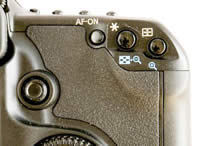
On basic SLRs, adjustments are made using a combination of buttons and a single control wheel. This is fine for novices, but awkward for experienced photographers who want to be able to adjust exposure, shutter speed or aperture quickly. Like other semi-pro cameras, the Canon EOS 40D offers two control wheels; one on the top of the handgrip, and a large, spinning dial on the back of the camera. This rear �quick control dial� is characteristic of all high-end EOS cameras. It�s a bit of an acquired taste compared to more conventional control dials, but you quickly get used to them and they are easy to �spin�. The power switch has a third position which activates this dial, and you can then use it to apply rapid exposure adjustments. But this dial does take up the space where you�d normally expect to find a four-way controller. This means that for menu navigation Canon�s had to incorporate an additional small joystick on the back of the camera. It works well enough, but it�s not as positive or as easy to use as a conventional four-way controller, like that you find on the cheaper EOS 400D.
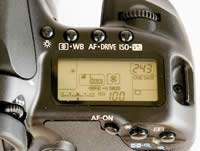
On top of the camera are three buttons, each of which has two functions. You press a button and then turn either the top dial or the rear dial to change the setting. It does take a little while to memorise which button does what, and which dial you need to turn. Having said that, the Canon EOS 40D is not an �occasional� camera that�s going to be brought out only for special occasions or outings. A camera like this is likely to get heavy, frequent use, and its controls will soon become second nature, and the layout does make routine adjustments very straightforward.
There are two LCD displays on this camera; the 3-inch colour LCD on the rear and a smaller status panel on the top. On cheaper cameras, the LCD on the rear usually has to do both jobs, but on this model all the camera settings are visible from above on the smaller panel. This can make the Canon EOS 40D quicker to use, and it may also extend the battery life. It is also possible to show the camera info on the rear LCD, but the display will look surprisingly crude to those who�ve used the excellent interface on the 400D.
 |
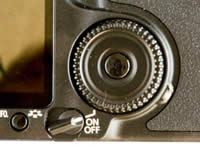 |
| Top Controls | Rear Thumbwheel |
The same applies to the Canon EOS 40D�s menu system. It�s very clear, with large, easily-read characters, but it doesn�t look as smart as the 400D�s. Of course, the 40D is designed to work well and not just look �pretty�, but it�s still a mild disappointment. The documentation that comes with the 40D, though, is very good, as it is with all Canon cameras. You get a detailed manual in English throughout (as opposed to the fat paperbacks with some cameras which turn out to contain just a handful of pages in a dozen different languages), and you�ll find everything you need to know about the camera�s operation in here, without the need to go rummaging through the CDs for an �electronic� manual.
The Canon EOS 40D�s software suite is very good, too. Admittedly, photographers who�ve graduated to a camera like this one will almost certainly have chosen image browsing and editing software already, so they won�t need the basic image browsing program included here, but there�s more than that. You also get Canon�s simple but effective PhotoStitch application for making panoramic shots, a utility for using the 40D remotely (while tethered to a PC) and Canon�s Digital Photo Professional application for converting RAW files. This is a big bonus, because other makers don�t always include RAW conversion software. With Nikon SLRs, for example, you have to pay extra to get Nikon Capture NX.
Digital Photo Professional isn�t the best RAW converter on the market, and Adobe Lightroom 1.2, for example (which already supports the 40D) does a much better job of recovering bright highlight detail, which is one of the main reasons for shooting RAW files in the first place. But what DPP can do is mimic the camera�s Picture Styles �retrospectively�. For example, the Landscape mode is great for deepening blue skies but it can be a bit over the top with other subjects. Instead of committing to this mode when shooting JPEGs, you can shoot RAW and change your mind later. The DPP application also produces slightly sharper results � this is discussed in more detail in the Image Quality section.
One advantage of Canon�s DIGIC III processor is the speed at which it can process images and save them to the memory card. This, and a heavy-duty shutter/mirror mechanism, allows the Canon EOS 40D to achieve its amazing 6.5fps continuous shooting speed, and to maintain it for 75 JPEG images or 17 RAW files. There are some pro cameras that can go faster than this and for longer, but they cost thousands � this is a camera that costs well under �1,000. In this respect that 40D completely obliterates its cheaper rivals, and if you�re at all interested in sports photography, it�s an excellent choice for this reason alone � the 3fps shooting of other cameras in this price band is just too slow, and you often miss the �peak� of the action because it falls between frames.
 |
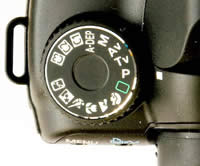 |
| Rear Controls | Mode Dial |
The Canon EOS 40D�s high-speed shooting is backed up by fast, positive autofocus, which can track moving subject very well and which is also near-silent, even with the cheaper 18-55mm kit lens. In fact, there are three body/lens choices with this camera. If you�re upgrading from an older or cheaper digital EOS model and already have a lens or lenses, you can buy the 40D body-only. The next-cheapest option is to get it with the 18-55mm lens normally sold with the 400D. This doesn�t have a great reputation for quality, but it�s better than a lot of people think and the autofocus is very fast and quiet.
Perhaps the best option, though, is Canon�s 17-85mm IS lens. This offers a wider focal range and also built-in image-stabilisation, which should give you sharper hand-held shots in low light or at long zoom settings. It�s the more expensive choice, but in the long run it�s a better, more versatile lens which fully matches the quality of the 40D itself. Canon has shown no sign of developing a sensor-based anti-shake system like those employed by Sony, Pentax and Olympus, but then the company has invested heavily in image-stabilised (IS) lenses, so there would be a conflict.
However, Canon has embraced dust-removal technology, where the sensor is shaken briefly at high frequency to � hopefully � dislodge any dust particles from its surface. This could delay the need for manual sensor cleaning, perhaps indefinitely, but it won�t be able to remove �sticky� deposits like salt spray, pollen or the smears left behind by careless sensor cleaning or the wrong kind of solvent.
In summary, the Canon EOS 40D is a hefty, well-made camera with controls aimed firmly at serious photographers. A green �Auto� button offers a foolproof point-and-shoot mode where necessary, and a range of scene modes can help novices get better results, but essentially this is a camera for those who already know how to take good photos and want to be able to do it quickly and without fuss and gimmicks.
|
 PhotographyBLOG
is a member of the DIWA
organisation. Our test results for the Canon EOS 40D have been submitted to DIWA
for comparison with test results for different samples of
the same camera model supplied by other DIWA
member sites.
PhotographyBLOG
is a member of the DIWA
organisation. Our test results for the Canon EOS 40D have been submitted to DIWA
for comparison with test results for different samples of
the same camera model supplied by other DIWA
member sites.