
Casio EX-Z200 Review
Review Date: April 14th 2008
Author: Mark Goldstein
Leave a comment about this Review
|
Introduction
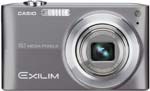
The brand new Casio EX-Z200 is the first ever Casio compact to feature a 28mm wide-angle lens, What's more, this tiny camera manages to squeeze in a 4x zoom, equivalent to 28-112mm, so there's also a useful telephoto focal length too. And even better, Casio have also included a mechanical CCD-shift anti-shake system on the Z200, which physically moves the sensor to help to combat the dreaded effects of camera-shake when hand-holding the camera. Other standout features of the Casio EX-Z200 include a 10 megapixel, 1/2.3 inch CCD sensor, a wide-screen 2.7 inch LCD monitor, a range of Auto Shutter and Best Shot modes for the beginner, and some advanced video modes, including support for the H.264 video standard. Priced at $299 / �200, is the Casio EX-Z200 the right pocket point-and-shoot for you?
Compare Prices
Support PhotographyBLOG: Buy the Sigma DP1 from one of our affiliate retailers:Ease of Use
Casio cameras have a well-earned reputation for offering bullet-proof construction in their cameras, and the EX-Z200 is certainly no different, with a high quality metal body. The gun-metal grey Casio EX-Z200 review sample that we were sent isn't the most exciting camera to look at, but it is superbly engineered. Measuring 93 x 55 x 21.2mm and weighing 110 grams, the EX-Z200 is a very small and light camera that can easily be carried in a trouser pocket or small handbag without noticing it. Yet Casio have still found room to fit in a 4x, wide-angle, retractable zoom lens, offering a versatile focal range of 28-112mm. Most models of this size from other manufacturers typically have a 3x zoom lens that starts at 35mm or higher, although there is a recent growing trend towards wider-angle lenses.
If you're used to a standard 3x zoom lens which usually starts at around 35mm wide, then you will find that the lens on the EX-Z200 provides an entirely new angle of view that can only increase your creativity. Take it from me, you won't want to go back to a "standard" zoom after using the 28mm lens on the EX-Z200. At the other end of the zoom, the telephoto setting of 112mm is perfect for head and shoulders portraits. Casio have also sensibly included a CCD-shift anti-shake system with a variety of different modes, , which helps to ensure that the majority of photos taken in good light are sharp. The EX-Z200's lens is quite fast at wide-angle, with a maximum aperture of f/2.8 at 28mm, but quite slow at telephoto, offering f/5.8 at 112mm. Still, having a 4x zoom lens in such a small package is definitely worth having despite this slight disappointment.
The CCD-shift anti-shake system on the EX-Z200 compensates for camera shake, which is a slight blurring of the image that typically occurs at slow shutter speeds when the camera is hand held. There are three different modes, Auto minimizes the effects of hand and subject movement (by increasing the ISO speed), Camera AS minimizes the effects of hand movement only, and Image AS minimizes the effects of subject movement, again by increasing the ISO speed. If you don't want the camera to increase the ISO speed and boost noise, choose the Camera AS mode. In practice I found that it does make a noticeable difference, as shown in the examples on the Image Quality page. You don't notice that the camera is actually doing anything different when anti-shake is turned on, just that you can use slower shutter speeds than normal and still take sharp photos. Thankfully leaving the anti-shake system on didn't negatively affect the battery-life, with the camera managing over 300 shots using the supplied rechargeable lithium ion battery.
The Casio EX-Z200's design is dominated by the 4x zoom lens and the wide-screen 2.7 inch LCD monitor on the rear. There is no optical viewfinder, which follows a recent trend in digital cameras, and this does make the EX-Z200 a little difficult to keep steady at the telephoto end of the zoom, especially given the disappointingly slow maximum aperture of f/5.8 at the telephoto focal length. The Super Clear LCD screen is a joy to use, though, even in very bright sunlight, offering 230,00 pixel resolution and a high contrast ratio. It can be configured to wide or 4:3 mode, with 5 different brightness settings available, and viewing angles are among the best that I've seen on a compact camera.
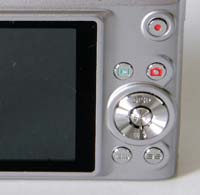
| Rear Controls | Top Controls |
 |
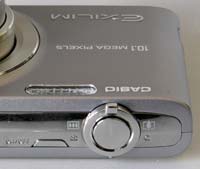 |
Casio have opted for a tactile and responsive push-pull zoom lever that sits around the shutter button - both of these important controls are very easy to operate, despite the diminutive dimensions of the camera. There's a dedicated Movie button on the rear, which instantly starts recording without having to switch shooting modes or delve into the menu system. In fact, the EX-Z200 has a veritable wealth of options that will appeal to the movie enthusiast, elevating it above most of the competition. H.264 video, also known as MPEG-4�AVC, implements the latest high compression technology, and movies can be recorded in a 16:9 aspect ratio (848x480) for easy playback on a HDTV, in addition to the standard 640x480 mode. If you set the EX-Z200 to the Prerecord Movie scene mode, the camera captures 5 seconds of video and saves it into memory before you even press the shutter button! It's then automatically added to your video when you do press the shutter. Finally, you can use the YouTube mode to record movies with size and quality settings optimized for YouTube.
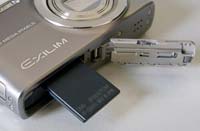
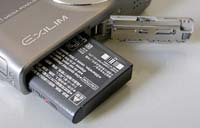
The Casio EX-Z200 is not overly complex in terms of the number of external controls that it has, just 10 in total, reflecting the fact that its predominantly a point and shoot camera with no manual exposure modes. The majority of the controls are clearly labeled and common to most cameras, with the Movie and BS buttons being specific to Casio and requiring a quick read of the user guide. There aren't really any weak-points in terms of the EX-Z200's design and build-quality. For once the battery compartment and SD card slot are both well implemented, and even the tripod mount is sensibly positioned, although it is plastic rather than metal (something of a minor quibble).
Beginners will find the Casio EX-Z200 particularly helpful, with a vast array of hand-holding modes on offer (39 scene modes in total), including some that will even take the picture for you! The Auto Best Shot mode analyzes the scene to determine an appropriate shooting mode, automatically choosing from six scenes that can be distinguished people, scenery, night scenes, night scenes with people, close-ups, and moving subjects). As the camera detects the scene, a symbol is displayed on the LCD to clearly show which scene mode it is using. Casio's system isn't as clever as Panasonic's Intelligent Auto mode, which also sets things like ISO speed and face detection, but it is a useful addition nonetheless, making it possible for the less experienced photographer to easily take well-exposed, sharp pictures of people, scenery and close-ups by simply pointing and shooting the camera.
The Casio EX-Z200 also has three Auto Shutter modes. As the name suggests, these are designed to fire the shutter automatically when the camera detects that a particular action in the scene has occurred. The three available options are Detect Blur, Detect Panning and Detect Smile, and the sensitivity level for each can be set to one of three levels. Despite increasing the sensitivity to maximum, in practice the Auto Shutter mode was a lot more miss than hit, with the camera rarely firing the shutter when you most expected it to. I found it to be one of those ideas that sounds much better in the marketing literature than it actually performed out in the real world.
| Memory Card Slot | Battery Compartment |
 |
 |
The main menu system on the Casio EX-Z200 is straight-forward to use and is accessed by pressing the Menu button underneath the navigation pad. There are three main menus, REC, Quality and Setup. Most of the camera's main options, such as white balance, image quality, auto-focus mode and ISO speed, are accessed here, so the Record menu has 16 options spread over 3 screens, the Quality menu has 15 options spread over 3 screens, and the Setup menu has 18 options spread over 5 screens. Due to the large LCD screen and restricting the number of on-screen choices to 6, the menu system is clear and legible.
As well as the standard menu system, Casio have also implemented a panel of options that is shown on the right of the LCD screen (this can be turned off if you don't like it). Press the Set button in the middle of the Navigation Pad, and you can quickly change 8 commonly used settings, including image size, flash, face detection, ISO speed and exposure compensation. Turned on by default, it's a clever system that you won't want to switch off. In addition to this panel, you can also configure the left and right navigation keys to control one of five settings - I chose EV Shift, but ISO speed would also be a good choice. This combination of configurable controls and the onscreen panel help to speed up the operation of the EX-Z200.
If you have never used a digital camera before, or you're upgrading from a more basic model, reading the easy-to-follow manual before you start is a good idea, especially as quite a few of the buttons and menu options are specific to Casio cameras. The very early review sample that we received from Casio UK didn't include a printed manual, and a quick check of the Casio website doesn't list a printed manual either, so it may well be the case that the user guide will only be available as a PDF on a CD.
The start-up time from turning the Casio EX-Z200 on to being ready to take a photo is fairly quick at around 2 seconds. Zooming from the widest focal length to the longest took around the same amount of time. Focusing is very quick in good light and the camera achieves focus almost all of the time indoors or in low-light situations, helped by the focus-assist lamp, with few problems locking onto the subject in low-light situations. The visibility and refresh rate of the 2.7 inch LCD screen are excellent, and the pixel count of 230,000 is fine too, with little visible grain. It takes about 1 second to store an image, allowing you to keep shooting as they are being recorded onto the memory card - there is a very brief LCD blackout between each image. The Casio EX-Z200 has a below-par Continuous shooting mode which enables you to take just 1 frame every second at the highest JPEG image quality. There is a much faster 4fps High Speed mode, but the image resolution drops to only 1600x1200 pixels. The Flash Continuous Shutter mode shoots at 3fps, but only at 2 megapixel resolution - the flash recycling time for 10 megapixel images is a much more sluggish 4 seconds. Overall the Casio EX-Z200 is about average in terms of operational speed, with continuous shooting being its weak-point.
Once you have captured a photo, the Casio EX-Z200 has a good range of options when it comes to playing, reviewing and managing your images. You can instantly scroll through the images that you have taken, view thumbnails (up to 12 onscreen at the same time and in a special Calendar view), and zoom in and out up to 8x magnification. You can view slideshows with a variety of configurable effects, perform automatic in-camera correction of dynamic range, white balance, brightness, keystone and colour, and copy, dub, trim, resize, rotate, protect, and and set the print order for still images. Video can be edited in-camera and you can also select individual frames for printing. The Display button toggles detailed settings information about each picture on and off, such as the ISO rating and aperture / shutter speed, and there is a histogram available during both shooting and playback. When taking a photo, pressing the Display button toggles between displaying limited information, detailed information including a histogram, and no information at all.
In summary, the Casio EX-Z200 is a feature-rich point-and-shoot pocket camera that importantly is also intuitive to use for both beginners and second or third camera owners alike.
|
 PhotographyBLOG
is a member of the DIWA
organisation. Our test results for the Casio EX-Z200 have
been submitted to DIWA
for comparison with test results for different samples of
the same camera model supplied by other DIWA
member sites.
PhotographyBLOG
is a member of the DIWA
organisation. Our test results for the Casio EX-Z200 have
been submitted to DIWA
for comparison with test results for different samples of
the same camera model supplied by other DIWA
member sites.