
Casio Exilim EX-Z60 Review
Review Date: August 21st 2006
Leave a comment about this Review
|
Ease of Use
At first glance the Casio Exilim EX-Z60 is a conventional looking compact camera, but you quickly realise just how small and slim it is when you pick it up. At 9cms wide, 6cms high and just under 2cms deep, this is a small pocketable camera that you can easily slip into a trouser or shirt pocket or a handbag. The all-metal body gives the EX-Z60 a weight of 119gms without the battery and storage card fitted. The EX-Z60 is one of the better built digicams that we've reviewed, with an all-metal body that oozes quality, far surpassing the plastic nature of most cameras in this price-range.
The Casio Exilim EX-Z60 is well designed, with a simple to understand, uncluttered interface. There really isn't anything to strongly dislike about the overall design, with all of the external controls having a responsive feel about them. There are a couple of external controls, however, that could have been better designed. The On/Off button is very small and recessed, which may prevent the camera from being accidentally turned on, but also makes it difficult to operate. And somewhat inexplicably on an all-metal camera, the tripod mount is plastic and not ideally positioned.
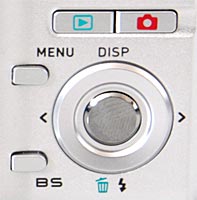
The Casio Exilim EX-Z60 is not very complex in terms of the number of external controls that it has. I counted just 10 controls in total, which suits the small dimensions of the camera. The majority of the controls are clearly labeled and common to most cameras, with the only non-standard one being the BS (Best Shot) button (the equivalent of scene modes on other cameras). Most of the key photographic options, such as ISO speed, exposure compensation and white balance, are buried within the menu system, rather than accessible via external buttons, which does slow down the operation of the camera.
| The Main Controls | Zoom Buttons |
 |
 |
Casio does allow you to customise the operation of the Left and Right buttons on the navigation pad via the L/R Key setting. You can choose to dedicate these buttons to Metering, EV Shift, White Balance, ISO or Self-Timer - I chose EV Shift. Then it's simply a case of pressing left or right to choose the various options - simple and effective. If you have never used a digital camera before, or you're upgrading from a more basic model, reading the rather basic but easy-to-follow manual before you start is a good idea. Unfortunately Casio have chosen to supply it as a PDF on a CD, rather than in printed format, so you won't be able to carry it with you, and you'll have to pay to print it out if you do want a hard-copy.
The 2.5 inch screen is big but also rather grainy, thanks to a rather low pixel count of 115,200. There are a wealth of options for customising it, available by pressing the Display button. You can turn icons off, turn them on and show a histogram, which helpfully shows RGB values in addition to the usual black-and-white levels. The large LCD screen does make it easy to share your images with friends and family, but it's also the only way of framing your shots, so if you have to have an optical viewfinder, look elsewhere now. The LCD screen is quite good in bright light, though, so you won't miss an optical viewfinder too much in the majority of shooting conditions. The various icons used to represent the camera settings are clear and legible.
The main menu system on the Casio Exilim EX-Z60 is very good, accessed by pressing the Menu button on the rear of the camera. There are three tabs across the top, REC, Quality and Setup, and a maximum of six options shown onscreen at one time. Casio have included all available options in the main menu system, with 42 options in total spread across the three tabs. Due to the large 2.5 inch LCD screen and restricting the number of on-screen choices to six, the various options are clear and legible, although I would have preferred a solid background colour, rather than the transparent system that Casio have chosen (you can see the scene that the camera is pointing at behind the menu options, which is a little distracting).
| Battery Compartment | Memory Card Slot |
 |
 |
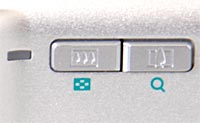
The start-up time from turning the Casio Exilim EX-Z60 on to being ready to take a photo is quick at around 1 second. Zooming from the widest focal length to the longest takes about 1 second. Focusing is very quick in good light and the camera achieves focus almost all of the time indoors or in low-light situations, helped by the focus-assist lamp. Shutter-lag is virtually non-exisitant, and you can speed it up further by selecting the Quick Shutter option (at the expense of turning off the camera's auto-focus system). The visibility and refresh rate of the 2.5 inch LCD screen are quite good with little lag, although there is some visible grain. It takes about 1.5 seconds to store an image, allowing you to keep shooting as they are being recorded onto the memory card, with a brief LCD blackout between each image. The Casio Exilim EX-Z60 has an interesting choice of Continuous modes, although the fastest setting isn't actually very fast - just 0.8 frames per second at the highest JPEG image quality. There's also a High Speed option (3fps, but only at Normal quality) and Flash Continuous, which takes 3 shots with flash in 1 second. Overall the Casio Exilim EX-Z60 is good in terms of operational speed.
Once you have captured a photo, the Casio Exilim EX-Z60 has an excellent range of options for playing, reviewing and managing your images. You can instantly scroll through the images that you have taken, view thumbnails, zoom in and out up to 8x magnification, and view a calendar that allows you to select photos by date. Via the Menu button, you can view slideshows with a variety of options and effects, delete, protect, resize, rotate and crop an image, set the print order, add audio, edit the date and time, and even perform colour and keystone correction (although sadly only at 2M resolution). For movies, there are options for creating a still image from a movie frame (either a 9 frame snapshot at 2M resolution or a 1 frame image at 640x480) and you can also cut the movie in three different ways. You can choose to view detailed information such as the ISO rating and aperture / shutter speed, and there is a histogram available during playback, with both RGB and black-and-white level settings.
In summary the Casio Exilim EX-Z60 is a slim, stylish, fast and simple-to-use point and shoot camera with a wealth of different shooting modes and playback options.
|
 PhotographyBLOG
is a member of the DIWA
organisation. Our test results for the Casio Exilim EX-Z60
have been submitted to DIWA
for comparison with test results for different samples of
the same camera model supplied by other DIWA
member sites.
PhotographyBLOG
is a member of the DIWA
organisation. Our test results for the Casio Exilim EX-Z60
have been submitted to DIWA
for comparison with test results for different samples of
the same camera model supplied by other DIWA
member sites.