
Fujifilm Finepix F50fd Review
Review Date: October 25th 2007
Author: Mark Goldstein
Leave a comment about this Review
|
Introduction
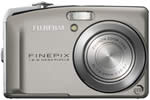
The Fujifilm Finepix F50fd is the successor to the popular Finepix F31fd model, retaining its manual controls in the form of aperture-priority and shutter-priority modes, whilst adding Face Detection 2, a new technology that automatically enables it to identify up to 10 faces in a frame, in both full profile and at virtually any angle. Fujifilm have doubled the image resolution from 6 to 12 megapixels, added a slightly larger 2.7 inch LCD screen and refined the body design, which is now 23mm thick and sports a new 'Aero curve' design. The ISO range has been increased to 100-6400 and the F50fd also offers a CCD-shift image stabilisation system, allowing you take more natural photos in low-light conditions without having to resort to using the flash. The F31fd was renowned for being one of the best performing compact digital cameras in low-light conditions, producing usable images all the way up to ISO 1600. Combined with the creative shooting modes, this made the F31fd a great pocket camera for the discerning shutterbug. Can the F50fd, with twice the resolution, maintain the reputation of its predecessor? Mark Goldstein reviewed the F50fd to find out...
Compare Prices
Support PhotographyBLOG: Buy the Fujifilm FinePix F50fd from one of our affiliate retailers:Ease of Use
The Fujifilm Finepix F50fd is a compact digital camera that easily fits into both the palm of your hand and a trouser pocket. With dimensions of 92.5(W)� 59.2(H)� 22.9(D) mm and weighing only 155g, this is a camera that you can slip into a pocket or small bag and not notice until you need to use it. Fujifilm have made a couple of subtle design changes to the F50fd when compared with the older F31fd. It's a lot more sculpted, with subtle curves on top and on the right of the camera body - quite a radical and stylish departure from the boxy look of the F31fd. The Fujifilm Finepix F50fd is pleasing on the eye, with a stylish two-tone champagne/black colour scheme and a rounded, compact appearance. It retains the excellent overall finish of the Fujifilm Finepix F-series cameras, and generally looks and feels more expensive than it actually is.
The Fujifilm Finepix F50fd is fairly comfortable to hold, with the shooting mode dial on the back of the camera where your right thumb is naturally positioned, and a small lip that acts as a handgrip on the front. Your right forefinger is then free to operate the shutter button and the zoom lever, which surrounds the shutter button. The mode dial and push-pull zoom lever are the two biggest changes since the F31fd, both of which are definite improvements. The new mode dial allows easy access to the various shooting modes, and the zoom lever is more responsive than the old version. Despite the smooth all-plastic body, the camera is not too slippy when gripping it. The various buttons are well-made and easy to operate, and the camera feels well-balanced in your hands. There are no real innovative features here, but everything that the Fujifilm Finepix F50fd does, it does well. Overall the Fujifilm Finepix F50fd is well constructed and designed with no obvious signs of corners being cut.
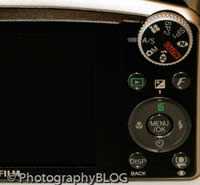
The Fujifilm Finepix F50fd has relatively few external controls, just 11 in total, which is surprising considering that this camera offers nearly a full range of photographic controls. You can directly access the various flash, macro, self-timer and delete options by clicking on the four buttons around the navigation pad. As with most other Fujifilm digital cameras, the Fujifilm FinePix F50fd has a Menu button on the rear of the camera which, as you would expect, gives you access to the software menu system. This lets you set various parameters including auto-focus, white balance, continuous mode and so on. There is also a small grey button with an F on it, which opens what Fujifilm call the Photo Mode menu. This allows you to control the power management, file quality, ISO speed and colour settings (B&W, Chrome or Standard). I'm not really sure why these 4 settings alone should fall under the heading of Photo Mode, and things like white balance are just part of the standard menu. And I'm undecided about whether it is a good idea or not. The F button does give quick access to certain features, but you do have to memorise what another button does.
The Fujifilm Finepix F50fd offers a range of advanced exposure modes, including shutter-priority, aperture-priority and manual, perfect for the photographer who wants to take full control. The manual mode is actually misleading, however, in that it does not allow you to set both the aperture and shutter speed at the same time. Instead, the camera actually sets the aperture/shutter speed, whilst you can change all of the other settings (white balance, exposure compensation and so on). If you buy the Fujifilm Finepix F50fd because you think it has a proper manual exposure mode, then you will be sorely disappointed.
 |
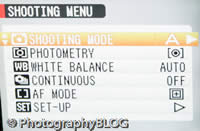 |
| Rear Controls | Main Menu |
Pressing Up on the navigation pad accesses the Exposure settings, which allow you to use either shutter-speed priority or aperture-priority (depending on which mode you have selected in the main menu) or exposure compensation. Simply press left/right on the navigation pad to alter the shutter speed or aperture, and up and down to set the exposure compensation level. There is, however, an annoying by-product of this system. Pressing the Exposure button effectively changes the default behaviour of the navigation pad buttons, and you have to press the OK button again to change them back. I found that I would often forget which mode the camera was operating in and press, for example, the left button to change the aperture, only to set the Macro mode by mistake, and vice versa. I would have preferred a system where pressing the Exposure button would allow you to change the exposure settings, but then the navigation buttons would revert back to their default settings after a certain period of time, so that you knew that you then had to press the Exposure button again in order to change the exposure.
As mentioned previously, there is a dial on the back of the camera that you turn to select the various shooting modes (Auto, Natural Light & Flash, Manual, Shutter-speed priority or Aperture-priority, Movie, 2 Scene Positions, and Natural Light). It's quite similar to the system used on many DSLR cameras and allows quick access to the various modes. All 12 external controls are clearly labeled using industry-standard symbols and terminology. Overall the camera body feels very well-designed and not at all cluttered, despite the presence of the large 2.7 inch LCD screen. Note that there is no optical viewfinder on the Finepix F50fd, leading to a few moments of frustration in very bright sunlight when it can be difficult to see the image on the monitor clearly. The F50fd's LCD monitor has a matt finish, compared to the glossy one on many compacts, and it is also slightly recessed, which should lead to fewer scratches. The resolution of 230,000 pixels and 100% scene coverage are also very welcome.
If you have never used a digital camera before, or you're upgrading from a more basic model, reading the comprehensive and fairly easy-to-follow manual before you start is a good idea. Thankfully Fujifilm have bucked the recent trend of not providing hard-copy manuals and supplied it in printed format. The main menu system on the Fujifilm Finepix F50fd is straight-forward to use and is accessed by pressing the Menu/OK button in the middle of the navigation pad. In the creative shooting modes there is a single Shooting menu with 6 options. At the bottom is the Setup option - select this to access 5 more tabbed pages with 23 options that you will probably set once and then forget about. Due to the large LCD screen, the various options and icons are perfectly easy to read.
The F50fd has a few interesting features up its sleeve. The Natural Light mode forces the camera to select a fast shutter speed in order to freeze subject movement more effectively, whilst setting a fast ISO speed without firing the flash for more natural results. It's an effective automatic way of taking photos of children indoors, for example. Intelligent Flash is a little more exciting. This feature is actually a shooting mode called Natural Light and Flash (obviously the marketing department didn't talk to the engineers about the naming convention). When selected, the camera instantly takes 2 photos, one with flash, one without, giving you the option of which one to choose later (both are saved by the camera). The infra-red port on top of the camera allows you to send or receive images (but not movies) to another Fujifilm camera or device with high-speed IR capability. Transmission distance is 5-20cm within a 20 degree angle. Note that the camera compresses the image so that it doesn't take too long to transmit.
The Face Detection 2.0 function is accessed via a button underneath the navigation pad. This feature is a welcome one that works well in the right situations. It's really best for posed group shots where your subject(s) is standing still at a moderate distance, but unlike the previous system it also works if the subject is moving quickly or has their head turned sideways. Movement tracking keeps the camera 'locked on' to its subjects until they move out of the picture. Face Detection 2.0 is a lot faster and more accurate than other face detection systems that I have used, and is a definite improvement on the F31fd's Face Detection.
 |
 |
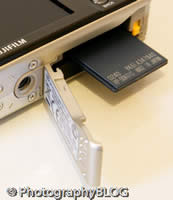
| Memory Card Slot | Battery Compartment |
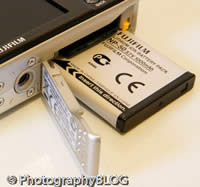
Fujifilm have added an image stabilisation system to the F50fd. Activated by a dedicated button on top of the camera, you can either turn the system on or off. The F50fd's image stabilisation system, called Dual IS Mode, uses a combination of mechanical CCD-shift and the use of high sensitivity settings of up to ISO 6400 to help keep shutter speeds high enough to avoid subject blur in low light conditions. Note that the camera will only automatically adjust the ISO speed when using the Auto or Picture Stabilisation shooting modes - in the more creative modes the ISO speed that you select will always be used, so only the mechanical CCD-shift part of the system is used. In practice I found that it does make a noticeable difference, as shown in the examples on the Image Quality page. You don't notice that the camera is actually doing anything different when anti-shake is turned on, just that you can use slower shutter speeds than normal and still take sharp photos. Thankfully leaving the anti-shake system on didn't negatively affect the battery-life, with the camera managing over 250 shots using the supplied NP-50 Li-ion battery.
There are a few notable missing features that will disappoint the photographer in you, and which I think Fujifilm should really have added to the Finepix F50fd. Firstly there is no manual focus mode, which is fine for most of the time as the camera's auto-focus usually locks onto your intended target, but is an annoying omission on the occasions when it struggles (usually in low-light). An infinity mode for landscapes would have been a good idea, but this is also missing. Somewhat amazingly, Fujifilm have still not included a histogram, either in shooting mode or image playback. Most if not all of their recent advanced cameras have this important feature, so it's pretty unforgivable not to include it on a camera that is aimed at the serious photographer. Finally there is no RAW mode, which may or may not be a deal-breaker for you.
The start-up time from turning the Fujifilm Finepix F50fd on to being ready to take a photo is very quick at around 0.75 second, and it takes about 1.5 seconds to zoom from the widest focal length to the longest. Focusing is very quick in good light and the camera achieves focus most of the time indoors or in low-light situations, helped by a powerful focus-assist lamp. The visibility and refresh rate of the 2.7 inch LCD screen are good, and the resolution is excellent. In the normal shooting mode it takes about 1 second to store an image, during which you can't take another picture. In Continuous mode the camera takes 2 frames per second at the highest image quality, not particularly quick, and it's limited to only 3 frames. There is a mode that allows you to take an unlimited number of frames, but only at 0.5 sec. intervals. All in all the Fujifilm Finepix F50fd is fairly quick in terms of operational speed.
Once you have captured a photo, the Fujifilm Finepix F50fd has a good range of options when it comes to playing, reviewing and managing your images. You can scroll through the images that you have taken, view thumbnails (up to 100 on the same screen!), zoom in and out, sort images by date, view slideshows with lots of different settings, delete, protect, trim and rotate an image. You can also add a sound clip to an image, remove red-eye, set the print order and the transfer order. The Display button toggles detailed settings information about each picture on and off, such as the ISO rating and aperture/shutter speed. There is no histogram either in shooting or playback mode.
In summary the Fujifilm Finepix F50fd is a well built and easy to use digital camera that offers a lot of creative control, with a more refined and stylish design than its predecessor, and a number of significant new features too. It does still have a few annoying omissions in its feature set which should really have been fixed by now.
|
 PhotographyBLOG
is a member of the DIWA
organisation. Our test results for the Fujifilm Finepix F50fd have been submitted to DIWA
for comparison with test results for different samples of
the same camera model supplied by other DIWA
member sites.
PhotographyBLOG
is a member of the DIWA
organisation. Our test results for the Fujifilm Finepix F50fd have been submitted to DIWA
for comparison with test results for different samples of
the same camera model supplied by other DIWA
member sites.