
Fujifilm Finepix S6500fd Review
(also called the Fujifilm Finepix S6000fd)
Review Date: January 6th 2007
Leave a comment about this Review
|
Introduction
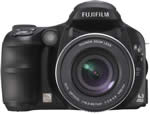
The Fujifilm Finepix S6500fd is an ultra-zoom digital camera with a 10.7x optical zoom lens that's equivalent to 28-300mm. The S6500fd features Face Detection, a new technology that automatically enables it to identify up to 10 faces in a frame, optimize settings and capture an image within just 0.05 seconds. The Fujifilm S6500fd uses the same 6.3MP, 1/1.7" Super CCD sensor as used in the F30 / F31fd cameras, and offers a fastest ISO speed of 3200 at full resolution, allowing you take more natural photos in low-light conditions without having to resort to flash. There's a also a full range of creative controls in the form of aperture-priority, shutter-priority and manual modes, plus RAW format support, mechanical zoom and focus rings, an electronic viewfinder and a 2.5 inch LCD screen. The Fujifilm Finepix S6500fd faces some tough competition from similar ultra-zoom bridge-style cameras, and also DSLRs that seem to be getting cheaper by the day. Read on to find out if it has what it takes to compete.
Compare Prices
Support PhotographyBLOG: Buy the Fujifilm Finepix S6500fd from one of our affiliate retailers:Ease of Use
To all intents and purposes, the Fujifilm Finepix S6500fd looks like a true digital SLR camera. the If you lined it up alongside cameras like the Nikon D40, Canon Digital EOS 400D and Sony A100, you would be hard pushed to spot the odd camera out at a first glance. All is revealed only when you look at the back of the S6500fd when it is turned on, and see the LCD screen showing a live preview of the scene, or if you hold the camera up to your eye and look through the electronic viewfinder. The Fujifilm Finepix S6500fd has similar dimensions and weight to a DSLR, as well as a very chunky, sculpted hand-grip on the right of the camera that makes it possible to hold with just one hand if you so desire. The Fujifilm Finepix S6500fd is also as well built overall as most entry-level DSLRs. Its all-plastic body has a little bit of flex and creak, although it's certainly well above average for the ultra-zoom bracket of compact digital cameras. Fujifilm must be congratulated for matching the build quality of a DSLR whilst also squeezing in all the other features into the budget.
The other obvious area where the Fujifilm Finepix S6500fd follows the design of a DSLR is the lens. Although this is obviously an integrated, non-removable lens, just like on every other compact digicam, Fujifilm have added a mechanical zooming ring on the lens barrel. After using the various zoom button designs on countless compact digicams, being able to use a "proper" zooming mechanism that works in the same way as on a 35mm SLR lens is a breath of fresh air. I find it much more intuitive, quicker and more precise to use than zoom buttons, and for me personally this would be a big attraction of the Fujifilm Finepix S6500fd. Fujifilm haven't stopped there, though, as they have also included a manual focusing ring, which allows for very precise adjustments when you want to manually fine-tune the focus. Again, much, much better than the convoluted systems that the majority of compact digital cameras offer. One small point though - it's a shame that the zooming ring doesn't automatically over-ride the auto-focusing system. Instead, you have to turn the Focusing dial to Manual before the zooming ring becomes operational.
The huge 10.7x zoom lens obviously makes this one of the most versatile compacts in terms of focal range, and is very attractive if you're used to a 3x zoom lens. The 28-300mm focal length will be like a breath of fresh air and should handle most photographic possibilities, with the exception of ultra wide-angle shots. Disappointly the S6500fd doesn't have an optical image stabilisation system, which would have helped to ensure that the majority of photos taken were sharp, especially at the telephoto end of the zoom, which has a slow maximum aperture of f/4.9. I found that quite a few shots taken at 300mm were unsharp, unless the ISO was set to ISO 800. This really handicaps the S6500fd as most competitive models have optical stabilisation.
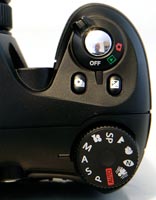
There aren't too many external controls and buttons on the Fujifilm Finepix S6500fd (13 in total), reflecting the fact that this is a camera in the mould of an entry-level DSLR. Most of them are thankfully clearly labeled and common to most cameras. There's a traditional dial on the top of the camera that lets you select the different exposure modes; Program, Shutter Priority, Aperture Priority and Manual. This dial is a typical feature of SLR cameras, and enables you to quickly change between the various modes. The various Scene modes and the Movie mode are also accessed via this dial.
| Rear Controls | Top Controls |
 |
 |
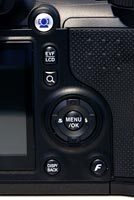
As with most other Fujfilm digital cameras, the Fujifilm Finepix S6500fd has a Menu button on the rear of the camera which, as you would expect, gives you access to the software menu system. The main menu system on the Fujifilm Finepix S6500fd is straight-forward to use and is accessed by pressing the Menu/OK button in the middle of the navigation pad. There is a single Shooting menu with 9 options. A number of the camera's main settings, such as white balance, exposure mode and AF mode, are located in this menu. At the bottom is the Setup option - select this to access 3 more tabbed pages (13 options in total) which contain options that you will probably set once and then forget about. If you are interested in using the camera's RAW format, note that the CCD-RAW option is on page 2 of the Setup menu, a strange location that almost seems to discourage you from using it. I would have liked to see it alongside the other image quality options in the Photo Mode menu. Due to the large LCD screen, the various options and icons are perfectly easy to read.
There is also a small silver button with an F on it, which opens what Fujifilm call the Photo Mode menu. This allows you to control the file quality setting, ISO speed and colour settings (B&W, Chrome or Standard). I'm not really sure why these 3 settings alone should fall under the heading of Photo Mode, and things like white balance and sharpening are just part of the standard menu. And I'm undecided about whether it is a good idea or not. The F button does give quick access to certain features, but you do have to memorise what another button does. If you have never used a digital camera before, or you're upgrading from a more basic model, reading the comprehensive and fairly easy-to-follow manual before you start is a good idea. Thankfully Fujifilm have bucked the recent trend of not providing hard-copy manuals and decided to supply it in printed format.
Fujifilm have added a Face Detection button to the Finepix S6500fd, which unlike the F31fd compact that we recently reviewed, actually works in all of the shooting modes, making it accessible to beginners and more experienced photographers alike. Face Detection is a new feature that works quite well in the right situations. It's best for posed group shots where your subject(s) is standing still at a moderate distance, as the system is fooled if the subject is too far away, is moving quickly or has their head turned sideways. The manual amusingly says that it will also fail if the subject is standing on their head! Fujifilm's new innovation is hardware-based and therefore a lot faster than other face detection systems that I have used, although it shares similar limitations to its competitors.
The major dislike that I had with the Fujifilm Finepix S6500fd is the EVF display, which is low resolution (just 115,000 pixels) and also on the dim side, not a great combination. As this camera has largely been designed to replicate a DSLR, it means that you will invariably compose your images by holding the camera up to your eye. I found that the EVF, as well as being dim and pixellated, doesn't keep up with the eye quite as quickly or precisely as an optical viewfinder, and it also gave me eye-strain after extended periods of use. On the plus side, there is a lot more visual feedback via the EVF than on most optical viewfinders, it offers 100% scene coverage and dioptre adjustment, and you can also playback your images on it! I still much prefer a traditional, good quality optical viewfinder though, and this would be one of the main reasons for opting for a true DSLR instead of the Fujifilm Finepix S6500fd. The S6500fd's LCD monitor is thankfully much better, with a resolution of 235,000 pixels and 100% scene coverage.
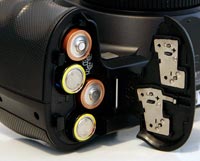
| Memory Card Slot | Battery Compartment |
 |
 |
The Fujifilm Finepix S6500fd offers a range of advanced exposure modes, including shutter-priority, aperture-priority and manual, perfect for the photographer who wants to take full control. The S6500fd also has a few interesting features up its sleeve that are designed to take better photos in low-light situations. The Anti-blur mode forces the camera to select a fast shutter speed in order to freeze subject movement more effectively, whilst also setting a fast ISO speed and firing the flash (the Natural Light scene mode doesn't fire the flash). It's an effective automatic way of taking photos of children indoors, for example. Intelligent Flash is a little more exciting. This feature is actually a new scene mode called Natural Light and Flash (obviously the marketing department didn't talk to the engineers about the naming convention). When selected, the camera instantly takes 2 photos, one with flash, one without, giving you the option of which one to choose later (both are saved by the camera).
The start-up time from turning the Fujifilm Finepix S6500fd on to being ready to take a photo is very quick at around 0.75 second, and zooming from the widest focal length to the longest is virtually instantaneous because of the mechanical zooming ring on the lens. Focusing is very quick in good light and the camera achieves focus most of the time indoors or in low-light situations, helped by a powerful focus-assist lamp. The visibility and refresh rate of the 2.5 inch LCD screen are good, and the resolution is excellent. It takes about 2 seconds to store a JPEG image, allowing you to keep shooting as they are being recorded onto the memory card - there is no LCD blackout between each image. In Continuous mode the camera takes 2.2 frames per second at the highest image quality, which is fairly quick for this class of camera, although this is limited to only 3 frames. There is also a Long Period mode that allows you to take 0.7 frames per second for an unlimited number of images. As you would expect, selecting RAW mode slows down the operation of the camera, taking about 5 seconds to store a RAW image. Worse still, there isn't a continuous shooting mode if RAW is selected, with the camera succinctly telling you that "RAW cannot take continuous shooting"! All in all the Fujifilm Finepix S6500fd is quite fast in terms of operational speed, if you stick to the JPEG mode.
Once you have captured a photo, the Fujifilm Finepix S6500fd has a good range of options when it comes to playing, reviewing and managing your images. You can scroll through the images that you have taken, view thumbnails, zoom in and out, sort images by date, view slideshows with lots of different settings, delete, protect, trim and rotate an image. You can also add a sound clip to an image and set the print order. The Display button toggles between various views, whilst holding down the Exposure Compensation button shows detailed settings information about each picture, such as the ISO rating and aperture/shutter speed, and a brightness-based histogram.
In summary the Fujifilm Finepix S6500fd almost achieves what Fujifilm set out to do - combine a digital SLR design with all the advantages of a compact digicam. There are some notable flaws and omissions, notably the lack of an optical image stabilisation system, slow RAW format and poor EVF.
|
 PhotographyBLOG
is a member of the DIWA
organisation. Our test results for the Fujifilm Finepix S6500fd
have been submitted to DIWA
for comparison with test results for different samples of
the same camera model supplied by other DIWA
member sites.
PhotographyBLOG
is a member of the DIWA
organisation. Our test results for the Fujifilm Finepix S6500fd
have been submitted to DIWA
for comparison with test results for different samples of
the same camera model supplied by other DIWA
member sites.