
GE G2 Review
Review Date: April 17th 2008
Author: Mark Goldstein
Leave a comment about this Review
|
Introduction
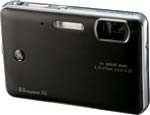
General Imaging launched a completely new range of digital cameras just over a year ago at the PMA show in Las Vegas. This year the company have followed up by unveiling their second generation, with 8 new models to choose from. The snappily named GE G2 sports an all-metal body that's just 18mm thick, 8 megapixel resolution, 4x zoom lens, 2.7 inch LCD screen, plus the three must have detections of 2008, Smile Detection, Blink Detection and Face Detection. Best of all, this stellar feature list can be yours for just �99.99 / $179.99. Last year we gave the GE E850 a less than enthusiastic review, with image quality in particular coming in for some sharp criticism. Have GE learnt from those mistakes with the G2 model? Mark Goldstein put it to the test...
Ease of Use
The GE G2 certainly continues in the same vein as the E850 model in terms of looks, with a very attractive and well-constructed all-metal body. Our review sample was an appealing anodised red colour, with a silver band running around the length of the camera body. The GE G2 is just about small enough to fit into the palm of your hand, measuring 91mm (W) x 59.8mm (H) � 18mm (D) and weighing less than 100 grams, making it one of the lightest cameras that we've ever tested. At 18mm, it's also incredibly slim, helped by the non-extending zoom lens.
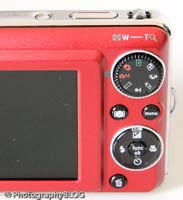
Most aspects of the G2's design and build quality are fine, with a couple of notable exceptions. Whilst the body is made of metal, the controls are all-plastic, which detracts somewhat from the overall feel. More annoying is the shooting mode dial on the back, which doesn't have a very positive action, so much so that I quite often took a picture in the wrong mode due to the dial moving round whilst stored in a trouser pocket. The zoom is operated by a rocker-type lever which has a spongy, imprecise feel, as do the shutter button and navigation pad. Finally, as the lens is positioned in the extreme top-right corner of the camera (looking from the front), you have to be careful not to get any fingers appearing in the frame.
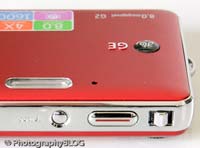
The GE G2 has relatively few external controls, just 9 in total, reflecting the fact that this is strictly a point and shoot camera in functionality terms. You can directly access the various flash, macro and timer options by clicking on the navigation pad, and the Up position is dedicated to Exposure Compensation, which is a commonly used feature. There is also a sub-menu accessed via the Func/OK button in the middle of the navigation pad, which allows you to set ISO speed, white balance, image effects, colour and image size/quality settings. This system is a good compromise given the small size of the camera, the large size of the LCD screen and therefore the limited space for external controls.
GE have included a Mode dial on the rear of the camera which is used to access all the main shooting modes and play back images. All 9 external controls are clearly labeled using industry-standard symbols and terminology, so you won't need to delve into the user guide too often. Overall the camera body feels well-designed and not at all cluttered, despite the presence of the 2.7 inch LCD screen. As a result there is no room for an optical viewfinder, which would have been welcome for moments when it is difficult to use the LCD screen i.e. in very bright sunlight.
| Rear Controls | Top Controls |
 |
 |
The GE G2 has a 4x optical zoom less, an impressive achievement given the 18mm depth of the camera body. Less impressive is the 38mm wide-angle setting, perhaps understandable in such a slim camera, but which doesn't compare well with some of the competition. On the other hand the 152mm telephoto setting is very useful, perfect for head and shoulders portraits and even some more candid shots. The GE G2's lens isn't particularly fast, with maximum apertures of f/3.5 at 38mm wide-angle and f/5.15 at the 152mm telephoto setting, but a 4x zoom lens in such a small package is definitely worth having. The GE G2 does offer electronic image stabilisation, but as with most of these systems it simply increases the ISO speed to compensate for poor light. And as you'll see on our Image Quality page, this isn't a particularly good idea with the GE G2.
The Manual mode setting on the GE G2 may make you think that this camera offers full photographic control, but sadly it doesn't. Manual mode is just GE's way of giving you access to more "advanced" features, like setting the ISO speed and White Balance. The G2 is purely a point and shoot camera with absolutely no control over aperture or shutter speed. It does offer Face Detection via a dedicated button on the rear of the camera, which provides quick access to a useful feature for beginners. This system worked well if the subject was looking face on at the camera, although it struggled to detect more than a few faces at once.
GE have also added one of the must-have features for 2008, at least as far as the manufacturers are concerned, which is Smile Detection. This is accessed by a second press of the Face Detection button. Smile detection worked less well - despite encouraging a group of friends to bare their teeth for all they were worth, the G2 refused to automatically take the picture like it was supposed to. Instead I turned this mode off and took the photo "normally". I had a little more luck with Blink detection, turned on by default in the main menu, which shows an onscreen alert if you take a photo and the subject has blinked. If the subject was face-on to the camera and obviously had their eyes closed, the GE G2 usually alerted me, but to be honest as with the other "detection" technologies, it all felt a bit hit and miss.
The menu system on the GE G2 is very straight-forward to use and is accessed by a dedicated button underneath the mode dial and above the navigation pad. Quite a lot of the camera's main settings, such as white balance, exposure compensation and ISO speed, are accessed elsewhere, so the main menu system isn't actually too complicated. Two icons along the top of the LCD screen provide access to the Photo and Setup menus, with most of the options being the kind that you set once and then forget about. Due to the large and bright LCD screen, the various options are easy to access and use, especially as only 6 are shown onscreen at one time.
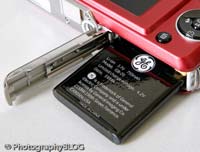
| Memory Card Slot | Battery Compartment |
 |
 |
The GE G2 did have a very annoying tendency to forget all the settings that I'd spent time configuring, and defaulting back to factory mode, including a tremendously loud beep when using the menu system. After the camera had effectively reset itself for the third or fourth time, I gave up and left it to its own devices. On the plus side, if you have never used a digital camera before, or you're upgrading from a more basic model, reading the easy-to-follow manual before you start is a good idea, although there's no index and it doesn't go into any great depth.
The start-up time from turning the GE G2 on to being ready to take a photo is respectable enough at around 3 seconds, and it takes about the same amount of time to zoom from the widest focal length to the longest, and back again. Focusing is reliable enough in good light but there is a noticeable pause as the camera locks onto the subject. It's a different story indoors or in low-light situations, where the G2 really struggles to find focus, especially at the telephoto end of the zoom, and despite the presence of a focus-assist lamp. The visibility and refresh rate of the 2.7 inch LCD screen are perfectly acceptable, and the resolution is also fine. It takes about 1 second to store an image, and there is a very brief LCD blackout between each image. In Continuous mode the camera takes 1.8 frames per second at the highest image quality for up to 5 shots, which is about average for this class of camera.
Once you have captured a photo, the GE G2 has a good range of options when it comes to playing, reviewing and managing your images. You can instantly scroll through the images that you have taken, view thumbnails (up to 16 onscreen at once), zoom in and out up to 8x magnification, view slideshows with lots of different user settings, delete, protect, trim, resize and rotate an image. You can also set the print order and there's a useful red-eye correction option for post-capture correction. You can choose to view shooting information for each photo, including aperture, shutter speed, ISO speed and a small histogram (which sadly isn't available when taking a photo).
In summary the GE G2 is an undeniably stylish, slim and easy-to-use point-and-shoot camera, which suffers from a few flaws, most notably inconsistent and slow focusing in low-light conditions.
|
 PhotographyBLOG
is a member of the DIWA
organisation. Our test results for the GE G2 have
been submitted to DIWA
for comparison with test results for different samples of
the same camera model supplied by other DIWA
member sites.
PhotographyBLOG
is a member of the DIWA
organisation. Our test results for the GE G2 have
been submitted to DIWA
for comparison with test results for different samples of
the same camera model supplied by other DIWA
member sites.