
HP Photosmart R837 Review
Review Date: April 2nd 2007
Author: Gavin Stoker
Leave a comment about this Review
|
Introduction
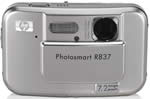
First announced just 2 weeks ago, the HP Photosmart R837 is a new 7.2 megapixel compact digital camera with a 3x, 39-118mm zoom lens and large 3 inch LCD screen. HP have injected some stylish design elements into the R837, in the shape of a distinctive curved body and vertically sliding lens cover, reminiscent of the Sony Cybershot T series of cameras. The HP R837 also features two new HP technologies, the option to remove blemishes from faces, such as a spot, mole or scar, and pet-eye fix, which removes the glowing effect caused by pets' eyes. Aimed firmly at the beginner photographer, did the new point and shoot HP R837 leave a lasting impression on our reviewer, Gavin Stoker? Carry on reading this review to find out.
Compare Prices
Support PhotographyBLOG: Buy the Pentax K10D from one of our affiliate retailers:Ease of Use
HP's digital cameras have a long and undistinguished history � unremarkable image quality and designs seemingly based on a child's drawing of a camera: you know, a basic box shape with a lens barrel whacked on the front and an unflattering shade of U-boat grey to boot. It's only taken them eight years, but first impressions of the seven megapixel, internally-stacked 3x optical zoom (39-114mm equivalent) R837 are that HP has finally started to put its house in order when it comes to fashioning digital compacts.
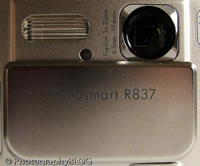
With an attractive metallic silver finish and sliding lens barrier that both acts as a means of powering up or down the camera the R837 immediately recalls Sony's Cyber-shot T series. Indeed its slightly bulging fascia closely resembles an impregnated T10 (if such a bizarre thing was possible). The curvy design means that it's not as easy to accidentally slide open the face plate and activate the camera when sliding it in or out of a pocket or bag as its rival, and at less than �180 in the UK it won't break the bank if you're after an easy-to-use snapshot.
And, inevitability, simple operation is what this camera is all about. HP is marketing the R837 as a kind of photo lab in the box � with the ability to correct red-eye (a necessity, as it transpires) and, something of a first, remove skin blemishes (well, us journalists do pull the odd late night) at the touch of a button. There's also the 'controversial' slimming tool for those of us a little too fond of chocolate digestives, while a fresh addition is a pet-eye fix that corrects the 'bleached eye' effect that invariably occurs when you point the flash at your furry friend. Ideally you wouldn't need to make fixes in the first place � and perversely there is no dedicated red eye reduction setting on the flash � but at least the ability to do so will provide first time digital users with a warm, fuzzy feeling inside.
Despite the budget price tag nothing about the R837's build feels or looks compromised, the body being a mix of metal and plastic so well blended that you don't readily notice the difference in materials. It manages the trick of being both lightweight enough to carry around in a top pocket, while feeling sturdy enough to withstand the odd fumble or accidental drop from desktop to floor (apologies HP). Images are framed and reviewed courtesy of the large-ish 3-inch LCD on the camera back in the absence of an optical viewfinder, the latter a fixture that seems to have largely died out on digital compacts of late. While screen visibility is clear when shooting interiors, sunlight renders images dark and murky � with the ability to manually boost brightness not providing that much of a lift. Curiously, images also appear sharper on screen in capture mode � once you've pressed the shutter release button that is � than they do when switching over to review.
| Sliding Lens Cover | Rear Controls |
 |
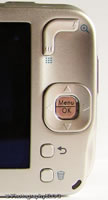 |
Located in a slight recess top right of the LCD is a thumbnail shaped zoom lever � its L-shape resembling a boomerang. Below this is a four-way control button for tabbing through the menu screens and options with the customary menu/OK button for calling them up and affecting any changes located in its centre. Below sit just two tiny buttons � the top one for jumping back a stage in whatever selection process you're engaged in, and the lower button, fittingly, providing the option to delete images. Incidentally, this doesn't just automatically delete whatever image is on the screen at the time, but also gives you options to delete all images or re-format the card � the latter an option that's more usually buried within the set up menu. While this accessibility is a blessing for the more experienced user, the less familiar run the real possibility of accidentally deleting everything with a slip of the thumb.
On the top of the camera, out of harm's way or accidental activation, is a three-point slider running through the essential trio of auto stills capture, video capture and playback. To the left of this � if viewed from the back � is a flash mode button (auto, forced, off and, er, that's it), plus a shooting/scene mode button. A press of this in stills capture mode allows access to full auto capture, macro shooting, 'steady photo' (anti-shake), theatre (a high sensitivity mode), plus an aid to composing panoramas (with the dual options of shooting left to right, or vice versa) and the more familiar landscape, portrait, action (sports), night portrait, beach, snow and sunset modes. Sitting higher on the camera top, and in front of these three controls, are a shutter release button (the largest control of all), and a speaker.
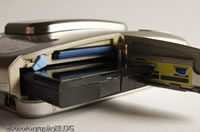
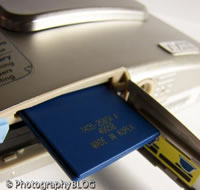
When not in use, the front of the camera has a clean, flush appearance; the lens, flash bulb and self-timer illuminator/focus assist light being hidden behind the sliding lens cover/power switch. Next to these under the HP logo sits a pinhole for the built-in microphone. Moving over to the right flank of the camera � if viewed from the rear � is a means of attaching the provided strap (useful, as there's not much on the camera to firmly grip), beneath which is an unprotected port for attaching the supplied USB cable. The base of the camera contains a compartment for the slender lithium ion rechargeable battery. JPEG images are saved to the camera's pretty standard capacity 32MB internal memory, and, again common at this price level, there's a slot for an optional SD nestled alongside the battery at the camera base. Adjacent to this dual compartment is a screw hole for mounting the camera on a tripod, just behind which is a means of connecting the R837 to an optional desktop dock, an echo of the digital camera's heritage as a PC peripheral � seemingly ditched here to maintain a keen market price.
Slide the lens cover down � and open � and the R837 powers up in a couple of seconds, the rear LCD fading up the image from black and, if in stills capture mode, the idiot-proof message 'take pictures' appearing onscreen next to the familiar camera logo. The screen also displays the number of shots remaining, an indicator of available battery life, bars indicating the central focus area, plus the resolution and image quality selected. A press of the menu/OK button brings up an intuitive and easily navigated picture capture menu, allowing access to self-timer, HP's adaptive lighting feature � which automatically brightens the showed areas of an image � plus the ability to tweak image quality from 7MP 'Best' down to VGA. Here you also find the burst mode, the ability to add a tag to an image (such as 'birthdays' or 'holidays'), imprint the date and time on a shot, adjust exposure compensation (from +/- 2EV), and, usefully, exposure bracketing � automatically varying EV comp by +/- 0.5EV or one stop. The penultimate options include the ability to manually select a white balance setting, or adjust ISO from full auto through ISO100, ISO200, ISO400, plus switch AE metering from average to spot.
| Battery Compartment | Memory Card Slot |
 |
 |
As you run through all of the above options, a black band at the base of the screen displays white text usefully explaining what the effect of each will be, marking the R837 out as a beginner's dream. For the more experienced, this feature is not so prominent as to become irritating and is easily ignored. Second to last on this list of image capture options is the set up menu, called up onscreen with a further press of the menu/OK button. In 'set up' you can adjust the brightness of the display, turn camera sounds on/off, enable or disable the 8x digital zoom, set date/time, choose NTSC or PAL output or swap the display language (Western languages only on our review sample). Finally, with another press of the menu/ok button, you get a camera help menu. This is, in effect, the camera manual built into the R837 itself � a hard copy 'quick start' guide is also included in the box. The on board manual is a nice touch, containing 'top ten' useful tips, a 'talk through' tour of the camera buttons, shooting modes, camera shortcuts and more � answers to just about all the questions you'd expect a basic manual to provide in fact.
The above stills capture menus are aped when you flick the top slider along to the video capture mode � except that image quality is simplified further to 'Good', 'Better' and 'Best' � while a further push of the slider along to playback reveals, as you'd expect, differing options again. In playback you get the familiar choice of viewing images individually or as a slideshow, and the ability to transfer images from internal memory to optional card for easy access if you already own a desktop card reader. More interestingly, you also get access to HP's Design Gallery menu � the R837's built-in image editing/photo lab feature, whereby red eyes can be removed, images rotated, funky artistic effects applied, images enhanced (fat friends trimmed, pet's eyes fixed, spots removed), colours changed (to B&W and sepia), images cropped or borders added. All that you'd get from a rudimentary piece of editing software then � but although it's simple, it's undeniably fun.
The camera is quick to respond to each selection process, and with the occasional pause for the camera to sufficiently charge its flash, there's little in the way of detectable shutter delay when taking pictures, while there's a wait of just over a second between shots, even when image quality is set at the highest setting. But what of the pictures themselves � do they offer sufficient photo-realism quality to keep all levels of user happy?
|
 PhotographyBLOG
is a member of the DIWA
organisation. Our test results for the HP Photosmart R837 have
been submitted to DIWA
for comparison with test results for different samples of
the same camera model supplied by other DIWA
member sites.
PhotographyBLOG
is a member of the DIWA
organisation. Our test results for the HP Photosmart R837 have
been submitted to DIWA
for comparison with test results for different samples of
the same camera model supplied by other DIWA
member sites.