
Nikon Coolpix S10 Review
Review Date: February 26th 2007
Author: Gavin Stoker
Leave a comment about this Review
|
Introduction
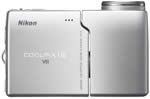
The Nikon Coolpix S10 is a return to the past in terms of design, with the retro twisting body being first seen on Coolpix models like the 900 and 950. Nikon have brought that design bang up to date with a 10x optical zoom lens (38-380mm), large 2.5 inch LCD screen and maximum ISO of 800. Advanced Vibration Reduction helps to combat camera shake by shifting the camera's sensor, an essential feature with such a long lens, whilst the unique swivel body allows greater freedom to shoot from different angles. The Nikon S10 also features the usual trio of Nikon technologies, namely Face-priority AF, D-Lighting and In-Camera Red-Eye Fix, to help improve your photos. Other features include a 6 megapixel sensor, PictMotion movies, one-touch portrait button and 15 different scene modes. The main thing that could possibly work against the Nikon Coolpix S10 is the price � �299 in the UK � which is some �100 more than other Nikon compacts boasting the same six megapixel resolution. Are the extras, including the 10x optical zoom and Vibration Reduction technology, really worth the additional cost? Carry on reading our in-depth review to find out.
Compare Prices
Support PhotographyBLOG: Buy the Nikon Coolpix S10 from one of our affiliate retailers:Ease of Use
For those of us intrepid souls who have been writing about digital cameras since the late 1990s, the feeling summoned up by the Nikon Coolpix S10 is one of d�j� vu. The twisting body/lens design graced the very earliest Coolpix's like the 900 and 950 models, and very well received they were too for their ability to offer a variety of creative shooting angles and get pictures where others couldn't. I once took one to a packed Notting Hill Carnival; there was no other way I'd have been able to capture those colourful processions over the bobbing heads of the crowd without. Of course, in those days all digital compacts were U-Boat grey and the size of a house brick, so, being great for candid snaps aside, the twisting, turning Nikons stood out.
But times have changed and these days if your compact boasts dimensions larger than a credit card you can forget it; which is why the bigger, boxier 'retro classic' styling of the Nikon S10 faces a struggle to win fans, even if it does feature a whopping lens. Keep the lens section flush to the main body, try balancing the camera on the end housing the Av out port, and it most closely resembles a digital video camera � albeit one the size of a fist. Though the Nikon Coolpix S10 is a tad plastic to the touch, the attractive metallic silver finish does its best to cloak the fact, but that design� you either love it or hate it I guess.
Given its plastic casing, with rechargeable battery and optional SD memory card inserted (there's also a miserly 16MB internal capacity) the Nikon Coolpix S10 does feel surprisingly solid (220g without) and able to withstand the odd glancing knock, a build quality you'd expect from Nikon. However there's no automatic sliding cover to protect the lens when the camera's deactivated, just a clip-on plastic cap provided, which again feels retrogressive, and to be honest is easily left behind when grabbing the camera on the way out the door.
| Main Controls | LCD Screen |
 |
 |
In the absence of an optical viewfinder, the back of the
unit is dominated by its 2.5-inch LCD, boasting a 170� viewing
angle. Since this whole section of the camera is only a few
millimetres wider than the screen itself, it presents a problem
when the camera is gripped � namely your thumb obscures the
right-hand third of the LCD and, with use, covers it in greasy
smears.
Top right of the screen is a narrow band of raised plastic
bumps for your thumb to get some purchase on, to the immediate
left of which is a joystick or toggle-like 'multi-selector'
in the absence of the traditional four-way dial.
Around this are ranged settings for calling up the self-timer, adjusting the flash modes or selecting macro setting. In the centre of the toggle is an indented 'OK' button for effecting changes. It's pretty sensitive, so I found I had to press this fairly carefully � and with a definite downwards motion � for my intentions to take effect. I often switched back to shooting mode and found my changes hadn't registered, which wasted time.
Still on the back of the Nikon S10, and to the left of the multi selector, is a self evident button for swapping between auto shooting and playback, the same as on the S9, and to the left of this again, marked with an 'm', is the mode button. A press of this during shooting or playback brings up a virtual four-point mode dial on screen. If you're already in capture mode, you're given a choice of auto stills capture, movie clips capture, voice recording or selecting one of the 15 hand holding pre-optimised scene modes on offer.
In playback mode the virtual dial provides a choice of tabbing through individual stills, setting off 'Pictmotion' slide shows, playing back voice recordings or listing images by date; nothing to confuse the digital virgin here then. Moving along to the menu button ranged alongside it, and, depending again whether you are in shooting or playback mode, a single press brings up a friendly-looking folder relevant to each.
In capture mode the Nikon Coolpix S10 offers the choice of such menu screen standards as selecting resolution � from 640x480 pixels (denoted here as 'TV screen' quality) up to the maximum 2816x2112 pixels. There's also the ability to manually adjust white balance, exposure compensation (+/-3.0 EV), switch from single shot to continuous, 16-image multi-shot or interval timer shooting, call up the best shot selector (giving you option of one sharp image from among ten), select light sensitivity (ISO50 to ISO800) and delve into the colour options. With the latter there's a choice of 'standard' colour � a coolly naturalistic default � or my personally preferred setting of 'vivid', with black and white, sepia and a silvery cyanotype being the remaining options. The AF mode can also be switched from centre to manual, and the point of focus controlled via a further press of the toggle stick, which is a neat solution.
| Memory Card Slot | Battery Compartment |
 |
 |
At the top of the main menu sits a sub folder denoted by a familiar spanner icon containing the set up options. Here you get the chance to format the card � or internal memory � in use, change how the menus are displayed (from text to icons), adjust sounds and visuals on start up, switch the AF assist illuminator to auto or off, or usefully reset all settings to the manufacturer's default. In playback mode, a press of the self-same menu button again gives you the set up option, plus the usual ability to kick off a slideshow, earmark particular images for direct printing, downsize an image, copy a selection from internal memory to card or vice versa. The final, fourth button (after menu) on the camera back is illustrated with a self explanatory trashcan � useful to have a dedicated button for deleting images on the fly.
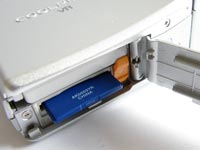
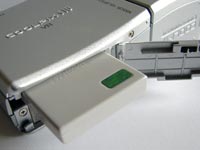
Still on the right flank of the LCD portion of the Nikon S10 � if viewed from the back � is the aforementioned AV out port and loop for the provided camera strap. Up top are a speaker (the microphone being a run of three dots on the front of the screen section), a lozenge-shaped on/off button, a large and springy square shutter release and a nicely responsive zoom lever � the latter three of which fall ergonomically under the forefinger. Finally, the base of the LCD section houses the battery and (optional) SD card compartment, along with, typically, a screw thread for a tripod. So you can't access either battery or card without first removing the camera from the tripod.
And so to the 'second half' or business end of the camera. Starting with the lens portion of the camera pointing upwards so it is flush to the screen half, on the back (or sitting above the lens if you're viewing the camera with the lens twisted 90� to the body) � are two buttons � one marked 'VR' for activating Vibration Reduction and the other a one-touch portrait button identical to that on the S9. The latter activates the Face Priority AF, which zeroes focus in on a human face wherever it is in the frame, plus the likes of in-camera red eye fix and Nikon's cheekily named D-Lighting function, which lifts underexposed areas of the frame thrown into shadow by harsh backlighting for those who don't already own a copy of Photoshop.
The only other features of this portion of the Nikon Coolpix S10 are the lens optics at the front, next to which sits the flash and the (as we'll discover rather hit and miss) AF illuminator bulb. The S10 powers up in just over two seconds, the rear LCD turning from dark to bright rather like an old cathode ray TV set warming up, which subtly and probably entirely unintentionally furthers the retro effect. The LCD itself is for the most part visibly clear both when composing and reviewing images, though it does become rather noisy under artificial tungsten light. Happily when you hit the shutter button there's little in the way of delay, although there is a three to four second wait between shots when shooting at maximum resolution.
So far, a performance that's pretty run of the mill � but then you get to the images themselves...
|
 PhotographyBLOG
is a member of the DIWA
organisation. Our test results for the Nikon Coolpix S10 have
been submitted to DIWA
for comparison with test results for different samples of
the same camera model supplied by other DIWA
member sites.
PhotographyBLOG
is a member of the DIWA
organisation. Our test results for the Nikon Coolpix S10 have
been submitted to DIWA
for comparison with test results for different samples of
the same camera model supplied by other DIWA
member sites.