
Nikon Coolpix S9 Review
Review Date: November 30th 2006
Leave a comment about this Review
|
Image Quality
All of the sample images in this Review were taken using the 6M High mode, which gives an average image size of around 2.5Mb.
Noise
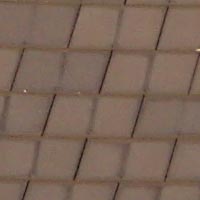
There are 4 ISO settings available on the Nikon Coolpix S9 which you can select at any time if the camera is in the normal shooting mode. Here are some 100% crops which show the noise levels for each ISO setting. There is no discernible noise at the slowest settings of ISO 64 and 100. Some noise is apparent at ISO 200 and by ISO 400 it's very obvious but still fairly usable for small prints.
ISO 64 (100% crop) |
ISO 100 (100% crop) |
 |
 |
ISO 200 (100% crop) |
ISO 400 (100% crop) |
 |
 |
Sharpening
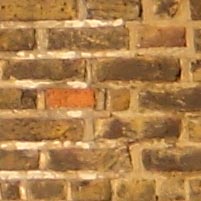
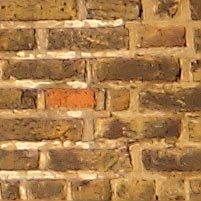
Here are two 100% crops which have been Saved as Web - Quality 50 in Photoshop. The right-hand image has had some sharpening applied in Photoshop. The out-of-the camera images are a little soft at the default sharpening setting and benefit from some further sharpening in a program like Adobe Photoshop. Unfortunately you can't change the in-camera sharpening level.
Original
(100% Crop) |
Sharpened (100% Crop) |
 |
 |
 |
 |
File Quality
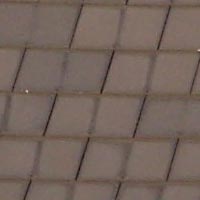
The Nikon Coolpix S9 has 2 different image quality settings available, with High being the highest quality option. Here are some 100% crops which show the quality of the various options, with the file size shown in brackets.
| 6M
High (2.63Mb) (100% Crop) |
6M
Normal (1.26Mb) (100% Crop) |
 |
 |
Chromatic Aberrations
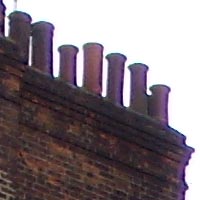
The Nikon Coolpix S9 handled chromatic aberrations well during the review, with limited purple fringing present around the edges of objects in certain high-contrast situations, particularly in the corners of the photograph. The test images also revealed that the S9 is not very sharp in the corners at the 38mm wide-angle lens setting, and is noticeable vignetting.
| Example
1 (100% Crop) |
Example
2 (100% Crop) |
 |
 |
Macro
The Nikon Coolpix S9 offers a Macro setting that allows you to focus on a subject that is 4cms away from the camera when the lens is set to wide-angle. The first image shows how close you can get to the subject (in this case a compact flash card). The second image is a 100% crop.
| Macro Shot |
Macro Shot (100% Crop) |
 |
 |
Flash
The flash settings on the Nikon Coolpix S9 are Auto, Auto with Red-eye Reduction (In-Camera Red-Eye Fix), Flash cancel, Anytime flash and Slow sync. These shots of a magnolia coloured wall were taken at a distance of 1.5m. As you can see, there is noticeable vignetting at the wide-angle lens setting.
| Flash Off - Wide Angle (38mm) |
Auto Flash - Wide Angle (38mm) |
 |
 |
| Flash Off - Telephoto (114mm) |
Auto Flash - Telephoto (114mm) |
 |
 |
And here are some self-portraits. As you can see, both the Flash On setting and the Red-Eye Reduction option caused a tiny amount of red-eye (or to be more accurate, purple-eye).
| Flash On |
Flash On (100% Crop) |
 |
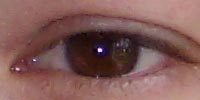 |
| Flash - Red-Eye Reduction |
Flash - Red-Eye Reduction (100% Crop) |
 |
 |
Night Shot
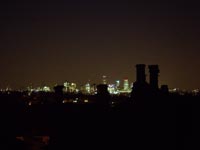
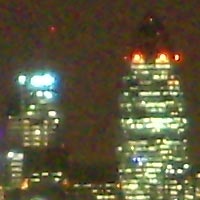
The Nikon Coolpix S9's maximum shutter speed is just 2 seconds, which is not good news if you're seriously interested in night photography. Also you can't set the aperture or ISO speed in the Night Landscape scene mode, and the S9 always seems to set a large aperture and fast ISO speed to get the fastest shutter speed possible, which isn't well suited to landscape photos. The shot below was taken in the Night Landscape mode using a shutter speed of 1 seconds at f/4.3 at ISO 400. Here is a 100% crop of the image to show what the quality is like (pretty terrible!).
| Night Shot |
Night Shot (100% Crop) |
 |
 |
D-Lighting
D-Lighting lightens under-exposed parts of the image whilst ensuring that correctly exposed parts remain the same (and are not also lightened). This basically balances the shadows and highlights in a high-contrast image, for example a scene that includes deep black shadows and a bright white sky. D-Lighting is selected by pressing the One Touch Portrait button when an image is played back, so it is applied after the image has been recorded. The Nikon Coolpix S9 processes a copy of the image (which takes around 5 seconds) so that some areas of the photograph are lightened and some are left as they are. Here are some examples which show the effects of using the D-Lighting feature, showing that it works well, although there is extra noise in the images that have had D-Lighting applied to them.
| D-Lighting - Off |
D-Lighting - On |
 |
 |
| D-Lighting - Off | D-Lighting - On |
 |
 |
Overall Image Quality
The Nikon Coolpix S9 produced images of average quality during the review period. The 6 megapixel images were a little soft straight out of the camera at the default sharpening setting and ideally require some further sharpening in an application like Adobe Photoshop. The Nikon Coolpix S9 dealt quite well with chromatic aberrations, with limited purple fringing appearing only in high contrast situations. Macro performance is about average, allowing you to focus as close as 4cms away from the subject. The built-in flash worked well indoors, with a tiny amount of red-eye and slight under-exposure. The night photograph was a weak point, with the maximum shutter speed of 2 seconds ruling out most photography after dark. The D-Lighting feature works very well with the right images, balancing out the shadow and highlight areas nicely, although at the expense of introducing extra noise. The Nikon Coolpix S9 handled noise quite well. The 1/2.5 inch, 6 megapixel sensor used in the Nikon Coolpix S9 produces noise-free images at ISO 64 and ISO 100, although ISO 200 is quite noisy and ISO 400 is only really usable for smaller prints. The lens is perhaps the weak-point of this camera, displaying noticeable vignetting and softness at the 38mm wide-angle setting (which isn't really that wide).
|
 PhotographyBLOG
is a member of the DIWA
organisation. Our test results for the Nikon Coolpix S9 have
been submitted to DIWA
for comparison with test results for different samples of
the same camera model supplied by other DIWA
member sites.
PhotographyBLOG
is a member of the DIWA
organisation. Our test results for the Nikon Coolpix S9 have
been submitted to DIWA
for comparison with test results for different samples of
the same camera model supplied by other DIWA
member sites.