
Nikon D40x Review
Review Date: November 7th 2007
Leave a comment about this Review
|
Introduction
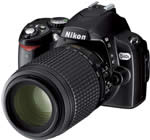
Announced just four months after its predecessor, the Nikon D40x DSLR camera is virtually identical to the D40, except for one important factor - it has a 10.2 megapixel sensor taken directly from the D80, rather than the 6 megapixels that the D40 offered. The sensor change means that the ISO range now starts at ISO 100, going all the way up to ISO 3200. The D40x also borrows the shutter mechanism from the more expensive D80, which results in a slightly faster continuous shooting speed of 3fps (2.5fps on the older D40), but also a slower flash sync speed (1/200 on the D40x, 1/500 on the D40). Other than those fairly minor changes, the D40x is to all intents and purposes a 10 megapixel D40, but those extra megapixels mean a higher price-tag, and importantly it now competes with the Canon Digital Rebel XTi / 400D and the Sony Alpha A100. The Nikon D40x retains all of the ease-of-use of the D40 and is still a good fit for first-time DSLR owners and compact digicam users trading up to a more "serious" camera, but are the extra megapixels worth the extra cost?
Compare Prices
Support PhotographyBLOG: Buy the Nikon D40x from one of our affiliate retailers:Ease of Use
When you first take the Nikon D40x out of its box, you can literally feel why this digital SLR is so cheap. Its all-plastic construction makes it very light, especially if you have used a more expensive DSLR. The same is true of the supplied 18-55mm kit lens, which again is made entirely of plastic. At this point you may be wondering if you made the right purchasing decision, but fit the body and lens together and it all begins to make much more sense. Suddenly you have a well-balanced package that is light by DSLR standards, but which doesn't feel flimsy or inconsequential. Nikon have also resisted the urge to make the D40x as small as some of its main rivals, notably the Canon EOS Rebel XTi / 400D and the Olympus E-400. Instead the D40x continues in the same vein as the older D50, with a chunky handgrip and a "business-like" design that is functional rather than pretty. The D40x is definitely designed for "normal" hands, and this helps to negate that initial feeling of the camera being too light and plasticky.
Despite being aimed at the new digital SLR owner, the D40x is still a fairly complex camera in terms of functionality and the number of external controls that it offers, with around 16 in total and some of them having more than one function. Despite the presence of so many buttons and switches, the Nikon D40x doesn't feel too cluttered or intimidating and quickly becomes second-nature to use. The D40x is very comfortable in terms of handling. The camera has a deep, contoured handgrip on the right-hand side, coated in a rubberized compound to aid grip, that enabled me to use three fingers to hold it and my right forefinger to operate the shutter button. There is a small contoured area where your right thumb sits, with the rest of the body finished in shiny smooth black plastic. The standard 18-55mm kit lens feels well-balanced on the Nikon D40x and it fits into place with a reassuring mechanical click. The shutter release action on the Nikon D40x is quite loud and mechanical, something that you will either love or hate. I liked it, although it isn't great for close-up candid photography as your subject will probably hear you if you get too close.
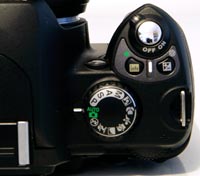
The Nikon D40x is generally well-made and designed. The Nikon D40x follows conventional DSLR design in having a shooting mode dial on the top of the camera, which allows you to select either one of the advanced mode like Aperture-priority, or 7 scene modes. The Exposure Compensation and Info buttons, which are located next to the shutter button, are thoughtfully positioned. Hold down the Exposure Compensation button with your right forefinger and spin the dial on the top-rear of the camera with your thumb to adjust its settings - simple and intuitive.
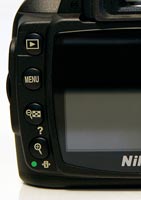
The Info button is a very interesting addition which is at the heart of the D40x's ease-of-use. Nikon have removed the top LCD panel in order to make the D40x smaller than its previous DSLRs. Consequently, they had to find a way to display the very useful information that was previously shown on this screen. Enter the Info button - pressing it displays virtually all of the camera's main settings on the large rear LCD screen. Existing DSLR owners may think that the removal of the top LCD panel is a backwards step, but I think the D40x's target audience will love it. Compact digital camera owners use the rear LCD screen all of the time, so it make perfect sense to utilise it on the D40x. Even more impressively, Nikon haven't stopped there. If you press the Info button and then the Question Mark button on the rear of the camera, you can actually move around and change 10 of the most important camera settings, including ISO speed, white balance, file quality and flash mode. There's even a graphical representation of each setting which clearly shows the results of the changes that you make. You could never do any of that on a top-panel LCD!
| Top Controls | Rear Controls |
 |
 |
Nikon have simplified the way that the Shutter-speed, Aperture and Manual modes are implemented on the D40x. Instead of having two dials as on the D80, one just below the shutter button on the top of the handgrip which changes the shutter speed, and the Main Command dial on the rear of the camera which changes the aperture, the Nikon D40x only has the Main Command Dial on the rear. This means that it is more difficult to alter the aperture and shutter speeds when the camera is set to Manual mode, as you have to hold down the Exposure Compensation button and turn the dial at the same time to change the aperture. Most D40x users may never notice this, as they may never use the Manual mode, but more experienced photographers should take note. Other notable omissions include the lack of a Depth of Field Preview, any bracketing functions, and dedicated buttons for ISO speed and some other commonly used options (although you can customise the Function button to access one of these). Compared to the older D50, Nikon have added a mirror lock-up function, customizable Auto ISO, an ISO 3200 setting, slightly more powerful built-in flash, and SDHC support.
Considering that this is a complicated digital SLR camera with an array of advanced features, the Nikon D40x has a clean and uncluttered design that will be familiar to anyone who has used a DSLR before, although it will be initially intimidating for someone who hasn't used one. Users of bridge-style compacts will be most at home. I strongly recommend that all users read through the excellent user guide first, which contrary to recent trends is actually printed rather than supplied on a CD.
The menu system of the D40x is very clear and easy to use. There are 5 main menu options, Playback, Shooting, Custom Setting Menu, Setup and Retouch, represented by both icons and text. The various options in each of the 5 menus are clearly displayed in a large font size, and cleverly the current setting for each one is shown to the right as an icon - very neat. The most complex menu is the CSM one, with 17 different options available, although many of them will only need to be set once (and you can also change the menu to "Simple" mode so that only 6 options are shown). Overall I found the menu system easy to read, understand and use - full marks to Nikon.
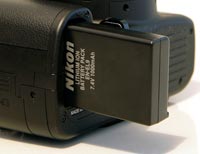
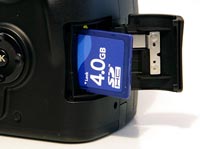
| Battery Compartment | Memory Card Slot |
 |
 |
One prominent feature in the Nikon D40x menu is a new Retouch menu section enabling you to perform in-camera image editing, effects and enhancements. These include automatic red-eye correction and cropping facility, as well as a D-lighting image optimising function and monochrome and filter effect settings. While many users might prefer to have more control by editing images via a PC, these are useful nonetheless, delivering reasonable results in a few seconds.
The start-up time of the Nikon D40x, from turning the camera on to being ready to take a photo, is very quick at around 1/2 second. The Nikon D40x "only" has a 3-area autofocus system, but I found that focusing is quick and consistent in good light with the standard kit lens, and the camera happily achieves focus indoors and in low-light situations thanks to the powerful AF Assist light. The 18-55mm kit lens is quiet in operation and feels well balanced on the D40x body. The large, high-resolution 2.5 inch LCD screen is bright, clear and has a perfectly acceptable refresh rate. It takes about 1 second to store a JPEG image at the highest quality setting with no discernible lockup between taking shots, allowing you to keep shooting as they are being recorded onto the memory card. For RAW images the Nikon D40x takes about 3 seconds to store an image and there is also no lockup between shots until the buffer is full after 9 shots - at this point the shooting rate slows down until the buffer is cleared. In the best quality JPEG mode, the D40x's continuous mode allows you to take 3 frames per second for an unlimited number of shots.
Once you have captured a photo, the Nikon D40x has an excellent range of options for playing, reviewing and managing your images. You can instantly scroll through the images that you have taken, view thumbnails (in 2 different sizes), zoom in and out, and view detailed information about each image by pressing up or down on the Multi-selector. You can also delete an image, automatically rotate an image, view a slideshow, set the playback folder, and set various printing options. Importantly the Nikon D40x displays a histogram for a photo, which is a great help in evaluating the exposure, plus any areas that are over-exposed flash on and off in the LCD preview to show you what you should be compensating for with your next attempt.
In summary the Nikon D40x is an all-plastic yet well constructed DSLR that is intuitive to use. As with the more expensive Nikon D80, the D40x inspires confidence in its target audience and allows you to get on with taking pictures.
|
 PhotographyBLOG
is a member of the DIWA
organisation. Our test results for the Nikon D40x have been
submitted to DIWA
for comparison with test results for different samples of
the same camera model supplied by other DIWA
member sites.
PhotographyBLOG
is a member of the DIWA
organisation. Our test results for the Nikon D40x have been
submitted to DIWA
for comparison with test results for different samples of
the same camera model supplied by other DIWA
member sites.