
Olympus E-410 Review
Review Date: July 23rd 2007
Author: Gavin Stoker
Leave a comment about this Review
|
Introduction
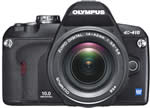
The Olympus E-410 is one of the world�s most compact DSLR cameras with Live Preview, allowing you to frame your shot using either the optical viewfinder or the 2.5 inch LCD screen. Based on the Four Thirds Standard, the Olympus E-410 replaces the E-400 and features a new 10 megapixel Live MOS sensor. There's also a new image processing engine which provides sequential shooting at up to 3 frames per second with an eight image RAW buffer in burst mode. Both CompactFlash and xD-Picture Cards can be used with the Olympus E-410, there's the proven Supersonic Wave Filter for dust reduction, plus 32 different shooting modes catering for beginners and more experienced photographers alike. With it's diminutive dimensions and compact digicam-like features, the Olympus E-410 is clearly aimed at users trading up to a DSLR from a compact camera, but it still offers a host of features that will appeal to the pro photographer. Can it really satisfy the needs of both target groups? Gavin Stoker took the Olympus E-410 for an exhaustive test drive to find out.
Compare Prices
Support PhotographyBLOG: Buy the Olympus E-410 from one of our affiliate retailers:Ease of Use
Olympus has been trumpeting the unique advantages of its Four Thirds system for some time now � with the headline message that it has been designed as a digital system from the get go, to enable smaller, lighter camera bodies and smaller, lighter lenses. Perhaps, though, you don't fully appreciate what a real world advantage this provides until, like me, you come to the Olympus E-410 straight after handling the Fuji S5 � the latter based on Nikon's D200 body � for a month. Don't get me wrong, that pro-level DSLR is a great camera in its own right, but next to the Olympus � aimed by contrast squarely at the consumer rather than seasoned pro � it is noticeably hefty and weighty. If you scaled the S5 down by a third, plus made it just a fraction of the weight, you'd have the Olympus E-410 (or the rather more awkward sounding Evolt E-410 if you live in the States).
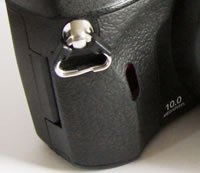
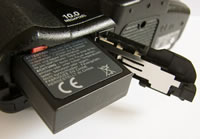
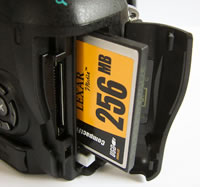
That's not to suggest Olympus' entry level DSLR feels built to a modest budget. Like its predecessor the E-400 (the world's smallest DSLR on launch) it's solidly fashioned and, yes, lightweight into the bargain, even with the bundled 14-42mm kit lens (equivalent to a 28-82mm lens in 35mm terms) attached. As we're talking a 3x zoom focus range that the average zoom compact commonly delivers this days, a better bet both creatively and financially would be to opt for the twin lens kit � that adds a 40-150mm (80-300mm 35mm equiv.) optic � if you're considering buying one. While the Olympus E-410 feels steady in the hand, I missed the benefit of a rounded grip to the right hand side of the camera that on competing DSLRs features the battery and card compartments. Both are housed in the same place here, but the E-410 feels less comfortable to hold. That said, gripping the camera in your right hand, your thumb comes to rest neatly against the rubber-padded indentation in the camera back, while your forefinger is left hovering expectantly over the shutter button.
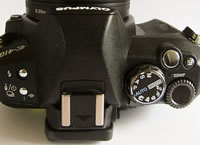
While outwardly little may have changed since its E-400 forebear, its innards have been ripped out to make way for a new sensor (the �LiveMos' utilised in the E-330) and a new processor; pretty major tweaks both. More on the effect of both as we move through the test and look at the image results. Looking down on the camera then, you're first confronted with quite a busy looking top plate for such a compact camera. Raised most prominently, and also the largest control on offer, is the shooting mode wheel, encircled by an on/off switch. The mode dial features the usual �suspects' of full auto, Program mode, Aperture Priority, Shutter Priority, Manual, plus the so-called �easy shooting modes'. These comprise scene mode, plus dedicated night portrait, sports, macro, landscape, and portrait settings. By twisting the mode dial to scene you get access to 20 pre-optimised settings. As well as the common likes of landscapes, sunsets and fireworks, you get more exciting high key or low -key options, while the last two are underwater (wide) and underwater macro settings. Yes, unusually for a consumer DSLR, there is an optional own-brand waterproof housing available from the off. No wonder, weight and size aside, Olympus is marketing the E-410 as the ultimate �travel' DSLR.
 |
 |
| Handgrip | Top Controls |
Just forward of the mode wheel and set at a slight angle is the shutter release button. It's responsive to the touch while the halfway point is easy to judge when pushing down steadily. Immediately right of this is a button for tweaking exposure compensation: give this a press with your forefinger and a slider indicator appears on the LCD, allowing a wider than normal +/- 5EV adjustment range via the command wheel that sits immediately behind it. The fact that these controls fall beneath finger and thumb without needing a second thought ensures the camera is intuitive to use, and that operation is fuss free and nicely fluid. To the left of that main mode wheel is the raised section that houses the bulb for the integral pop-up flash, on top of � but set back from � which is a hot shoe for an additional flashgun.
To the left of this again � if continuing to view the camera from the back � are two standalone buttons. The one nearest to you at this point serves several functions: In playback mode, it's a copy button, a means of transferring images between memory cards � the Olympus E-410 boasts two card slots, one for xD-Picture Card and the other for regular CompactFlash/Microdrive. Secondly it's a means of earmarking individual or all images for print via a DPOF (Direct Print Order Format)-compatible printer. In shooting mode however it's also a means of calling up the self-timer options on screen (two or 12 seconds countdown), single or sequential frame capture (up to 7 JPEGS at three frames-per-second), and also provides the option for those who have purchased an additional remote control to capture a shot either straight away or after a two-second pause. Again, you can race through these options using the command dial.
The second of the two buttons, marked with the familiar lightning bolt icon, activates the pop-up flash itself. Press this a second time and the flash options appear on the rear LCD, which are more plentiful and varied than commonly found on entry level SLRs. For example you get two slow sync modes, and not only auto red eye reduction but slow sync red eye reduction. In manual mode you can also control the output of the flash - from full power down to �, 1/16 or 1/64. Not bad. Again you tab through these options using the command dial. It's at this point we should mention the catches for the provided strap that dangle at the front edges of the camera rather than in their more traditional location out of harm's way at the sides. Though these do obstruct your fingers slightly, I must confess that I often don't bother with straps at all � so am less directly inconvenienced � keeping the camera in a side bag slung on my shoulder when not in use. But then I live on the edge of a city, fearful of muggers, and I can imagine this will be more of an issue for those who prefer to dangle the camera around their neck all day.
 |
 |
| Rear Controls | Menu Screen |
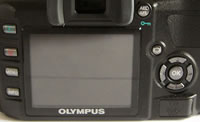
And so to the back of the camera, which is dominated by the 2.5-inch LCD screen, shifted just left of centre, and which is best described as being reasonably clear. Top right of this is the window for the optical viewfinder, surrounded for comfort by a rubber eyepiece. The view through this could definitely do with being both clearer and brighter, but is still perfectly usable. Of course, with this model you do have Olympus' Live View function to fall back on, whereby like a compact you can use the 2.5-inch LCD to set up a shot if using the viewfinder would be tricky � shooting over the heads of a crowd for example. There's a dioptric adjustment wheel to the right of the viewfinder for the myopic, but, particularly when the on/off switch is switched around to the �on' setting, it's difficult to get enough of a purchase on it to actually get it to turn.
In the absence of a separate LCD display window atop the Olympus E-410 via which to convey essential shooting information, the one-and-only LCD reveals a full complement of options upon start up. These include the current ISO and white balance settings, flash mode, colour mode, shutter speed, aperture, metering, focus mode, single or sequential shooting, image quality setting � and even which of the two available card slots is currently in use. If you want to recall this information later, a press of the dedicated info button at the bottom left of the screen does the job. Just below right of the viewfinder window is a dedicated Automatic Exposure Lock and Automatic Focus Lock button. The positioning of this also feels �just right', as it too falls readily under the thumb as your finger quivers above the shutter release.
 |
 |
| Battery Compartment | Memory Card Slot |
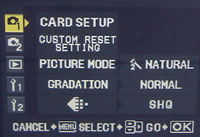
Just below, and again to the right of the viewfinder is the dedicated control that activates the aforementioned Live View mode. Almost uniquely for a DSLR � Panasonic's Four Thirds chipped L1 also has the function � this not only allows use of the monitor for composition but, when in manual mode, to enlarge the image on the screen up to 7x or 10x (you have to first press that info button again) to check you've got focus spot on before you take the shot. To the right and just below the Live View button is a familiar four-way controller for tabbing through menu screens and captured images, with a central �OK' button for effecting changes. Swapping over to the left of the LCD you find just four self-explanatory buttons. The top one is for playing back images, the second is for deleting duff ones, the third's the menu button for calling up self-same on screen and the last is the aforementioned �info' control. Keeping things simple, whether in shooting or playback mode, a press of the menu button calls up five folders.
The first folder features shooting settings such as image quality and picture mode � giving the choice of vivid, natural, muted colours or monotone � plus usefully, right at the top, the ability to format the card in use. I say useful, because normally this setting is buried deep within most DSLR's menus. The second shooting folder allows the selection of the likes of metering modes, plus focus mode selection, plus an �anti shock' function for situations where slow shutter speeds are used and camera vibration needs to be kept to a minimum. The third folder contains the standard playback options � including a doubling up of the DPOF faculty � while the fifth and sixth folders contain a smattering of typical set up options, with, more unusually, the ability to incrementally fine tune the compression level for the different resolution options. You are also able to prevent the flash from automatically popping up when you're otherwise attempting to shoot in natural light. More usefully still there's also a built-in sensor-cleaning mode to prevent dust spots on your images.
So what of the pictures themselves � do they typify Olympus' love for slightly cold, muted colours, or has the manufacturer bowed to the fad for well-saturated images? A bit of both actually�
|
 PhotographyBLOG
is a member of the DIWA
organisation. Our test results for the Olympus E-410 have been submitted to DIWA
for comparison with test results for different samples of
the same camera model supplied by other DIWA
member sites.
PhotographyBLOG
is a member of the DIWA
organisation. Our test results for the Olympus E-410 have been submitted to DIWA
for comparison with test results for different samples of
the same camera model supplied by other DIWA
member sites.