
Panasonic Lumix DMC-FX12 Review
Review Date: March 4th 2007
Leave a comment about this Review
|
Introduction
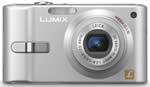
The brand new Panasonic Lumix DMC-FX12 carries on the diminutive tradition of the FX series of digital cameras, measuring just 9.4 x 5.1 x 2.4 cms and weighing 150 grams. The FX12 packs in a Leica DC 3x (35-105mm) optical zoom lens with f/2.8 available at the wide-angle setting. The 7.2 megapixel Panasonic DMC-FX12 also offers a 2.5 inch LCD screen, optical image stabiliser and Intelligent ISO Control, plus ISO 1250 at full image resolution. The Venus Engine III image-processing engine has made its way down the Panasonic line-up to this entry-level model, whilst the Extra Optical Zoom feature allows you to extend the zoom by 4.5x in 3 megapixel mode. Panasonic have attempted to retain the best features of the FX series in a more affordable camera, but is the Panasonic Lumix DMC-FX12 a worthy addition, or have too many corners been cut?
Compare Prices
Support PhotographyBLOG: Buy the Panasonic Lumix DMC-FX12 from one of our affiliate retailers:Ease of Use
The Panasonic Lumix DMC-FX12 is an extremely compact digital camera, measuring just 9.4cms wide and 2.4cms deep, which means that you can carry it in a trouser pocket without noticing it. Panasonic have fitted in a 3x zoom lens (equivalent to 35-105mm on a 35mm camera) into this tiny body, which is par for the course in terms of focal length for this class of camera. The lens is coupled with Panasonic's Mega O.I.S system, which helps to ensure that the majority of photos taken in good light are sharp.
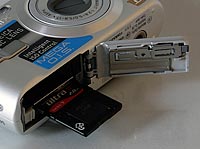
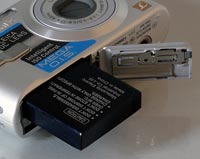
The DMC-FX12 is a well-built camera, with a high quality plastic body and controls. The camera's design is dominated by the lens on the front and the 2.5 inch LCD screen on the rear. There is no optical viewfinder, which follows a recent trend in digital cameras, and this does make the camera a little difficult to keep steady at the telephoto end of the zoom, especially given the disappointingly slow maximum aperture of f/5 at the telephoto focal length. There aren't any weak-points in terms of the DMC-FX12's design and build-quality - for once the battery compartment and SD card slot are both well implemented.
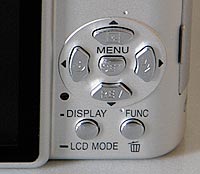
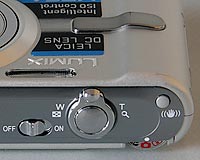
As this is purely a point and shoot camera with no manual controls, the Panasonic Lumix DMC-FX12 is not overly complex in terms of the number of external controls that it has. I counted just 12 in total. The majority of the controls are clearly labeled and common to most cameras. There's a clever dial on the top edge of the camera that lets you select the various shooting and scene modes, plus image playback. This dial is reminiscent of the type found on SLR cameras, and enables you to quickly change between the various modes. It does have one drawback - you have to keep switching between the shooting or playback modes, rather than just pressing a button to review your images whilst in a shooting mode, as on most other digital cameras (although the Rev button on the back of the camera provides limited playback functionality). Also found on the top of the camera are the on/off switch, zoom lever, shutter button and the optical image stabilisation button.
| Main Controls - Rear | Main Controls - Top |
 |
 |
If you have never used a digital camera before, or you're upgrading from a more basic model, reading the easy-to-follow manual before you start is a good idea. Thankfully Panasonic have chosen to supply it in printed format, rather than as a PDF on a CD, so you can also carry it with you. The large 2.5 inch LCD screen is the only way of framing your shots, so if you have to have an optical viewfinder, look elsewhere now. There's a clever mode called High Angle, which essentially brightens the LCD screen when the camera is held over your head so that it is perfectly viewable, which is great for shooting over the heads of a crowd. The various icons used to represent the camera settings are clear and legible, although I was annoyed by the "Press LCDMode for 1 sec" message along the bottom of the screen, which is displayed whenever you press the Display button.
The main menu system on the Panasonic Lumix DMC-FX12 is straight-forward to use and is accessed by pressing the Menu/Set button in the middle of the navigation pad. There are two main menus, Record and Setup. Most of the camera's main options, such as white balance, image quality, auto-focus mode and ISO speed, are accessed here, so the Record menu has 11 options spread over 3 screens. It would have been good to see the more commonly used options, such as ISO speed, available via the press of a button, rather than having to go into the menu system. Due to the large LCD screen and restricting the number of on-screen choices to five, the various options and icons are clear and legible.
There is an innovative feature on the Panasonic Lumix DMC-FX12 that aims to make life easier for you. As with current Panasonic models, this camera has an anti-shake system, dubbed Mega O.I.S - turn it on and the Panasonic Lumix DMC-FX12 automatically compensates for camera shake, which is a slight blurring of the image that typically occurs at slow shutter speeds. There are two different modes, Mode 1 is on all the time including image composition, and Mode 2 is only on when you press the shutter button. In practice I found that it does make a noticeable difference, as shown in the examples on the Image Quality page. You don't notice that the camera is actually doing anything different when anti-shake is turned on, just that you can use slower shutter speeds than normal and still take sharp photos. Thankfully leaving the anti-shake system on didn't negatively affect the battery-life, with the camera managing over 300 shots using the supplied rechargeable Li-ion battery.
| Memory Card Slot | Battery Compartment |
 |
 |
Panasonic also provide a High Sensitivity Mode to help combat the effects of camera shake. When this scene mode is selected, the camera automatically raises the ISO speed up to a maximum of 3200 and therefore allows for a faster shutter speed. This mode allows you to handhold the camera without using the flash and get more natural results, whilst at the same time freezing subject movement more successfully. There are some obvious drawbacks with this special scene mode, principally a significant reduction in resolution - Panasonic states in the FX12 manual that "The resolution of the recorded picture decreases slightly because of high sensitivity processing. This is not a malfunction". You also need to select the scene mode and therefore have some idea about when it is applicable to your subject. You can see sample images using the High Sensitivity Mode on the the Image Quality page.
The start-up time from turning the Panasonic Lumix DMC-FX12 on to being ready to take a photo is fairly quick at around 1.5 seconds. Zooming from the widest focal length to the longest is a lot slower though at around 3 seconds. Focusing is quick in good light and the camera achieves focus most of the time indoors or in low-light situations, helped by the focus-assist lamp. The camera doesn't have any problems locking onto the subject in low-light situations. The visibility and refresh rate of the 2.5 inch LCD screen are perfectly acceptable, although the pixel count of 115,000 is on the low side, resulting in a slightly grainy display. It takes about 1 second to store an image, allowing you to keep shooting as they are being recorded onto the memory card - there is no LCD blackout between each image. The Panasonic Lumix DMC-FX12 has a poor Burst mode which enables you to take just 1.5 frames per second at the highest JPEG image quality, although there is no limit on how many shots you can take when holding down the shutter button. Overall the Panasonic Lumix DMC-FX12 is average in terms of operational speed.
Once you have captured a photo, the Panasonic Lumix DMC-FX12 has a good range of options when it comes to playing, reviewing and managing your images. You can instantly scroll through the images that you have taken, view thumbnails, zoom in and out up to 16x magnification, view slideshows, delete, protect, trim, resize, copy and rotate an image. You can also select favourite images, add a date stamp and set the print order. The Display button toggles detailed settings information about each picture on and off, such as the ISO rating and aperture / shutter speed, and there is a small histogram available during both shooting and playback. When taking a photo, pressing the Display button toggles between the detailed information, the histogram and gridlines to aid composition.
In summary, the Panasonic Lumix DMC-FX12 is a simple-to-use, fairly responsive compact camera that inherits most of the good points of the FX series in terms of ease-of-use.
|
 PhotographyBLOG
is a member of the DIWA
organisation. Our test results for the Panasonic Lumix DMC-FX12 have
been submitted to DIWA
for comparison with test results for different samples of
the same camera model supplied by other DIWA
member sites.
PhotographyBLOG
is a member of the DIWA
organisation. Our test results for the Panasonic Lumix DMC-FX12 have
been submitted to DIWA
for comparison with test results for different samples of
the same camera model supplied by other DIWA
member sites.