
Panasonic Lumix DMC-FX500 Review
Review Date: July 7th 2008
Author: Mark Goldstein
Leave a comment about this Review
|
Introduction
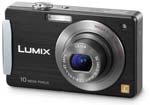
At first glance the Panasonic Lumix DMC-FX500 appears to be a fairly conventional 10 megapixel compact camera, but don't be fooled by its boxy looks - this is actually one of the most desirable models of 2008 in terms of its overall specification. The FX500 combines a number of core technological innovations that really help to make it stand out from the crowd, propelling it straight to the top of Panasonic's FX-series. The main attraction is the addition of a touch-sensitive control system - for the first time on a Panasonic camera, you can control various settings by tapping the LCD screen using the supplied stylus or your fingertip. There's also a 5x optical zoom lens with an ultra-wide 25mm focal length, reaching 125mm at the telephoto setting, housed in a camera body just 23mm thick. If you like to shoot movies with your still camera, the main attraction of the Panasonic DMC-FX500 will be the 720p, 16:9 ratio HD video mode, which can shoot 1280x720 pixel video at 30fps. More experienced photographers will be excited to learn that the FX500 offers a complement of creative exposure controls, including aperture- and shutter- priority modes and manual, making this one of the few Panasonic compacts that you can exert full control over. All of this comes at a substantial price, however, with an RRP of �330 / $399, more than some entry-level DSLRs. Mark Goldstein found out if the new Panasonic Lumix DMC-FX500 is worth investing in...
Compare Prices
Support PhotographyBLOG: Buy the Panasonic Lumix DMC-FX500 from one of our affiliate retailers:Ease of Use
The Panasonic Lumix DMC-FX500 is a very compact digital camera, measuring just 9.5cms wide and 2.3cms deep, which means that you can carry it in a trouser pocket without noticing it. Panasonic have somehow fitted in a wide-angle 5x zoom lens, equivalent to 25-125mm on a 35mm camera, into this tiny body. Other models of this size typically have a 3x zoom lens that starts at 35mm or higher. The 25mm wide-angle lens makes this one of the more versatile compacts in terms of focal range, especially as it is coupled with Panasonic's Mega O.I.S system, which helps to ensure that the majority of photos taken in good light are sharp. If you're used to a standard 3x zoom lens which usually starts at around 35mm wide, then you will find that the lens on the DMC-FX500 provides an entirely new angle of view that can only increase your creativity. Take it from me, you won't want to go back to a "standard" zoom after using the 25mm lens on the FX500, especially as it still offers a telephoto setting of 125mm which is perfect for head and shoulders portraits.
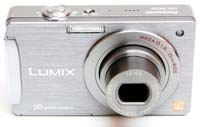
The DMC-FX500 is a well-built camera, with a mostly high quality metal body and controls. It features an ascetically pleasing mix of brushed aluminum front, shiny silver top and bottom, and a glossy black plastic rear. The camera's design is dominated by the lens on the front and the large 3 inch LCD screen on the rear. There is no optical viewfinder, which follows a recent trend in digital cameras, and this does make the FX500 a little difficult to keep steady at the 125mm telephoto end of the zoom, especially given the disappointingly slow maximum aperture of f/5.9 at the telephoto focal length. The cover for the battery compartment and SD card slot feels a little insubstantial and is locked using a cheap plastic switch, and the tripod socket is positioned in the bottom-left corner of the camera, which doesn't make it very stable on a tripod.
The DMC-FX500 is one of a handful of Panasonic compacts to offer advanced controls over exposure, with full manual, aperture and shutter priority modes on offer, which will appeal to the more experienced photographer looking for a pocket alternative to their DSLR. Only the lack of a RAW mode prevents the FX500 from being a real contender in this respect. Shutter speed's range from 60-1/2000 seconds, and apertures from F2.8 - F8. Despite offering a full range of exposure modes, the Panasonic Lumix DMC-FX500 is not overly complex in terms of the number of external controls that it has, just 8 in total. Found on the top of the camera are the small on/off switch, responsive push/pull zoom lever and the large, tactile shutter button. On the bottom is the metal tripod socket and battery / SD card compartment, and on the right side are three connection ports, including the new Component Out socket for connecting the FX500 to a HD television or monitor. Unfortunately, Panasonic have decided to cut costs and not include a component cable as standard in the box, which means that you'll have to purchase one separately to take advantage of this camera's HD connectivity.
On the rear of the camera is a new Mode button that lets you select the various shooting and scene modes, which works in tandem with the Camera / Play switch above it. The latter switch enables you to quickly and easily switch from shooting to playback without also changing the shooting mode. This system does have one drawback though, in that you have to keep switching between the shooting or playback modes, rather than just pressing a button to review your images whilst in a shooting mode, as on most other digital cameras. In shooting mode, the Display button alternates between showing no information, gridlines and the main camera settings. Panasonic have used a refined version of their joystick control (first seen on the DMC-FX55) instead of the more traditional navigation D-pad, which is a little unresponsive but generally pleasant to use. Pressing the joystick accesses the menu system, whilst pressing left, up, right and down selects self-timer, exposure compensation, flash and macro options respectively.
 |
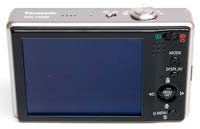 |
| Front | Rear |
Underneath the DMC-FX500's joystick is a new Q.Menu button (formerly the Func button on the DMC-X55), which is a very welcome addition, as it provides quick access to most of the principal controls, including ISO speed, image size, image quality and white balance (there are up to 8 settings in total, depending upon the current shooting mode). You can still access all of these options from the main menu system too. Optical image stabilisation, which could previously be turned on and off via an external button, is now only accessible through the DMC-FX500's menu system. This isn't really a problem in practice, as I left it turned on for 99% of the time without negatively affecting the battery life.
If you have never used a digital camera before, or you're upgrading from a more basic model, reading the easy-to-follow manual before you start is a good idea. Thankfully Panasonic have chosen to supply it in printed format, rather than as a PDF on a CD, so you can also carry it with you. The large 3 inch LCD screen is the only way of framing your shots, so if you have to have an optical viewfinder, look elsewhere now. There's a clever function called High Angle, accessible from the Quick Menu, which essentially brightens the LCD screen when the camera is held over your head so that it is perfectly viewable, which is great for shooting over the heads of a crowd. The Intelligent LCD function automatically detects the current lighting conditions and boosts the LCD backlighting by up to 40% when shooting outdoors in bright sunshine, helping to keep the screen visible. The various icons used to represent the camera settings are clear and legible.
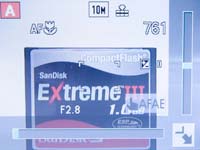
The 3 inch LCD screen incorporates a touch-sensitive panel that allows you to literally get hands-on with the DMC-FX500, which is the very first Lumix camera to offer a touch-screen interface. Panasonic have resisted the urge to make every single feature controllable by touching the screen, instead combining it with the more traditional joystick/navigation pad. Key settings like aperture, shutter speed and exposure compensation can be set using a fingertip or the supplied plastic stylus, as well as scrolling and zooming in playback mode. Pressing the Mode button displays the Rec Mode screen on the LCD, where a quick finger-press on one of the 7 options selects the shooting mode. A system of on-screen sliders is then used to set the aperture, shutter-speed and exposure levels, a system that is both quick and intuitive. A very clever feature is the ability to touch anywhere on the screen to focus and expose for that specific part of the scene, making it incredibly quick and easy to shift the focus point around. That�s pretty much it as far as the DMC-FX500�s touchscreen functionality goes, so you'll be disappointed if you were expecting to control everything via the LCD screen. It would also have been nice to see a higher-resolution screen, with 230K pixels being a little on the low side for such a big LCD.
The main menu system on the Panasonic Lumix DMC-FX500 is straight-forward to use and is accessed by pressing the Menu/Set button in the middle of the navigation joystick. There are two main menus, Record and Setup. Most of the camera's main options, such as white balance, image quality, auto-focus mode and ISO speed, are accessed here, so the Record menu has 19 options spread over 3 screens. As mentioned previously, the addition of the Q.Menu button on the rear of the camera speeds up access to some of the more commonly used options. Due to the large LCD screen and restricting the number of on-screen choices to five, the various options and icons are clear and legible.
 |
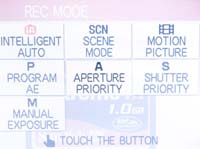 |
| Touchscreen Interface | Rec Mode Menu |
First introduced on the DMC-FX55 camera, the DMC-FX500 features an enhanced version of Intelligent Auto Mode. Panasonic have tried to make things as easy as possible for the complete beginner by providing this shooting mode, which allows you to point and shoot the camera without having to worry about choosing the right mode or settings. Intelligent Auto Mode automatically determines a number of key criteria when taking a picture, including selecting the most appropriate scene mode (from 5 commonly used presets) and ISO speed, and turning face detection (up to 15 faces), image stabilization and quick auto-focus on. New additions to the Intelligent Auto Mode for the DMC-FX500 are Intelligent Exposure, which increases exposure only in the under-exposed areas of the image, and Digital Red-eye, which automatically detects and removes red-eye. Intelligent Exposure can also be turned on in the Normal Picture mode (but strangely not Digital Red-eye). In practice the Intelligent Auto Mode system works very well, with the camera seamlessly choosing the most appropriate combination of settings for the current situation. The 5 available scene modes are Portrait, Landscape, Macro, Night Portrait and Night Scenery, so obviously not all situations are covered by Intelligent Auto Mode, but it does work for the majority of the time. It makes it possible for the less experienced photographer to easily take well-exposed, sharp pictures of people, scenery and close-ups by simply pointing and shooting the camera.
The HD video capability of the DMC-FX500 is one of the major new features of this model. There are two 16:9 HD movie modes which record 720p video at 1280x720 pixels at 30 or 15 fps. Selecting these modes is more awkward than it should be, as you have to first select the 16:9 aspect ratio and then the 16:9H picture mode. Movies are saved in the Quicktime .MOV format, which is fine for the smaller sizes, but less so for the HD video - our 17 second sample movie is a whopping 55Mb, and you'll only be able to fit around 10 minutes of HD footage on a 2Gb SD card. Panasonic would have been better advised to employ a more efficient video codec. On a more positive note, sound is recorded during capture (although as with most digicams it's on the muffled side). Back to the minus points though, as you can't use the zoom lens during recording, although this does avoid the continuous auto-focusing problem that afflicted the DMC-TZ5's movies. I also didn't notice any of the thin white vertical lines that appeared during both shooting and video-playback in the TZ5's movies.
As with all current Panasonic models, this camera has an anti-shake system, dubbed Mega O.I.S. Turn it on via the Record Menu and the Panasonic Lumix DMC-FX500 automatically compensates for camera shake, which is a slight blurring of the image that typically occurs at slow shutter speeds when the camera is hand held. There are two different modes, Mode 1 is on all the time including image composition, and Mode 2 is only on when you press the shutter button. In practice I found that it does make a noticeable difference, as shown in the examples on the Image Quality page. You don't notice that the camera is actually doing anything different when anti-shake is turned on, just that you can use slower shutter speeds than normal and still take sharp photos. Thankfully leaving the anti-shake system on didn't negatively affect the battery-life, with the camera managing just over 250 shots using the supplied rechargeable Li-ion battery.
Panasonic also provide a High Sensitivity Mode to help combat the effects of camera shake. When this scene mode is selected, the camera automatically raises the ISO speed up to a maximum of 6400 and therefore allows for a faster shutter speed. This mode allows you to handhold the DMC-FX500 without using the flash and get more natural results, whilst at the same time freezing subject movement more successfully. There are some obvious drawbacks with this special scene mode, principally a significant increase in noise and blurring - Panasonic state that "Pictures may appear slightly grainy due to high sensitivity". You also need to select the scene mode and therefore have some idea about when it is applicable to your subject.
 |
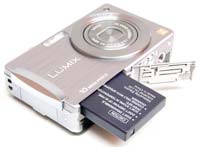 |
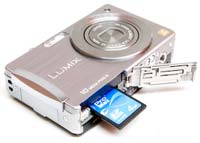
| Memory Card Slot | Battery Compartment |
The Intelligent ISO mode is the third way in which the DMC-FX500 attempts to avoid subject blur in low-light conditions. The camera automatically sets the appropriate shutter speed AND ISO speed for the subject that you are taking pictures of. So if you're taking shots of a child indoors, the DMC-FX500 automatically raises the ISO and in turn the shutter speed to avoid blurring the child's movement. If the subject is still, then the camera chooses a lower sensitivity and slower shutter speed. It's a clever idea that works well in practice, with the camera generally choosing an appropriate combination of shutter and ISO speed. You can also limit the maximum ISO speed that the camera can choose, which I'd strongly advise, as ISO 1600 produces very noisy images - ISO 800 is a better maximum setting. There is one small caveat with the Intelligent ISO mode - if you turn on the flash, the ISO speed only reaches 640, but overall it's a useful addition for natural low-light shooting.
The Extra Zoom feature from earlier Lumix models has been retained, which basically works by digitally increasing the zoom from 5x up to a maximum of 8.9x by only using the central part of the image. To achieve that increase, though, a smaller image size has to be selected by the user. Choosing the 3 megapixel mode means that you can zoom up to 8.9x, whilst 5 megapixel provides a 7.1x zoom, and 7 megapixel is 5.9x (all in the 4:3 aspect ratio). Fairly useful if you don't mind the decrease in resolution, but you do have to set the camera to the right picture size before the extra zoom function works. It would have been a much better system if the camera intelligently increased the zoom and then decreased the size of the image. When activated, EZ is displayed next to the horizontal zooming scale.
The start-up time from turning the Panasonic Lumix DMC-FX500 on to being ready to take a photo is fairly quick at around 1.5 seconds. Zooming from the widest focal length to the longest is a lot slower though at over 5 seconds. Focusing is quick in good light and the camera achieves focus most of the time indoors or in low-light situations, helped by the focus-assist lamp. The camera doesn't have any problems locking onto the subject in low-light situations. The visibility and refresh rate of the 3 inch LCD screen are perfectly acceptable, and the pixel count of 230,000 is OK too, with just a little visible grain. It takes about 1 second to store an image, allowing you to keep shooting as they are being recorded onto the memory card - there is no LCD blackout between each image. The Panasonic Lumix DMC-FX500 has a pretty standard Burst mode which enables you to take 2.5 frames per second for up to 3 images at the highest JPEG image quality. Overall the Panasonic Lumix DMC-FX500 is about average in terms of operational speed.
Once you have captured a photo, the Panasonic Lumix DMC-FX500 has a good range of options when it comes to playing, reviewing and managing your images. You can instantly scroll through the images that you have taken, view thumbnails (up to 30 onscreen at the same time and in a special Calendar view), zoom in and out up to 16x magnification, view slideshows, delete, protect, trim, resize, copy and rotate an image. You can also select favourite images, sort images into categories, change an image's aspect ratio, add a text stamp, add a soundclip and set the print order. Dual Play is a great option that takes advantage of the big LCD screen by allowing you to compare two images onscreen at the same time. The Display button toggles detailed settings information about each picture on and off, such as the ISO rating and aperture / shutter speed, and there is a small histogram available during both shooting and playback. When taking a photo, pressing the Display button toggles between the detailed information, the detailed information plus gridlines to aid composition, and no information at all.
In summary, the Panasonic Lumix DMC-FX500 is a very easy-to-use, ultra-compact camera with new touch-screen functionality that genuinely enhances the overall user experience.
|
 PhotographyBLOG
is a member of the DIWA
organisation. Our test results for the Panasonic Lumix DMC-FX500 have
been submitted to DIWA
for comparison with test results for different samples of
the same camera model supplied by other DIWA
member sites.
PhotographyBLOG
is a member of the DIWA
organisation. Our test results for the Panasonic Lumix DMC-FX500 have
been submitted to DIWA
for comparison with test results for different samples of
the same camera model supplied by other DIWA
member sites.