
Panasonic Lumix DMC-L10 Review
Review Date: November 2nd 2007
Author: Mark Goldstein
Leave a comment about this Review
|
Introduction
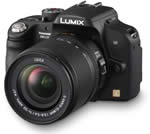
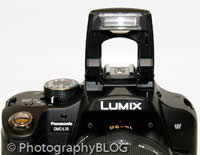
The Panasonic Lumix DMC-L10 is the second DSLR camera from Panasonic, and it's just as distinctive in its own way as the L1 camera that was launched back in 2006. Panasonic have adopted a much more conventional design for the L10 when compared to the rather retro, rangefinder-like L1, which by all accounts didn't sell in any great numbers. The new Lumix L10 may look normal at first glance, but Panasonic have pulled out all the stops to ensure that the L10 is unlike any other DSLR camera currently available. Drawing on their rich heritage of well-received compact and ultra-zoom models, the Panasonic L10 is the closest that you will get to a compact digicam in DSLR form, and is an ideal match for anyone upgrading to a DSLR. This is the first ever DSLR to offer a 2.5 inch flip-out LCD that offers 270 degree of rotation, making it perfect for waist level shooting, hand-held self-portraits and getting down close to the ground. The L10 also has a full-time live view function so that you can compose pictures using the LCD screen rather than the optical viewfinder, complete with a contrast auto-focus system and 256 zone multi-pattern metering. Panasonic have gone further still - this is the first DSLR to incorporate a Face Detection system! Based on the Four Thirds standard, the Panasonic L10 has a 10.1 megapixel sensor, Supersonic Wave Filter system to prevent dust, Intelligent ISO Control function, built-in pop-up flash and full range of scene and more creative shooting modes. Thanks to Panasonic's close links with Leica, the Lumix DMC-L10 also has one of the best kit lenses around - the new Leica D Vario-Elmar 14-50mm F3.8-5.6 lens, complete with optical image stabilisation. I first used the L10 back in August when it was launched at the IFA electronics show in Germany - now I bring you my in-depth review of the new Panasonic Lumix DMC-L10.
Compare Prices
Support PhotographyBLOG: Buy the Panasonic Lumix DMC-L10 from one of our affiliate retailers:Ease of Use
Considering that the Panasonic Lumix DMC-L10 is based on the Four Thirds system, which uses a smaller sensor than the 35mm standard and therefore potentially allows for smaller camera design, this is a large and hefty camera when paired with the Leica kit lens. On its own the L10 body weighs nearly 1/2kg and measures 134.5 x 95.5 x 77.5mm, but it becomes a lot heavier and bulkier with the Leica lens. This is no bad thing, as the camera body is made of plastic and doesn't feel particularly inspiring until the lens is fitted, whereupon it assumes a much more substantial feel. The DMC-L10 is a well-built camera, with a high quality plastic body and controls, but it doesn't compare well to the bullet-proof build quality that cameras' like the Canon EOS 40D offer. The L10's design is dominated by the Leica lens on the front, chunky rubberised handgrip, and the large free-angle 2.5 inch LCD screen on the rear. There aren't any particular weak-points in terms of the DMC-L10's design, with everything falling to hand and feeling as solid as a plastic camera can get.
It's impossible to talk about the Lumix DMC-L10 without focusing on the Leica D Vario-Elmar 14-50mm F3.8-5.6 lens (pardon the pun), especially as the L10 is only available in kit form with this lens, and not body only. Panasonic are planning to sell the Leica lens separately for around �600, which is a whopping 2/3rds of the L10 kit's overall price and a good indication of the quality. It's slightly slower and substantially cheaper than the kit lens that ships with the L1, but it's a far better kit lens and much more expensive than the ones that ship with comparatively priced DSLRs. With a maximum aperture of F3.8 at 28mm wide-angle and F5.6 at telephoto, it's not especially fast, but should suffice when coupled with Panasonic's excellent image stabilisation system. Consisting of 15 lens elements in 11 groups, this is a hefty lens that oozes quality, with a very smooth zoom ring, thin but equally smooth focusing ring, 5 marked focal lengths and a switch for the OIS system (more on that later). The lens can focus as close as 29cms and accepts 67mm filters. It's a really nice lens, but you could argue that the high quality and price of the kit lens has driven up the price of what is after all a plastic-bodied DSLR. Importantly this is currently the only lens that supports the L10's contrast detection auto-focus system in live view mode - fitting a different Four Thirds lens removes what is a crucial feature of this camera.
The Panasonic Lumix DMC-L10 is the first DSLR camera to feature a rotating, free-angle LCD screen, which is hinged on the left side of the camera (looking from the rear) and flips out and twists through 270 degrees. You can use the screen as a waist-level viewfinder, holding the camera overhead, and even for turning the camera on yourself for arm-length self-portraits. There's also the added benefit of folding the screen away against the camera body to protect it when stored in a camera bag, preventing it from becoming marked or scratched. Importantly the L10 features an Intelligent LCD function which automatically adjusts the screen's brightness level to match the current light conditions. The free-angle LCD screen is much more than just a novelty - it's much more versatile than the usual combination of optical viewfinder and fixed LCD, providing new angles of view and enhancing your overall creativity. Above all it's a fun way of composing your images.
 |
 |
| Top Controls | Rear Controls |
Which brings us onto the L10's live view mode, which is more advanced than the system introduced in the new Canon EOS 40D. When Live View is activated via the dedicated button to the left of the optical viewfinder, the DMC-L10 enables you to control the exposure, white balance and focus of the image via the LCD screen, all in real-time before you take the photo. The L10 uses a 256 zone multi-pattern exposure system, whereas a 49 zone multi-pattern system is available when shooting through the viewfinder. For focusing, the camera uses a 11-point contrast AF system in Live View mode, much like any compact camera, with 6 different methods (Face Detection, 9-point, Multi, 3-point, 1-point and Spot), and a 3-point TTL phase difference detection system for the optical viewfinder. In manual focus mode you can enlarge the specific part of the subject on the LCD and freely move the magnified area for easy framing. Finally the effects of altering the white balance setting can be viewed in real-time on the LCD. All of this adds up to a compact camera-like experience that upgraders will really love, and which importantly works quickly and efficiently. I found that using the L10's optical viewfinder was marginally faster than using live view mode, but certainly not so different that I preferred one system over the other. The L10's optical viewfinder is brighter than the L1's, but has lower magnification when compared to other DSLRs in the same price-range. To compensate for this, Panasonic supply a 1.2x magnifying eye-cup in the box, which enlarges the image but isn't suitable if you wear glasses. The magnifying eye-cup made a significant difference, so you should use it if you can.
As mentioned above, the Panasonic Lumix DMC-L10 is the first DSLR to offer a face detection system. More serious photographers will probably scoff at having this feature on a DSLR, but anyone who has used a modern compact will appreciate it. Only available when using the Live View mode, the L10 can detect up to 15 human faces simultaneously and set the focus and appropriate exposure, just like on the majority of compacts available today. The Intelligent ISO mode sets the appropriate shutter speed AND ISO speed for the subject that you are taking pictures of. So if you're taking shots of a child indoors, the DMC-L10 automatically raises the ISO and in turn the shutter speed to avoid blurring the child's movement. If the subject is still, then the camera chooses a lower sensitivity and slower shutter speed. It's a clever idea that works well in practice, with the camera generally choosing an appropriate combination of shutter and ISO speed. You can also limit the maximum ISO speed that the camera can choose.
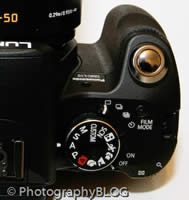
In a nod to the past, the Panasonic Lumix DMC-L10 offers a number of different "film modes", accessed by a button on top of the camera. These are essentially preset looks based on the concept of analog films (which may be lost on this camera's target audience). You can choose from nine film modes including Standard, Dynamic, Nature, Smooth, Nostalgic, Vibrant, Standard B/W, Dynamic B/W and Smooth B/W, and adjust the contrast, sharpness, saturation and noise reduction for each one. There are also two My Film custom modes for creating your own personalised look. All of these settings can be previewed in Live View mode on the LCD screen before you take the picture. If you use RAW mode only then you'll never use this feature, but they're a great addition for everyone who shoots JPEGs.
 |
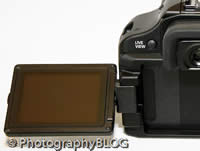 |
| Pop-up Flash | Tilting LCD Screen |
As with Canon and Nikon systems, there's no sensor-shifting anti-shake mechanism built into the camera body itself. Instead the supplied lens features an optical image stabilization dubbed MEGA O.I.S. This is turned on and off by a switch on the side of the lens barrel, and when activated it automatically compensates for camera shake, which is a slight blurring of the image that typically occurs at slow shutter speeds when the camera is hand held. There are three different modes, Mode 1 is on all the time including image composition, Mode 2 is only on when you press the shutter button, and Mode 3 is for horizontal panning (the camera only compensates for vertical shake). In practice I found that it does make a noticeable difference, as shown in the examples on the Image Quality page. You don't notice that the camera is actually doing anything different when anti-shake is turned on, just that you can use slower shutter speeds than normal and still take sharp photos. Also present and correct is the grandly named Supersonic Wave Filter, which is also used by Olympus DSLR cameras. Any dust particles that intrude while changing lenses settle onto a filter that protects the CCD and are then shaken clear onto a sticky tape when the camera is turned on. The Supersonic Wave Filter is a proven system that has previously been demonstrated to be one of the most effective.
The Panasonic Lumix DMC-L10 is quite complex in terms of the number of external controls that it has, with over 20 in total. The majority of the controls are clearly labeled and common to most cameras. There's a mode dial on top of the camera that lets you quickly select the various shooting and scene modes. The Custom option essentially allows you to configure the camera in up to three different ways and then quickly choose one of the custom modes. Also found on top of the camera are the on/off switch, continuous shooting/bracketing switch, film mode button and the shutter button. Notable by its absence is any kind of LCD panel to show what the camera's current settings are. Instead you have to rely on the information displayed in the optical viewfinder, the more comprehensive information shown by default on the LCD screen, or the smaller icons in Live View mode.
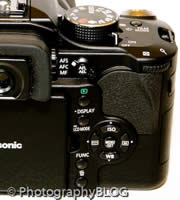
On the rear of the camera is a Func. button, just like on Panasonic's compact cameras, which provides quick access to most of the principal creative controls, including image size, image quality, MEGA OIS mode, ISO speed, white balance and flash settings. You can still access all of these options from the main menu system or a dedicated button too. Depending upon the shooting mode, exposure compensation is set via the rear control dial, with the control dial near the shutter button controlling the aperture or shutter speed. In full Manual mode, the front dial controls aperture and the rear dial shutter speed. The behaviour of these dials can also be changed in the Custom menu. The navigation pad is split into 5 buttons, the top one for ISO speed, the left for focus area, the right for metering mode, and the bottom for white balance, providing quick access to four frequently used features.
 |
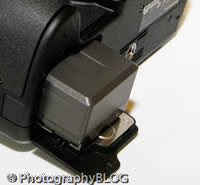 |
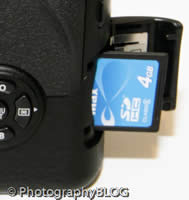
| Memory Card Slot | Battery Compartment |
The main menu system on the Panasonic Lumix DMC-L10 is straight-forward to use and is accessed by pressing the Menu/Set button in the middle of the navigation pad. There are four main menus, Record, Setup, Custom and Play. Most of the camera's main options, such as white balance, image quality, auto-focus mode and ISO speed, are accessed here, so the Record menu has 17 options spread over 4 screens, the Setup menu also has 17 options, the Custom menu 14 and the Play menu 9. Due to the large LCD screen and restricting the number of on-screen choices to five, the various options and icons are clear and legible. If you have never used a digital camera before, or you're upgrading from a more basic model, reading the easy-to-follow manual before you start is a good idea. Thankfully Panasonic have chosen to supply it in printed format, rather than as a PDF on a CD, so you can also carry it with you.
The start-up time from turning the Panasonic Lumix DMC-L10 on to being ready to take a photo is quick at around 1/2 second (double that time in Live View mode). Focusing is dependably quick in good light in either Live View mode or using the optical viewfinder, and the camera achieves focus most of the time indoors or in low-light situations, helped by the focus-assist lamp (available in Live View only). The camera doesn't have any problems locking onto the subject in low-light situations. The visibility and refresh rate of the 2.5 inch LCD screen are perfectly acceptable, and the pixel count of 207,000 is fine too, with just a little visible grain. It takes less than a second to store a JPEG image, allowing you to keep shooting as they are being recorded onto the memory card, with a brief LCD blackout between each image. In RAW mode the image is stored in 2 seconds, again with the same brief LCD blackout. The Panasonic Lumix DMC-L10 has a pretty standard Burst mode which enables you to take 3 frames per second for an unlimited number of images at the highest JPEG image quality, but only up to 3 images in RAW mode (these speeds are also the same in Live View mode). Overall the Panasonic Lumix DMC-L10 is quite responsive in terms of operational speed.
Once you have captured a photo, the Panasonic Lumix DMC-L10 has a good range of options when it comes to playing, reviewing and managing your images. You can instantly scroll through the images that you have taken, view thumbnails, zoom in and out up to 16x magnification, view slideshows, delete, protect, trim, resize, and rotate an image. You can also select favourite images, set the print order, change the aspect, and view a Calendar mode. The Display button toggles between a simple and detailed settings information screen about each picture, plus there's an RGBY histogram, with a small brightness histogram available during shooting. When taking a photo, pressing the Display button toggles between the detailed information, the histogram and gridlines to aid composition.
In summary, the Panasonic Lumix DMC-L10 is a DSLR camera that successfully takes many of the features from compact digicams like the DMC-FZ50 and creates a usable, responsive and radically different shooting experience.
|
 PhotographyBLOG
is a member of the DIWA
organisation. Our test results for the Panasonic Lumix DMC-L10 have
been submitted to DIWA
for comparison with test results for different samples of
the same camera model supplied by other DIWA
member sites.
PhotographyBLOG
is a member of the DIWA
organisation. Our test results for the Panasonic Lumix DMC-L10 have
been submitted to DIWA
for comparison with test results for different samples of
the same camera model supplied by other DIWA
member sites.