
Pentax K10D Review
Review Date: April 24th 2007
Leave a comment about this Review
|
Introduction
Compare Prices
Support PhotographyBLOG: Buy the Pentax K10D from one of our affiliate retailers:Ease of Use
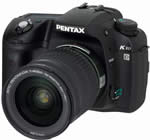
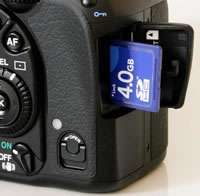
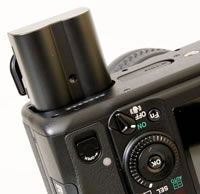
When you first take the Pentax K10D out of its box, you can instantly tell that this is a serious camera. Weighing over 700g and measuring 101(H) x 141(W) x 70(D), this is a large and heavy DSLR, even without the lens fitted. The K10D has a reassuringly solid feel that belies its mid-range price-tag, with an all-metal body and extremely angular, sculpted hand-grip. It's a world away from the much smaller, entry-level Pentax cameras, signifying the company's attempt to provide a DSLR camera for more experienced photographers. The K10D is definitely designed for "normal" hands, departing from the recent trend of ultra-compact models. As already mentioned, the Pentax K10D is dust and water resistant, thanks to a system of seals used throughout the design. This shows itself externally via the battery and memory card compartments, which are both opened by small rotating latches. They are a little fiddly to use if you're in a hurry though. Less impressive is the standard 18-55mm kit lens, which has an all-plastic construction that just feels out of place mounted on the K10D. It's also a slow lens at both ends of the focal length (f3.5-5.6), so I'd suggest that you buy the K10D with the more expensive 16-45mm f/4 lens. Overall the K10D is an impressively solid camera that should withstand years of use.
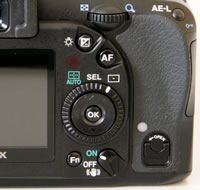
As it's aimed at the more experienced digital SLR owner, the K10D is a complex camera in terms of functionality and the number of external controls that it offers, with around 22 in total and some of them having more than one function. Despite the presence of so many buttons and switches, the Pentax K10D doesn't feel overly cluttered or intimidating and it quickly becomes second-nature to use. The K10D is very comfortable in terms of handling. The camera has a deep, contoured handgrip on the right-hand side, coated in a rubberized compound to aid grip, that enabled me to use three fingers to hold it and my right forefinger to operate the shutter button. There is a generous contoured area where your right thumb sits, with the rest of the body finished in a textured matt black plastic. The shutter release action on the Pentax K10D is quite loud and mechanical, something that you will either love or hate. I liked it, although it isn't great for close-up candid photography as your subject will probably hear you if you get too close.
 |
 |
| Mode Dial | Rear Controls |
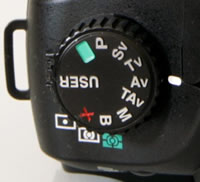
The Pentax K10D follows conventional DSLR design in having a shooting mode dial on the top-left of the camera, which allows you to select either one of the advanced mode like Aperture-priority, Shutter-Priority and Manual, or the more point-and-shoot Auto and Program modes. There are no scene modes on this camera, signaling its intent as a serious photographic tool. You'll instantly notice that the K10D has a couple of unusual shooting modes that you won't have seen before on any other camera. These are the Sensitivity-Priority and Shutter & Aperture-Priority modes, and they are genuinely useful additions that I hope will find their way onto more cameras. Sensitivity-Priority automatically selects the best combination of aperture and shutter speed for your chosen ISO speed. The sensitivity can be shifted instantly (in 1/2 or 1/3 steps) by turning the electronic dial. This allows you to quickly select an ISO speed, without having to access the menu system, which is very useful in rapidly changing light conditions. In Shutter & Aperture-Priority mode the camera selects the most appropriate ISO speed for a shutter speed and aperture combination, allowing you to use ISO sensitivity as a third factor in determining the correct exposure. As digital cameras have always offered the unique ability to instantly change the sensitivity, it's surprising that Pentax are the first manufacturer to allow you to use ISO in this way.
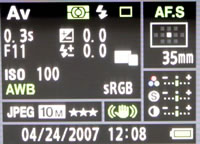
On the right hand side of the top of the camera is the shutter button, on/off button and a rather innocuous looking button with a small green dot. Again, this is something unique to the K10D. The green button has two uses. Firstly, when shooting in the fully Manual mode, a single push of the green button allows you to instantly set the correct exposure for the subject, as calculated by the camera, useful if you need a starting point for your own exposure. Secondly, the K10D offers a Hyper Program function which instantly switches to either the Shutter-Priority or Aperture-Priority mode from the Program mode, simply by turning either of the electronic dials on the grip. Pressing the Green button then returns to the Program mode. Pentax have also retained the traditional top LCD panel which displays some information about the current camera settings. The LCD panel displays quite a comprehensive amount of information, including the shooting mode, current aperture or shutter speed, flash mode, battery level, number of remaining frames and drive mode. An even greater number of settings are displayed in the viewfinder. In addition, when you turn the camera on or change the shooting mode, a summary is briefly displayed on the main LCD screen. You can also press the Info button on the rear of the camera at any time to show virtually all of the K10D's current settings. The Pentax K10D does a very good job of providing easily understood information about the settings that it is using.
 |
 |
| Info Screen | Menu System |
There is an innovative feature on the Pentax K10D that aims to make life easier for you. This camera is the first Pentax DSLR to offer a Shake Reduction system. Turn it on via the switch on the rear of the camera and the K10D automatically compensates for camera shake, which is a slight blurring of the image that typically occurs at slow shutter speeds. In practice I found that it does make a noticeable difference, as shown in the examples on the Image Quality page. You don't notice that the camera is actually doing anything different when Shake Reduction is turned on, just that you can use slower shutter speeds than normal and still take sharp photos. Thankfully leaving the anti-shake system on didn't negatively affect the battery-life, with the camera managing over 300 shots using the supplied rechargeable Li-ion battery. The K10D also displays a blur icon in the viewfinder to warn you that camera-shake may occur, regardless of whether or not Shake Reduction is on.
There are a few more nice touches on the K10D that are worthy of mention. There's a RAW button on the front-left of the camera body, which instantly sets the image quality to whichever RAW format is selected in the menu system, useful if you are shooting in JPEG and want to quickly switch to RAW mode for a particular image. On the back of the camera is a button labelled AF, which functions in exactly the same way as half-pressing the shutter button - it locks the focus on the subject. I found that the K10D's shutter button was a little too responsive, often firing the shutter when I was just trying to half-press it, so you may find that you use the AF button more than you think. Finally around the shutter button is a dial with 3 settings, Off, On and Depth of Field Preview, which works in the traditional way by stopping down the aperture and therefore dimming the viewfinder. Interestingly this can be configured to instead show a digital preview of the scene on the camera's LCD screen.
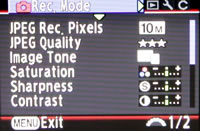
An aspect of the camera that I am slightly less enthusiastic is the menu system. Pentax have split the various menu settings into two, accessed by separate buttons on the rear of the camera. The Fn button allows you to set white balance, drive mode, ISO speed and the flash mode. This grouping of a few features has allowed the Pentax designers to keep the body as uncluttered as possible, but at the same time key controls like the ISO speed are a two-step process to access (a button press and a menu selection), rather than one as on many DSLRs, although this can be avoided by using the Sensitivity-Priority mode for setting the ISO speed. The Menu button then accesses all of the other menu options that the camera offers. With this being a fairly complex DSLR there are a lot of them - I counted over 65 different options in total. Thankfully you will only have to set about half of the settings once and can then forget about them. I would personally prefer to see all the menu options consolidated in one place, so that I don't have to remember which specific option is in which of the two menus. Otherwise the menu system has a logical tabbed system and is easily readable, with a bright display and a large font size making it perfectly readable even in low light.
 |
 |
| Memory Card Slot | Battery Compartment |
The start-up time of the Pentax K10D, from turning the camera on to being ready to take a photo, is very quick for at around 1 second. Focusing is also quite quick and consistent in good light with the standard 18-55mm kit lens, with the new 11 point AF system offering fairly generous scene coverage, and the camera happily achieves focus indoors and in low-light situations. Note that the 18-55mm lens has an annoyingly loud focusing mechanism though, and the powerful AF Assist lamp can only be used if the built-in flash is raised. The large 2.5 inch LCD screen is bright, clear and has a perfectly acceptable refresh rate and pixel count. It takes about 2 seconds to store a JPEG image at the highest quality setting with no discernible lockup between taking shots, allowing you to keep shooting as they are being recorded onto the memory card. For RAW images the Pentax K10D takes about 8 seconds to store an image and again there is no lockup between shots until the buffer of 8 images is reached. At this point you can still see through the viewfinder but you can't fire the shutter again until the buffer has cleared, which doesn't take very long at all. In the continuous shooting mode you can hold down the shutter button and take around 3 shots per second for an unlimited amount of JPEGS, 10 RAW files, or 6 RAW+JPEG files. An impressive performance given the large 10 megapixel files that this camera produces.
Once you have captured a photo, the Pentax K10D has an above average range of options for playing, reviewing and managing your images. You can instantly scroll through the images that you have taken, view thumbnails, zoom in and out up to a magnification of 20x, and see very detailed information about each image by pressing the Info button. You can also delete an image, rotate an image, view a slideshow, lock images so that they cannot be deleted, and set various printing options. There are also a few digital effects available which can be applied to JPEGs - Black and White, Colour, Brightness, Sepia, Soft and Slim, which effectively resizes an image. The camera shows you a preview of what the effect will look like when applied, and the effect is applied to a copy of your image, thus preserving the original intact. Importantly the Pentax K10D offers a histogram after taking a photo which is a great help in evaluating the exposure, plus any areas that are over-exposed flash on and off in the LCD preview to show you want you should be compensating for with your next attempt. If you have never used a digital camera before, or you're upgrading from a more basic model, reading the comprehensive but relatively easy-to-follow manual before you start is a good idea. Thankfully Pentax have chosen to supply it in printed format, rather than as a PDF on a CD, so you can also carry it with you.
In summary the Pentax K10D is extremely well-built, complex but intuitive DSLR, with no corners being cut despite the relatively low price-point. There are lots of nice touches which show that the Pentax designers have put a lot of thought into how the camera will be used, and the camera is very responsive.
|
 PhotographyBLOG
is a member of the DIWA
organisation. Our test results for the Pentax K10D have been submitted to DIWA
for comparison with test results for different samples of
the same camera model supplied by other DIWA
member sites.
PhotographyBLOG
is a member of the DIWA
organisation. Our test results for the Pentax K10D have been submitted to DIWA
for comparison with test results for different samples of
the same camera model supplied by other DIWA
member sites.