
Ricoh R8 Review
Review Date: March 13th 2008
Author: Mark Goldstein
Leave a comment about this Review
|
Introduction
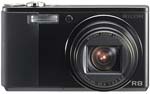
The Ricoh R8 is the latest version in Ricoh's regularly updated series of 7x zoom digital cameras. Offering the same versatile 28-200mm focal length as its predecessor, the most significant change to the new R8 is the increase from 8 to 10 megapixels. Other important new features include a large 2.7-inch, 460,000-pixel HVGA LCD, 1:1 aspect square format function, a minimum aperture function which increases the depth of field, and a complete external redesign with a much more "retro" look. The Ricoh R8 retains the same Smooth Imaging Engine III image processing engine, CCD-shift vibration correction, face recognition and 1cm macro mode as the previous R7 model. So is the Ricoh R8 worth considering if you're looking for a point and shoot digicam, and is it any better than the 6-month old R7? Mark Goldstein found out...
Compare Prices
Support PhotographyBLOG: Buy the Ricoh R8 from one of our affiliate retailers:Ease of Use
The Ricoh R8 is very slightly bigger and heavier than the older R7 model, measuring 102(W) x 58.3 (H) x 22.6mm (D) and weighing 168g with the battery and wrist-strap fitted, but it's still a very compact digital camera that easily fits in the palm of your hand - you certainly won't notice carrying in a trouser/shirt pocket or a handbag. The R8 is available in either all-silver or an attractive black and silver two-tone - Ricoh provided the latter for our review. Ricoh have completely overhauled the external design of the R8, giving it a pleasingly retro look that will appeal to fans of compact Contax film cameras, for example. It still has a rather under-stated look, but in my opinion is much more attractive and a lot more practical than previous R-series designs. The strange gradual 15 degree bend in the body of the Caplio R7 has gone, replaced with a simpler, squarer design, and the even stranger metal band which ran around the edge of the camera has also been consigned to the scrap-heap. In an attempt to emphasize just how serious they are, Ricoh have dropped the "Caplio" branding to bring the R8 more in line with the professional GR and GX model cameras. As soon as you pick it up, the Ricoh R8 feels more solidly made, refined and purposeful when compared to it's predecessors.
Despite all the external design changes, the Ricoh R8 retains its 28-200mm zoom range, still a truly amazing feat of engineering in such a small camera. When the lens is fully extended, the camera measures over 7cm in depth, but thankfully it retracts fully back into the body when it is turned off. The 28-200mm range is incredibly versatile, covering everything from wide-angle landscapes to close-up action photos. Ricoh were the first manufacturer to include a 7x zoom lens in a compact camera, and even though most of the other competitors now offer similarly-specced models, the R8 is still one of the most compact designs on offer. The new rubberized hand-grip makes it much easier to hand-hold the Ricoh R8 and get sharp results at the telephoto end of the zoom range.
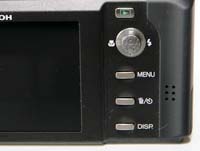
Ricoh have also greatly simplified the rear of the R8, with just 9 external controls in total, leaving plenty of room for the large 2.7 inch LCD screen that dominates the back of the camera. The awkward Mode switch that sat above the R7's LCD screen has been replaced with a much better, DSLR-like dial on top of the camera. You can now select from the Camera, Movie and Scene options, plus two new settings called MY1 and MY2, which allow you to configure the R8 for different uses and allows quick access to each configuration (the camera remembers the settings when it's turned off). The functionality of the Adjust button, or more accurately the Adjust four-way joystick, has been greatly expanded. It still allows you to quickly adjust 3 different settings that are commonly used. Press it to alter Exposure Compensation, White Balance and ISO Speed. Even better, the Adj. menu is customisable - you can add another setting to it and also choose what all four settings do, allowing you to control exactly what you want quick access to. Ricoh have also integrated some of the settings that were controlled with a separate navigation pad on the R7 (which has now disappeared completely) into the Adjust button. It now doubles up as the OK button to select options and it also sets the Macro and Flash options - there's a completely new button underneath to access the Main menu system. In theory it sounds like a recipe for disaster, but in practice it works well, allowing quick access to most of the major functions of the camera.
 |
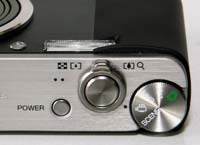 |
| Rear Controls | Top Controls |
The Ricoh R8 is a point and shoot camera with no advanced exposure controls - Ricoh don't want the R8 to steal market-share from their more professional and more expensive cameras. Having said that, the R8 does have a few notable tricks up its sleeve. The improved AF/AE Target Selection mode allows you to shift the target for both auto focus and automatic exposure without having to move the camera, useful for tripod-mounted macro subjects, but now also available in any shooting mode. The new [F1:1] Picture Size, as previously seen on the GX100 and GR Digital II cameras, allows you to record your photos in square format (7 megapixels), similar to some medium format cameras, offering a new perspective on the world. Finally, the Fix minimum aperture function forces the camera to shoot at the smallest aperture available, which gives a greater depth of field in the resulting photograph.
There is one innovative feature on the Ricoh R8 that aims to make life easier for you. This camera has an anti-shake system called Camera Shake Correction - turn it on in the Main menu and the Ricoh R8 automatically compensates for camera shake, which is a slight blurring of the image that typically occurs at slow shutter speeds. You don't notice that the camera is actually doing anything different when anti-shake is turned on, just that you can use slower shutter speeds than normal and still take sharp photos. Ricoh seem to have realised the importance of this system, as it is turned on by default, and thankfully leaving the anti-shake system on didn't negatively affect the battery-life, with the camera managing over 275 shots before the battery needed to be recharged (note that the number of shots is slightly lower than the R7 model).
The face recognition feature offered by the Ricoh R8 didn't make a great deal of difference if I'm being honest, as there's the tendency of the user to pre-focus on the subject � and obviously a face if taking a portrait � before fully pressing the shutter button anyway. It's a pretty simple system recognising a maximum of just 4 faces, and Ricoh have also chosen to make it a specific scene mode, rather than a general setting that applies to whichever shooting mode is currently selected, which rather limits its usefulness. Face recognition does work if the subjects are looking directly at the camera, but the R8 takes a while to lock onto the subject, and I think that the tried and trusted method of half-pressing the shutter button to focus and then recomposing the shot is a quicker and more reliable method.
The main menu system on the Ricoh R8 is straight-forward to use and is accessed by pressing the Menu button on the rear of the camera. There are two main menus, Shooting and Setup, and Ricoh have given the menu system a cosmetic makeover, making it slightly easier to use than previous models. Quite a lot of the camera's main options, such as image size, sharpness, metering mode and continuous mode, are accessed here, so the Shooting menu has 18 options spread over 3 screens, and there are 16 options in the Setup menu. Due to the large LCD screen and restricting the number of on-screen choices to 6, the various options and icons are clear and legible.
 |
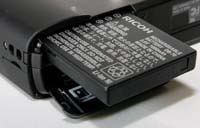 |
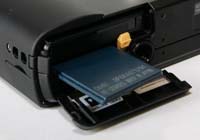
| Memory Card Slot | Battery Compartment |
If you have never used a digital camera before, or you're upgrading from a more basic model, reading the comprehensive and easy-to-follow manual before you start is a must. Thankfully Ricoh have chosen to supply it in printed format, rather than as a PDF on a CD, so you can also carry it with you. The large, wide-angle 2.7 inch LCD screen is the only way of framing your shots, so if you have to have an optical viewfinder, look elsewhere now. Ricoh have doubled the resolution of the LCD screen on the R8, which now has an impressive 460,000 pixels, making it one of the best-specced LCDs at this price-point. Consequently the various icons used to represent the camera settings are very clear and legible.
Ricoh are well known for delivering responsive cameras, and the R8 certainly continues that tradition. The start-up time from turning the Ricoh R8 on to being ready to take a photo is very quick at around 0.5 second, and it only takes just over 1 second to zoom from the widest focal length to the longest, impressive given the focal range. Focusing is very quick in good light and the camera happily achieves focus most of the time indoors or in low-light situations. Note that the camera does struggle to lock onto the subject sometimes at the tele-photo end of the lens. The visibility and refresh rate of the new 2.7 inch LCD screen are very good. It takes about 0.5 second to store a JPEG image, allowing you to keep shooting as they are being recorded onto the memory card - there is no LCD blackout between each image. In the fastest Continuous mode the camera takes 2.5 frames per second for an unlimited number of images at the highest JPEG image quality, which is good for this class of camera. Overall the Ricoh R8 is extremely quick in terms of operational speed.
Once you have captured a photo, the Ricoh R8 has an above average range of options when it comes to playing, reviewing and managing your images. You can instantly scroll through the images that you have taken, view thumbnails (20 onscreen at once), zoom in and out up to 16x magnification, view slideshows with audio, set the print order, delete, trim, rotate, protect and resize an image. There's also a Recover File option which will rescue deleted images, just so long as you don't turn the camera off first. Level Compensation allows you to correct the contrast and tone of an image after it has been taken, and White Balance Compensation the white balance. The Skew Correction function alters any photo that was taken at an angle so it appears as if it were taken directly in front of you. The Display button toggles detailed settings information about each picture on and off, such as the ISO rating and aperture / shutter speed, and there is a small histogram available during both shooting and playback. The White Saturation display mode during image playback indicates over-exposed highlights by flashing those areas on and off. When taking a photo, pressing the Display button toggles between the detailed information, the histogram and gridlines to aid composition.
Ricoh have gone back to the drawing board and come up with a camera that improves on an already easy-to-use design. The Ricoh R8 has a lot of subtle new features that collectively add a great deal, making this the most intuitive R-series camera yet.
|
 PhotographyBLOG
is a member of the DIWA
organisation. Our test results for the Ricoh R8 have been submitted to DIWA
for comparison with test results for different samples of
the same camera model supplied by other DIWA
member sites.
PhotographyBLOG
is a member of the DIWA
organisation. Our test results for the Ricoh R8 have been submitted to DIWA
for comparison with test results for different samples of
the same camera model supplied by other DIWA
member sites.