
Samsung GX-20 Review
Review Date: July 24th 2008
Author: Mark Goldstein
Leave a comment about this Review
|
Introduction
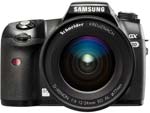
The Samsung GX-20 is a 14.6 megapixel, mid-range DSLR camera, which temporarily led the megapixel race when it was first announced back in January. Since then Sony have also unveiled a 14 megapixel camera, the A350, so Samsung no longer have everything to themselves in terms of headline resolution. The original GX-10 model offered a compelling mix of innovative features and excellent image quality, and the new GX-20 adds a number of subtle refinements that expand on this winning blueprint. In addition to more megapixels, the GX-20 features a larger 2.7 inch LCD monitor, Live View mode for composing pictures using the LCD screen, expanded ISO range of 100-6400, Dust Alert System and an X-sync socket for studio flash systems. The Samsung GX-20 retains the core fundamentals of its predecessor - a Shake Reduction system built into the dust-proof, water-resistant camera body, Dust Removal to prevent dust from sticking to the CMOS sensor, innovative Sensitivity-Priority and Shutter & Aperture-Priority modes, 11-point wide-frame AF, and support for the Adobe DNG RAW format. No review of the GX-20 can fail to mention this camera's similarity to the Pentax K20D, which is essentially the same camera, with both models born out of a close relationship between the two companies. There are a few cosmetic differences (detailed below), but the main one, depending on where you live, is price. In the UK, the official cost of the GX20 with kit lens is �750, just �10 less than the K20D at �760. Both companies have also recently launched �100 off cashback offers. In the US, it's a slightly different story, with the GX-20 $100 more expensive than the K20D at $1399.
Ease of Use
The Samsung GX-20 is virtually identical to the Pentax K20D in terms of its design, so a lot of the comments that we made in our review of that camera will be repeated here. The main differences when comparing the GX20 to the K20D are found in the menu system, which has a revised layout, and external controls, with some buttons being square rather than round. Surprisingly, the expanded dynamic range function from the K20D isn't featured at all on the GX-20. The GX-20 also only supports the DNG RAW format (the Pentax K20D additionally offers Pentax's own PEF format), and the supplied software is Raw Converter 2.0 rather than Photo Laboratory 3 (although both are based on Silkypix Developer Studio). Note that Samsung don't currently offer an equivalent to Pentax's Remote Assistant 3 software application, which allows for tethered shooting with the K10D/K20D. Other than those subtle differences, the two cameras are essentially the same.
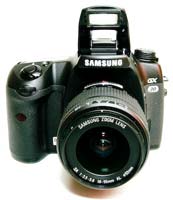
When you first take the Samsung GX-20 out of its box, you can instantly tell that this is a serious camera. Weighing over 700g and measuring 101(H) x 142(W) x 71.5(D), this is a large and heavy DSLR, even without the lens fitted. The GX-20 has a reassuringly solid feel that belies its mid-range price-tag, with an all-metal body and extremely angular, sculpted hand-grip. It's a world away from the much smaller, entry-level Samsung cameras, signifying the company's attempt to provide a DSLR camera for more experienced photographers.
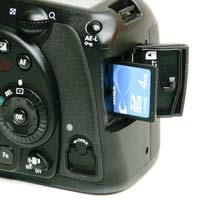
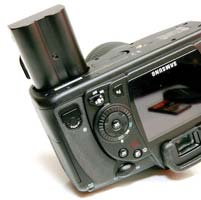
The GX-20 is definitely designed for "normal" hands, departing from the recent trend of ultra-compact models. The Samsung GX-20 is dust and water resistant, thanks to a system of seals used throughout the design. This shows itself externally via the battery and memory card compartments, which are both opened by small rotating latches. They are a little fiddly to use if you're in a hurry though. Less impressive is the standard 18-55mm kit lens, which has also been updated to a Mark II version to cope with the extra resolution of the 14.6 megapixel sensor. This lens has an all-plastic construction that just feels out of place mounted on the GX-20. It's also a slow lens at both ends of the focal length (f3.5-5.6), so I'd suggest that you buy the GX-20 with the more expensive 16-45mm f/4 lens. Overall the GX-20 is an impressively solid camera that should withstand years of use.
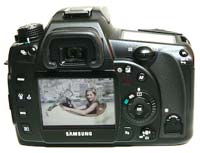
As it's aimed at the more experienced digital SLR owner, the GX-20 is a complex camera in terms of functionality and the number of external controls that it offers, with around 22 in total and some of them having more than one function. Despite the presence of so many buttons and switches, the Samsung GX-20 doesn't feel overly cluttered or intimidating and it quickly becomes second-nature to use. The GX-20 is very comfortable in terms of handling. The camera has a deep, contoured handgrip on the right-hand side, coated in a rubberized compound to aid grip, that enabled me to use three fingers to hold it and my right forefinger to operate the shutter button. There is a generous contoured area where your right thumb sits, with the rest of the body finished in a textured matt black. The shutter release action on the Samsung GX-20 is quite loud and mechanical, something that you will either love or hate. I liked it, although it isn't great for close-up candid photography as your subject will probably hear you if you get too close.
The Samsung GX-20 follows conventional DSLR design in having a shooting mode dial on the top-left of the camera, which allows you to select either one of the advanced mode like Aperture-priority, Shutter-Priority and Manual, or the more point-and-shoot Auto and Program modes. There are no scene modes on this camera, signaling its intent as a serious photographic tool. You'll instantly notice that the GX-20 has a couple of unusual shooting modes that you won't have seen before on any other camera (apart from the older GX10 and the Pentax K10D/K20D). These are the Sensitivity-Priority and Shutter & Aperture-Priority modes, and they are genuinely useful additions.
Sensitivity-Priority automatically selects the best combination of aperture and shutter speed for your chosen ISO speed. The sensitivity can be shifted instantly (in 1/2 or 1/3 steps) by turning the rear control dial. This allows you to quickly select an ISO speed, without having to access the menu system, which is very useful in rapidly changing light conditions. In Shutter & Aperture-Priority mode the camera selects the most appropriate ISO speed for a shutter speed and aperture combination, allowing you to use ISO sensitivity as a third factor in determining the correct exposure. As digital cameras have always offered the unique ability to instantly change the sensitivity, it's surprising that Samsung and Pentax are still the only manufacturers to allow you to use ISO in this way.
 |
 |
| Front | Rear |
On the right hand side of the top of the GX-20 is the shutter button, on/off button and a rather innocuous looking button with a small green dot. Again, this is something unique to the GX-20. The green button has two uses. Firstly, when shooting in Manual mode, a single push of the green button allows you to instantly set the correct exposure for the subject, as calculated by the camera, useful if you need a starting point for your own exposure. Secondly, the GX-20 offers a Hyper Program function which instantly switches to either the Shutter-Priority or Aperture-Priority mode from the Program mode, simply by turning either of the control dials on the grip. Pressing the Green button then returns to the Program mode.
The Off/On switch around the shutter button has a third setting, which by default activates the traditional Depth of Field Preview function, stopping down the lens so that you can see the effect of your chosen aperture. Using the Preview Method custom setting, the behaviour of this switch can be set to either Liveview, Optical (Samsung's name for Depth of Field Preview), Manual WB or Digital. The latter function, which takes a picture, displays a preview on the LCD screen and then optionally allows you to save it, was also featured on the GX10. You can use the Digital preview to check the effects of altering the white balance - simply select Digital, choose White Balance from the Function menu, then scroll through the options to see how they affect the image shown on the LCD screen. It's a very intuitive way of finding the right white balance for the scene that you're shooting.
Live View is a brand new addition to the GX-20, but unfortunately it's not been particularly well-implemented. You can use it to hold the GX-20 at arm's length or mount the camera on a tripod, with the current scene displayed on the LCD screen. Focusing is achieved by pressing the AF button on the rear of the camera, rather than half-pressing the shutter-button, and you have to press the AF button every time you recompose the picture. At that point the mirror moves and the LCD screen blanks out momentarily, before the newly refocused scene is shown, making it nigh on impossible to use Live View for tracking a moving subject. You can also use manual focus in Live View mode, with 4x or 8x magnification available via the rear control dial to help you fine-tune the focus. During Live View the GX-20 makes an audible "whirring" noise, the only information shown on the LCD is gridlines and the autofocus points, with no visual feedback on the camera's settings or a live histogram. Even worse, you can't actually change the aperture, shutter speed, exposure compensation or ISO speed when Live View is activated, which means that it's essentially just a glorified version of the Digital Preview option.
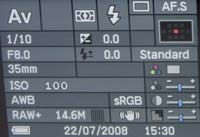
Samsung have retained the traditional top LCD panel which displays some information about the current camera settings. The LCD panel displays quite a comprehensive amount of information, including the shooting mode, current aperture or shutter speed, flash mode, battery level, number of remaining frames and drive mode. An even greater number of settings are displayed in the viewfinder. In addition, when you turn the GX-20 on or change the shooting mode, a summary is briefly displayed on the main LCD screen. You can also press the Info button on the rear of the camera at any time to show virtually all of the camera's current settings. The Samsung GX-20 does a very good job of providing easily understood information about the settings that it's using.
The Samsung GX-20 features an improved Shake Reduction system. Turn it on via the switch on the rear of the camera and the GX-20 automatically compensates for camera shake, which is a slight blurring of the image that typically occurs at slow shutter speeds. In practice I found that it does make a noticeable difference, as shown in the examples on the Image Quality page. You don't notice that the camera is actually doing anything different when Shake Reduction is turned on, just that you can use slower shutter speeds than normal and still take sharp photos. Thankfully leaving the anti-shake system on didn't negatively affect the battery-life, with the camera managing over 500 shots using the supplied rechargeable Li-ion battery, a significant improvement on the older GX10. The GX-20 also displays a blur icon in the viewfinder to warn you that camera-shake may occur, regardless of whether or not Shake Reduction is on.
 |
 |
| Info Screen | Menu System |
There are a few more nice touches on the GX-20 that are worthy of mention. There's a RAW button on the front-left of the camera body, which instantly sets the image quality to the DNG RAW format, useful if you are shooting in JPEG and want to quickly switch to RAW mode for a particular image. On the back of the camera is a button labeled AF, which functions in exactly the same way as half-pressing the shutter button - it locks the focus on the subject. Samsung have improved the sensitivity of the shutter button - it was too responsive on the GX10, often firing the shutter when I was just trying to half-press it. You can now more confidently half-press it without taking an unwanted photo, although it's still a little over-sensitive, especially when wearing gloves.
If you've had a bad experience with DSLRs and dust in the past, then the GX-20 has a neat feature called Dust Alert which is designed to show exactly where the dust is on the image sensor. A vertically and laterally correct image of the sensor shot at f/16 is shown on the LCD screen, indicate exactly where any stubborn dust particles may be lurking. While this feature won't prevent dust from getting onto the sensor, it does provide a quick and easy way of checking for it. In addition Dust Removal can be set to activate whenever the camera is turned on, and you can also use the built-in Sensor Cleaning function to lift the mirror and clean the image sensor with a blower brush or third-party cleaning solution.
The final feature well worth mentioning here is the rather innocuous-sounding AF Fine Adjustment option in the Setup menu. If you have a collection of older Samsung or Pentax lenses and you've never been quite sure how accurate they focus when mounted on a DSLR, this is the function for you. Essentially it allows you to alter the focus of each lens. You can use a focusing target to test if the lens focuses correctly, and if it doesn't alter it slightly using the AF Adjustment option, then test again until perfect focus is achieved. With all other DSLR systems you'd have to send the camera and lens off for calibration (and maybe even have to pay for it), but with the GX-20, you can calibrate all of your lenses in the comfort of your own home. This process is very well-documented on The Online Photographer website.
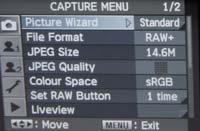
The menu system hasn't changed from the GX10, and its something which I'm still rather unenthusiastic about. Samsung have split the various menu settings into two, accessed by separate buttons on the rear of the camera. The Fn button allows you to set white balance, drive mode, ISO speed and the flash mode. This grouping of a few features has allowed the Samsung designers to keep the body as uncluttered as possible, but at the same time key controls like the white balance are a two-step process to access (a button press and a menu selection), rather than one as on many DSLRs. Thankfully the ISO speed can alternatively be set by holding down the OK button and using the front control dial, or by using the Sensitivity-Priority shooting mode.
The Menu button then accesses all of the other menu options that the camera offers. With this being a fairly complex DSLR there are a lot of them - I counted 76 different options in total. Thankfully you will only have to set about half of the settings once and can then forget about them. I would personally prefer to see all the menu options consolidated in one place, so that I don't have to remember which specific option is in which of the two menus. Otherwise the menu system has a logical tabbed system with five vertical tabs down the left-hand side of the screen, Capture, Custom1, Custom2, Setup and Playback, and it's easily readable, with a bright display and a large font size making it perfectly visible even in low light.
 |
 |
| Memory Card Slot | Battery Compartment |
The start-up time of the Samsung GX-20, from turning the camera on to being ready to take a photo, is very quick for at around 1 second. Focusing is also quite quick and consistent in good light with the standard 18-55mm kit lens, with the 11 point AF system offering fairly generous scene coverage, and the camera happily achieves focus indoors and in low-light situations. Note that the 18-55mm lens has an annoyingly loud focusing mechanism though, and the powerful AF Assist lamp can only be used if the built-in flash is raised. The large 2.7 inch LCD screen is bright, clear and has a perfectly acceptable refresh rate and pixel count.
Samsung have really improved the file write times of the GX-20. It takes about 1 second to store a JPEG image at the highest quality setting with no discernible lockup between taking shots, allowing you to keep shooting as they are being recorded onto the memory card. For RAW images the Samsung GX-20 takes about 2 seconds to store an image, a big improvement on the GX10, and there is no lockup between shots. In the continuous shooting mode you can hold down the shutter button and take around 3 shots per second for up to 38 JPEGS, 10 RAW files, or 6 RAW+JPEG files. A very impressive performance given the large 14 megapixel files that this camera produces.
Once you have captured a photo, the Samsung GX-20 has an above average range of options for playing, reviewing and managing your images. You can instantly scroll through the images that you have taken, view thumbnails, zoom in and out up to a magnification of 20x, and see very detailed information about each image by pressing the Info button. You can also delete an image, rotate an image, view a slideshow, lock images so that they cannot be deleted, and set various printing options. There are also an expanded range of digital effects available which can be applied to JPEGs - Black and White, Sepia, Color, Extract Color, Soft, Illustration, High Dynamic Range, Slim and Brightness. The camera shows you a preview of what the effect will look like when applied, and the effect is applied to a copy of your image, thus preserving the original intact.
Importantly the Samsung GX-20 offers a histogram after taking a photo which is a great help in evaluating the exposure, plus any areas that are over-exposed flash on and off in the LCD preview to show you want you should be compensating for with your next attempt. If you have never used a digital camera before, or you're upgrading from a more basic model, reading the comprehensive and easy-to-follow manual before you start is a good idea. Thankfully Samsung have chosen to supply it in printed format, rather than as a PDF on a CD, so you can also carry it with you.
In summary the Samsung GX-20 is very similar to the previous GX10 model - an extremely well-built, intuitive and responsive DSLR - with some thoughtful improvements that make an already excellent camera even better. The only notable fly in the ointment is the poorly-implemented Live View mode, which doesn't compare very well to the GX-20's competitors in terms of functionality or ease-of-use.
|
 PhotographyBLOG
is a member of the DIWA
organisation. Our test results for the Samsung GX-20 have been submitted to DIWA
for comparison with test results for different samples of
the same camera model supplied by other DIWA
member sites.
PhotographyBLOG
is a member of the DIWA
organisation. Our test results for the Samsung GX-20 have been submitted to DIWA
for comparison with test results for different samples of
the same camera model supplied by other DIWA
member sites.