
Samsung i7 Review
Review Date: July 26th 2007
Author: Mark Goldstein
Leave a comment about this Review
|
Introduction

The Samsung i7 is much more than just a simple point and shoot digital camera. The feature list is seemingly endless - 7.2 megapixel still camera, personal media player, music centre, camcorder, portable hard drive, text viewer and voice recorder - all in a compact and stylish black metal body. There's even a glorified travel guide in the form of the World Tour Guide, which provides images and explanations of famous attractions in 30 different countries! The Samsung i7 offers a very innovative way of accessing all of these options. The large 3 inch LCD screen actually rotates through 180 degrees, with different functionality available at each of the 0, 90 and 180 degree settings. The LCD is a touch-screen model, with virtually all of the device's options operated by interacting with the graphical user interface. On the camera side, standout features include Face Recognition AF & AE, ISO 1600 mode, 800�592 pixel MPEG-4 movies, 14 scene modes and a wide range of picture-editing effects. The Samsung i7 wants to be your all-singing, all-dancing multimedia centre, but should you replace all of your dedicated devices with the i7? Read our in-depth review to find out.
Ease of Use
Viewed from the front, the Samsung i7 looks like any other compact digital camera, albeit one with a stylish gloss black body and a non-extending zoom lens tucked away in the top-right corner. Turn the i7 around, though, and the heart of this camera is revealed - namely, the large 3 inch, rotating, touchscreen LCD. Pressing the Power button on with the LCD in its default position accesses the MP3 mode. Rotate the screen 90 degrees to the left, and the i7 turns into a portable media player. Rotate it another 90 degrees, and you reach the camera mode. It initially seems a little counter-intuitive that the default position at 0 degrees is not the camera mode - after all, the Samsung i7 is principally a still camera. And having to rotate the LCD through 180 degrees every time you want to use the i7 as a camera does slow the operation down. There are a couple of benefits to this approach though. Firstly the screen extends past the edge of the main camera body when it's in the 180 degree position, with a grip hidden by the LCD becoming available so that you can hold the camera steady. Secondly, you don't actually have to press the power button to turn the camera on - just rotate the screen. Finally, the crescent shaped set of 5 buttons that surround the right-hand side of the screen are revealed, along with a recessed area for your right thumb to rest. All very convenient and well thought-out.
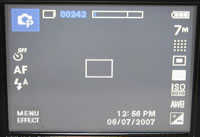
The Samsung i7 has just 8 external buttons, pretty amazing given the complexity of the device. Once you've rotated the LCD to choose a particular function, you then use the touchscreen interface to operate almost all of the device's options. It's vitally important that the i7 has an intuitive and responsive interface, and it certainly doesn't disappoint. Operating the camera with your thumb or forefinger might seem like a strange idea if you're accustomed to scrolling through screens and screens of traditional menu options, but you'll be hooked about 5 minutes after picking up the i7. In camera mode, all of the main options are displayed as on-sceen icons using industry standard symbols, with 4 vertical icons on the left of the screen and 7 on the right. You press an icon once, and the camera then shows a larger version of the same icon whilst removing the rest of the on-screen clutter. Press it again and the options for that particular function appear as a horizontal row of icons. A back arrow then returns you to the main shooting screen. The Menu/Effect icon opens a more traditional menu system. The user interface is very slick, actually speeding up the camera operation once you become accustomed to it (which doesn't take very long). A refreshing approach from Samsung that takes advantage of the large LCD screen and really benefits the user.
 |
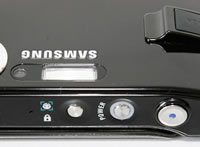 |
| Touchscreen Interface | Face Detection Button |
The touchscreen interface has the knock-on effect of keeping the Samsung i7 slim and free of too many external controls. The Samsung i7 is a compact and slim compact digital camera that easily fits into the palm of my average sized hands, measuring 100.5 (W) x 60.4 (H) x 22.2mm (D) and weighing around 180g. Like previous Samsung cameras that I've reviewed, specifically the premium NV series, the i7 is very well-constructed, with an all-metal body putting it up there with the best that the other manufacturers have to offer. It has an under-stated, all-black appearance which lends the camera a professional look and feel. My review sample did have a few areas where the black had come off to reveal s silver finish underneath, so it's probably a good idea to keep the i7 in a suitable case to protect it.
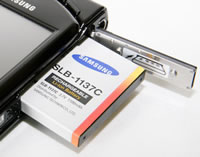
As the Samsung i7 is purely a point and shoot camera with no manual controls, and with the added benefit of the touchscreen interface, it's refreshingly simple in terms of its design. There are only 8 external controls in total, leaving more than enough room for the 3 inch LCD screen on the back of the camera. Along with the Power and Shutter Release buttons, there's a dedicated Face Detection button on top of the camera. With this Face Recognition AF & AE function, the Samsung i7 detects faces, automatically focuses on them and adjusts the brightness of the face area, useful in strong backlight conditions. This system worked quite well in practice, although it's not as quick as the traditional method of focusing on the subject by half-pressing the shutter button and then re-composing the scene as required. On the rear of the camera are 5 buttons - zoom out, zoom in, shooting mode, information and play. A headphone socket, metal tripod mount, battery/memory card compartment and USB/AV port complete the external controls.
 |
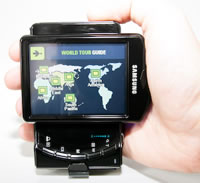 |
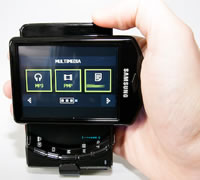
| PMP Menu | World Map Mode |
The Samsung i7 features an intriguing World Tour Guide feature, which provides images and explanations of famous attractions in 30 different countries. The various World Tour Guides are available as free downloads from Samsung Camera�s website (http://www.samsungcamera.com). The guides provide a brief and colourful introduction to the major cities of the world, and are really included to help show off the capabilities of the i7's screen and interface. The Samsung i7 has 450MB of internal memory to store the various World Tour Guides or your photos, enough space for around 100 images taken at the highest resolution.
If you have never used a digital camera before, or you're upgrading from a more basic model, reading the rather brief but easy-to-follow 120+ page manual before you start is a must. Thankfully Samsung have chosen to supply it in printed format, rather than as a PDF on a CD, so you can also carry it with you for easy reference in the field. The 3 inch, 230,000 pixel LCD screen is the only way of framing your shots, so look elsewhere if you also require an electronic or increasingly rare optical viewfinder. The various icons used to represent the camera settings are clear, legible and follow industry standards.
 |
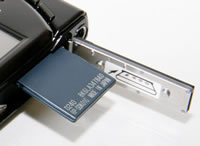 |
| Battery Compartment | Memory Card Slot |
The start-up time from turning the Samsung i7 on to being ready to take a photo is quick at around 2 seconds, but it does take a rather pedestrian 3 seconds to zoom from the widest focal length to the longest. Focusing is very quick in good light and the camera happily achieves focus most of the time indoors or in low-light situations. The visibility, refresh rate and pixel count of the 3 inch LCD screen are very good. It takes about 0.5 second to store a JPEG image, allowing you to keep shooting as they are being recorded onto the memory card - there is a very short LCD blackout between each image. In the Continuous shooting mode the camera takes 2 frames per second for an unlimited number of images at the highest JPEG image quality, which is good for this class of camera. Overall the Samsung i7 is quick in terms of operational speed.
Once you have captured a photo, the Samsung i7 has a good range of options when it comes to playing, reviewing and managing your images. You can instantly scroll through the images that you have taken, view 9 thumbnails, zoom in and out up to 12x magnification, view slideshows with audio, record voice memos, set the print order, delete, protect, rotate, trim and resize an image. The Information button toggles settings information about each picture on and off, such as the ISO rating and aperture / shutter speed, but there is no histogram available during either shooting or playback. A wide range of creative effects are available, including Highlight, Colour Effect, Composite, Cartoon, Sticker and Photo Frame. These effects can be applied to both pictures that have already been taken, and as you take a shot.
In summary the Samsung i7 is an effective combination of camera and multimedia device with an intuitive and responsive user interface.
|
 PhotographyBLOG
is a member of the DIWA
organisation. Our test results for the Samsung i7 have been submitted to DIWA
for comparison with test results for different samples of
the same camera model supplied by other DIWA
member sites.
PhotographyBLOG
is a member of the DIWA
organisation. Our test results for the Samsung i7 have been submitted to DIWA
for comparison with test results for different samples of
the same camera model supplied by other DIWA
member sites.