
Samsung NV20 Review
Review Date: October 15th 2007
Author: Mark Goldstein
Leave a comment about this Review
|
Introduction

The Samsung NV20 is the latest addition to Samsung's extensive range of compact digital cameras, slotting straight in at the top of the premium NV range. Offering 12.1 megapixels, a 3x zoom lens equivalent to 34-102mm, Advanced Shake Reduction mode and a 2.5 inch LCD screen, on paper the Samsung NV20 looks very similar to a number of other cameras on the market. It has a markedly different user interface to most digicams, however, employing a touch-sensitive smart button system to make its menu system more accessible. The Samsung NV20 offers 15 different scene modes inclduing the new Backlight mode which enables the camera to compensate for the brightness of a shadowed subject in backlit conditions. There's also a Manual mode for the more experienced photographer, the ISO range has been expanded to cover ISO 80-3200, and as with every other recent digital camera, there's a Face Detection mode to help you take better portrait shots. Part of Samsung's Lifestyle range, the NV20 is made from a stylish brushed black metal, is supplied with a docking cradle and has a built-in pop-up flash unit. Samsung have made a lot of headway recently in the digital compact market, so can the NV20 help them to cary on that growth? Mark Goldstein found out.
Compare Prices
Support PhotographyBLOG: Buy the Samsung NV20 from one of our affiliate retailers:Ease of Use
With an imposing black metal body and two mysterious rows of unlabelled buttons on the rear, the Samsung NV20 is a radical departure from the normal compact digital camera. 'NV' stands for New Voyage, and in terms of the look and feel of the NV20, Samsung have certainly delivered. Samsung have aggressively stated that they want to become one of the top 3 manufacturers of digital cameras by 2008 (not long to go now!), with the new NV series leading the charge. Positioned at the top of their Lifestyle range, Samsung's NV series represents a heavy investment in the company's future, and it's a world away from the cheap and cheerful non-descript cameras that the company used to sell.
Back to the NV20, from the front it looks like a stylish but fairly conventional digital camera. Look closely though, and you'll start to see why the NV20 represents a leap forward for Samsung. There's a distinctive blue ring around the NV20's 3x optical zoom lens (34-102mm), indicating that this is a quality Schneider optic, currently only found on the NV series. Samsung are trying to do something similar to Canon's red ring (used to denote their pro "L" series SLR lenses) and use the blue ring to denote their best quality digital camera products. There is a pop-up flash positioned above the lens, cleverly disguised by the Samsung logo. The small red LED just under the shutter button is actually a powerful focus assist lamp. And there's a minimal but effective vertical hand-grip which ensures that you can hold the camera securely.
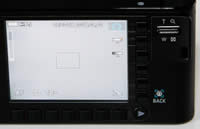
The top and bottom of the Samsung NV20 are more conventional. There's a Power button, tactile Shutter button and a conventional mode dial on the top for selecting the various shooting modes (more on these later). On the bottom are a centrally positioned metal tripod mount, docking port for the supplied camera cradle, and the battery/memory card compartment. The rear of the camera is where things really get interesting. There's a large 2.5 inch LCD screen surrounded by a vertical row of 6 square buttons on the right and 7 buttons on the bottom. Only one button is labeled, the Back / Face Detect button, and there's also a round Play button. The rocker-style zoom lever becomes the zoom button when viewing images that you have taken, whilst the metal camera strap eyelet cleverly doubles up as a convenient place to hold the camera with your right thumb. So what do those unlabelled buttons actually do? Samsung call them Smart buttons, briefly explaining in the User Guide that they are "used for shifting the menu cursor to select or for confirming the selected menu". Not the greatest of explanations, I'm sure you'll agree!
What Samsung have actually done is replace the conventional main menu system that most cameras have (usually accessed via the Menu button) with a context-sensitive system that is always shown on-screen. Depending on which shooting mode is currently selected, each button corresponds to a specific option, for example auto-focus mode, which is represented by an icon on the LCD screen. You simply press the corresponding vertical or horizontal button to display and select the sub-options for that function. You can also scroll through the options by simply moving your thumb up or down, left or right across the touch-sensitive buttons. Very cool, although perhaps not entirely necessary.
What's more important is that being able to see the entire menu system onscreen makes it much easier to understand and access. You no longer have to try and remember which menu a particular option is in. The downside is that the icons, although fairly small and unobtrusive, are displayed all the time, overlaid on top of the live image preview. If you find this really irritating, Samsung have provided a solution in the Setup menu. Simply change the OSD Set option to Hide, and the icons will disappear from the screen after 3 seconds of non-operation, and then instantly re-appear when you press any of the smart buttons again.
 |
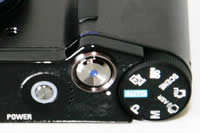 |
| Rear Controls | Main Menu |
Initially I found Samsung's touch sensitive smart button system to be more revolutionary than effective, but once I'd discovered the Hide option and used it for a while, it became a lot more intuitive, making the various menu options much more accessible and speeding up the operation of the camera. It's a very brave step by Samsung as it may put some buyers off (particularly as it takes some time to get used to), but on the whole it's also a great idea. There are a couple of points of weakness though. In some shooting modes there are simply more options that there are buttons. Samsung have addressed this by making the bottom-right button toggle between two rows of options. Press it once to display and choose the second row, press it again to return to the default row. It kind of works, but you do have to try and remember which options are in the second hidden row. More importantly, the touch-sensitive buttons aren't the most precise way to select the options which use on-screen sliders, such as Exposure Compensation and in particular Shutter Speed.
Overall the Samsung NV20 is superbly built, marking this out as a premium product. The metal body feels indestructible, everything is well-positioned, and all of the various controls are designed and finished to a high standard. Even the pop-up flash unit, usually something of a weak-point, has a positive action and fits well when it's not in use. The flash unit is well-positioned above the lens, helping to avoid the effects of red-eye, although I sometimes found that my left fore-finger got in the way of its operation. The Samsung NV20 is definitely a camera that you will want to show off to friends and family, and one which should survive more than a few bumps and scrapes.
There is one innovative feature on the Samsung NV20 that aims to make life easier for you. This camera has an anti-shake mode, dubbed ASR (Advanced Shake Reduction) - select it on the Mode dial and the Samsung NV20 automatically compensates for camera shake, which is a slight blurring of the image that typically occurs at slow shutter speeds. You don't notice that the camera is actually doing anything different when anti-shake is turned on, just that you can use slower shutter speeds than normal and still take sharp photos. This isn't an optical stabilisation system though - instead the camera automatically chooses a faster ISO speed to try and compensate for slow shutter speeds (and therefore avoid camera shake). It also seems to apply additional in-camera processing, as each image shot using this mode takes a few seconds to process and save. In practice, I found that the NV20 only ever increased the ISO to 200, even when the shutter speed was greater than 1 second, resulting in blurred results. If you are more experienced, you will know how and when to change the ISO speed yourself to compensate for poor lighting. The ASR mode also drastically reduces the menu options available to you. Therefore the Advanced Shake Reduction mode seems to be targeted more at beginners, and is only genuinely useful in certain situations.
The new face detection feature can detect up to nine different faces and automatically set the correct focus and exposure, plus remove any red-eye. In practice it won't make too much difference for the more experienced photographer, as there's the tendency to pre-focus on the subject � and obviously a face if taking a portrait � before fully pressing the shutter button. It will prove more useful for the novice point and shoot user though who just wants to take a good portrait shot without any bother. I didn't notice any notable difference between having the Face Detection settings on or off in terms of focusing speed, so I just set the camera to the latter.
There are a couple of options on the Mode Dial which are worthy of mention. The first one is the Special Effect mode, which as the name suggests allows you to apply three kinds of effect to your images as you take them. Photo Frame lets you add 9 types of frame-like borders to a photo, Motion GIF takes up to 50 photos and turns them into a single sequence of animated GIF images, and Composite Shooting enables you to combine 2, 3, or 4 different shots in a still image in different configurations. They are all a little bit novel rather than actually being useful, and you probably won't use them too much after you've tried them out a few times.
 |
 |
| Memory Card Slot | Battery Compartment |
Much more useful for photographers is the Manual mode, which gives you full control over both aperture and shutter speed. It's quite surprising to find this on what is predominantly a style-focused camera, but very welcome anyway. When you half-press the shutter button, the camera tells you how under- or over- exposed the resulting image will be based on the current shutter speed and aperture by showing the Exposure Compensation symbol and a plus or minus value, with values greater than +-2 shown in red. It's a simple system that works quite well, although there are a couple of notable drawbacks. Firstly, it's tricky to use the touch sensitive user interface to quickly and accurately select a shutter speed. More importantly, only two aperture values are available, for example f/2.8 and f/7.0 when the lens is set to wide-angle, which perhaps explains why there is no aperture-priority mode. This effectively restricts what you can do, but I'd still rather have a limited Manual mode than no Manual mode at all.
If you have never used a digital camera before, or you're upgrading from a more basic model, reading the easy-to-follow manual before you start is a good idea, although it's not exactly the most in-depth read. Thankfully Samsung have chosen to supply it in printed format, rather than as a PDF on a CD, so you can also carry it with you. The large 2.5 inch LCD screen is the only way of framing your shots, so if you have to have an optical viewfinder, look elsewhere now. Samsung have used a screen with a perfectly acceptable 230,000 pixels which is visible in all but the brightest sunlight. The various icons used to represent the camera settings are clear and legible, which is a good thing given the predominantly visual operation of the camera.
The start-up time from turning the Samsung NV20 on to being ready to take a photo is quick at less than 1 second, and it takes 1 second to zoom from the widest focal length to the longest. Focusing is quick in good light and the camera achieves focus most of the time indoors or in low-light situations. The visibility and refresh rate of the 2.5 inch LCD screen are good. It takes about 1 second to store a JPEG image, allowing you to keep shooting as they are being recorded onto the memory card - there is a very short LCD blackout between each image. In the fastest Continuous mode the camera takes 3 frames per second for just 3 frames, which is somewhat limiting. Thankfully the flash recycle time has been greatly improved - on the older NV10 model you had to wait for 4 seconds before you could take another flash photo, but now it's pretty much instantly available again. You still can't use flash at all in the continuous shooting modes though. Overall the Samsung NV20 is quite quick in terms of operational speed and a big improvement on the NV10.
Once you have captured a photo, the Samsung NV20 has a good range of options for playing, reviewing and managing your images. You can instantly scroll through the images that you have taken using the touch sensitive smart buttons, view thumbnails, zoom in and out up to 11x magnification. You can view slideshows with audio, set the print order, delete, protect, rotate, trim and resize an image. Different colour effects can be applied to an image and you make a motion GIF file from images that you have taken. You can capture still images from a movie clip and trim a movie to make it shorter. There's a Photo Gallery option on the Mode dial which allows you to organise images into preset albums, view by date and playback images in a slideshow with music and various effects. Note that there is no histogram available during either shooting or playback.
In summary the Samsung NV20 is a truly innovative, stylish and well-built digital camera that is on the whole easy to use. The new menu system does take a while to get used to and won't be to everyone's taste, but it does work surprisingly well in practice.
|
 PhotographyBLOG
is a member of the DIWA
organisation. Our test results for the Samsung NV20 have been submitted to DIWA
for comparison with test results for different samples of
the same camera model supplied by other DIWA
member sites.
PhotographyBLOG
is a member of the DIWA
organisation. Our test results for the Samsung NV20 have been submitted to DIWA
for comparison with test results for different samples of
the same camera model supplied by other DIWA
member sites.