
Sony Cyber-shot DSC-T100 Review
Review Date: May 21st 2007
Author: Gavin Stoker
Leave a comment about this Review
|
Introduction
Compare Prices
Support PhotographyBLOG: Buy the Sony Cyber-shot DSC-T100 from one of our affiliate retailers:Ease of Use
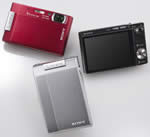
Sony must have hit on something with its T-series Cyber-shots, as both Casio (EX-V7) and HP (R837) have aped it considerably by in recent months introducing flat fronted cameras with internally stacked zooms and flip open lens covers that recall the slide-open-and-snap ethos of mobile phone cameras. The Sony Cyber-shot DSC-T100's build quality and attractiveness is however higher than both its doppelgangers, being at once more slender yet of sturdier construction. It has a modernist brushed metal reflective finish to the fascia that recalls an expensive cigarette case and proved pleasingly resistant to scratches throughout our test. From the outside then, every line and curve signals that this is a premium product, so unsurprisingly for the Sony brand the DSC-T100 sports a slightly more expensive price tag (to the tune of at least �50) than other comparable compacts in its class. It does have that High Definition output option of course, but you'll need to buy a separate cable (and own a HD TV set) to utilize it.
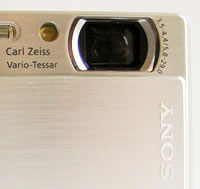
Though the front of the camera resembles a coldly Teutonic minimalist masterpiece when not actually in use, slide down and open the upper faceplate and, to the tune of the start-up 'ident', the inset Carl Zeiss Vario-Tessar lens is revealed, and alongside it a self timer lamp, narrow flash window and microphone. The camera takes the standard two seconds to power up. Turn the Sony Cyber-shot DSC-T100 around and you're hit by a slab of LCD screen, ranged to the left and taking up most of the backplate. Top right of this is a smoothly responsive rocker switch for the flash, and below it a slight indent for your thumb to rest within when gripping the camera with one hand. Below that is a self-explanatory menu button. Press this in either capture or review mode and you're presented with a toolbar down the left hand side of the screen displaying a range of familiar icons for the various settings. Tab down this and you get a sub menu extending across the screen for each option. A brief onscreen explanation for each is also provided, which marks the Sony Cyber-shot DSC-T100 out as beginner friendly despite its cold appearance.
In shooting mode you have the ability to adjust image size incrementally from 8 megapixels down to VGA (640x480 pixels), or select 3:2 ratio or 16:9 ratio (widescreen) images. You can also adjust colour from normal setting to either vivid (more saturated), neutral, sepia or black and white as desired. The next setting as you tab down the toolbar is one for manually tweaking ISO, with options ranging from ISO80 up to ISO3200, comparable to the likes of Fuji's F31fd and marking this out as a possible winner in the low light stakes. Exposure is next, in +/-2EV increments, then metering � multi, centre or spot. Interestingly, given its point-and-shoot appearance, auto focus can be alternated from the camera taking its readings across the frame, to focusing on a subject in the centre, or a central point, and further set manually at a distance of one, three, seven metres or infinity.
 |
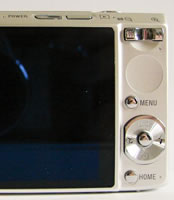 |
| Lens Cover Open | Rear Controls |
You also get two white balance options � full auto, or a second setting for when using flash. Similarly, the intensity of the bulb can also be adjusted through three settings � from low, through the standard default, to high. There's a further separate option to use auto red-eye reduction, set it to always on, or turn the feature off. Sony's standard SteadyShot anti-shake function also has three settings � activated when you're about to take a shot and the shutter button is half pressed, set to continuous, or turned off if you want intentionally blurry pics, though sharpness is by no means guaranteed, as we'll come to later. The last option on the shooting mode sidebar/toolbar is for controlling 'set up'. Press the nameless button � usually referred to as the 'OK' or 'set' button, but here remaining blank � that's itself encircled by the four-way control button just beneath the one for menu, and you have another two screens of shooting settings.
Options here include the ability to switch the AF illuminator from auto to off, activate or deactivate the digital zoom, and likewise the automatic orientation of images and whether shots are automatically reviewed on screen at point of capture. For those wanting to get their horizons level or brush up on the rule of thirds, a nine-zone grid guideline can also, if wished, be laid over the image as an aid to composition. Switching from shooting to playback � via one of two buttons on the beveled ridge above the LCD � and a press of the menu button again reveals a sidebar, only this time the icons have changed. Here you get the opportunity to delete images � where a separate dedicated button would undoubtedly have been easier but was perhaps junked due to lack of space � or activate a slideshow. Further options include the ability to 'retouch' images in camera.
Though that makes it sound like a service offered by a professional lab, what this amounts to in the case of the Sony Cyber-shot DSC-T100 is the ability to give your images a soft focus look, surround a designated colour area with a feathered border of monochrome � admittedly fun � apply a warped fish or starburst style effect (think 1970s roller disco for the latter). Less excitingly, shots can also be cropped in camera or red eye removed. The latter option was unconvincing � failing to recognize very obvious cases of red eye that was staring out at me from the LCD. Again more later. In playback still, images can be earmarked for printing or assigned a designated folder.
 |
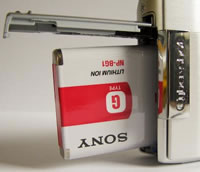 |
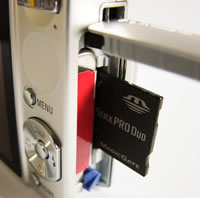
| Memory Card Slot | Battery Compartment |
Back to the controls then, and that aforementioned four-way control button. Ranged around this are four options: one for display, the next for flash, the third for self-timer and the fourth for macro mode. Taking each in turn, a press upwards of the display button automatically darkens or lightens the screen, very usefully calls up a live histogram, or turns all displayed items off. The flash setting provides the choice of auto illumination, flash always on, flash off or slow sync. The self-timer has three settings � two seconds, ten seconds or off, while the macro has three also: for on, off or 'super macro' style extreme close up.
Near the base of the camera sits an unassuming 'home' button. Press this and you're rewarded with what at first appears to be an Aladdin's cave of additional functionality. Though the auto functionality here rather pointlessly directs you back to pressing the separate menu button, you also get additional access to pre-optimised scene settings and the movie mode in the absence of a conventional mode dial. Playback, print and 'manage memory' options are also provided � here's where you can format that card for example � or alternatively change clock and language settings on the camera.
Next among the controls, and atop the Sony Cyber-shot DSC-T100, sits a solitary button for controlling the shutter, which is nicely springy to the touch yet with a definite halfway 'bite' point. The camera is reassuringly quick to find critical focus. Press it fully and image capture is also nigh on instantaneous, though the screen blanks out momentarily while the image is committed to memory, with the wait between being able to capture one full resolution snap and the next an impressive blink-and-you'll-miss-it second. To the right side of the camera, if viewed from the back, is a strut for attaching a wrist strap. Beneath this is a sliding cover for the supplied lithium ion battery and an optional Memory Stick Pro duo card.At the base of the camera is a screw thread for a tripod, along with a port for connecting the supplied multi connector cable that includes both USB and AV leads. There are no features to be found on the other (left) flank of the camera.
With minimal buttons then, the Sony Cyber-shot DSC-T100 manages not to leave the impression that anything is necessarily lacking � though to be particularly picky I would have liked to have been able to delete duff images instantly without having to delve into a menu. But did many photos actually warrant extermination? Read on and find out�
|
 PhotographyBLOG
is a member of the DIWA
organisation. Our test results for the Sony Cyber-shot DSC-T100 have been submitted to DIWA
for comparison with test results for different samples of
the same camera model supplied by other DIWA
member sites.
PhotographyBLOG
is a member of the DIWA
organisation. Our test results for the Sony Cyber-shot DSC-T100 have been submitted to DIWA
for comparison with test results for different samples of
the same camera model supplied by other DIWA
member sites.