
Canon PowerShot S5 IS Review
Review Date: September 19th 2007
Author: Gavin Stoker
Leave a comment about this Review
|
Introduction
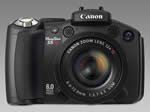
The Canon PowerShot S5 IS is Canon's top-of-the-range ultra-zoom compact camera, with an image-stabilized 12x optical zoom lens offering a focal range of 36-432mm, fast aperture range of f/2.7 � f/3.5 and an Ultrasonic Motor for silent auto-focusing. With an external flash hot shoe for use with selected Canon EX Speedlites, chunky hand grip and mode wheel, the S5 IS is very much styled like an entry-level DSLR camera. The 8 megapixel Canon S5 IS also benefits from a versatile 2.5 inch vari-angle LCD screen, Canon's DIGIC III processor (as used in their range of DSLRs), Face Detection AF/AE/FE and ISO speeds up to a maximum of 1600. There's a choice of 22 shooting modes, including Manual mode for creative control, and a 0cm Super Macro mode for extreme close-ups! With a recommended price of over �400, the Canon PowerShot S5 IS is competing directly with a lot of budget SLRs, as well as cheaper high-end bridge cameras, so does it offer enough to compete? Gavin Stoker finds out...
Compare Prices
Support PhotographyBLOG: Buy the Canon PowerShot S5 IS from one of our affiliate retailers:Ease of Use
Pick up the Canon PowerShot S5 IS 'super zoom' with built-in image stabiliser and you have the immediate impression that this is a serious proposition. Its comfortably rounded and chunky handgrip houses four AA batteries that, while not quite making it tank-like, at least lend the hard plastic build unit extra weight and contribute to the overall sturdy, solid feel. Its price tag � between �399 and �410 in the UK at the time of writing � again begs the question of why should one opt for this latest bridge camera when you can buy a fully fledged DSLR and lens (Nikon D40, Pentax K100D Super, or � almost � Canon's own 400D) for an identical or similar outlay. It doesn't even have the G7's advantage of slotting neatly into a coat pocket � you'll need to bag this one or attach the provided shoulder strap and dodge the muggers.
Still, with its all-black livery and smattering of controls that almost identically recall a budget DSLR � including hot shoe, mode wheel, and large shutter release button positioned at the forefront of the sloping handgrip � the Canon PowerShot S5 IS at least looks worthy of consideration when ranged against its often more obviously plastic-y super zoom rivals. While its 36-432mm (12x) focal range doesn't look as impressive as it once might have now that Olympus, Panasonic and Fuji have announced their own 18x zoom compacts, it's still a lot more portable than a DSLR with equivalent lens attached, even if it's noticeably heavier than an Olympus E-410 or E-510 body only. And yet� unlike a DSLR you do get a flexible video mode here. Furthermore the Canon branding reassures that, on paper at least, this ought to be a reliable performer.
Let's begin with an overview of the Canon PowerShot S5 IS's control layout, its handling, operation and responsiveness. Looking down on the camera you're presented with a fairly busy smattering of buttons and dials, and not much in the way of straight edges. For all the S5's relative bulky-ness, it's well disguised by soft lines. The aforementioned shutter release button has just the right amount of give to enable you to subconsciously determine a half press, and is encircled on the sloping front of the grip by a zoom lever. Controlling the zoom via the thumb (and thus having a lever on the back of the camera) makes more sense to me, thus freeing up your forefinger to take the shot the instant your desired framing falls into place, but you soon get used to the alternative positioning.
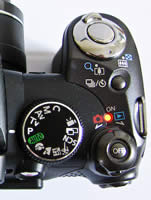
Right behind this dual-purpose control, and slightly recessed into the bodywork, sits a dual-purpose button for conveniently and quickly switching to continuous shooting or alternatively activating the self-timer. Behind this again, and roughly the size of a five cent coin, is a rotating switch for activating the Canon PowerShot S5 IS � powering it up by either flicking it to the left for image capture or to the right for immediate image review. I found this unnecessarily fiddly � certainly more so than simply pressing a dedicated on/off button, but at least it prevents accidental activation when the unit's knocking around in your camera bag. You do in fact get a dedicated button for turning the camera off however, set centrally within the switch itself. Though workable, the separated on/off set up feels slightly clumsy and, as said, a single on/off button � and separate image capture/review slider � would have made more sense.
The Canon PowerShot S5 IS is in any event very quick to power up, the lens extending to maximum wide angle from storage within its stubby lens housing within a second or so, and either the electronic viewfinder or LCD screen (if the latter is already flipped open and facing towards you) bursting into life. As you'd expect from an enthusiast model, shutter delay in imperceptible and committing of full resolution images to memory takes less than a second at highest resolution � so no complaints as far as operational speed is concerned; it just works, leaving you with the business of getting on with taking images. Interestingly � given that this is supposed to be a bridge model � there's no RAW capture offered, a black mark for some. Pictures are committed to SD card, with a 32MB capacity claimed to be provided, though it was missing from our review sample.
 |
 |
| Rear Controls | Top Controls |
To the left of the power on/off switch is a mode wheel thankfully three times the size that looks borrowed from an entry level DSLR. Featured here are the familiar (and thus unthreatening) likes of full auto, program, shutter priority, aperture priority, manual and a further custom mode, joined by further dedicated settings for portrait, landscape, night portrait mode, sports mode, collective scene modes, panorama (stitch assist) and finally video mode. The mode dial has just the right amount of resistance with a definite click and lock as you come to each option, meaning that you won't shoot past what you actually wanted in the heat of the moment.
Unusually, rather than being operated via the main shutter button � as on a snapshot camera � in video mode recording is activated via a dedicated silver button with a central red dot recalling a video camera that sits just below the mode wheel on the slope of the camera back, so that it falls under the thumb. Usefully you can utilize the full extent of the optical � and if wished, digital, zoom in this mode, as well as utilize the gimmicky face detection facility which can cope with up to eight faces in a scene. Should something take your fancy you can also fire the shutter and take a still, though the sound and resultant pause in the proceedings is picked up in the video clip itself. As indicated on the lens barrel, an Ultra Sonic Motor (USM) ensures your zoom transitions are commendably smooth and jerk free.
Next on the Canon PowerShot S5 IS top, moving from right to left, is the hotshoe for supplementary flash, beneath which and sitting slightly forward is the built-in pop-up flash, to the right of which again is a dedicated button for calling up its settings onscreen (or in the viewfinder). The flash itself has to be raised and open for the button to become operational, and it again serves a dual purpose: a microphone icon signifying that sound clips or messages can be added to captured files, with � another plus point � left and right stereo microphones sitting either side of the lens barrel at the front, backed up by a built in speaker at the left hand side (if viewing the camera from the photographer's perspective at the rear).
Incidentally, sitting on the lens barrel itself for easy access are a dedicated button for calling up the Canon PowerShot S5 IS's macro mode (a second press proving access to a peeress 0cm Super Macro option), above which is a second for manual focusing. Hold this down while in manual mode itself � or in fact, any of the modes except full auto or scene or subject modes � and a slider bar appears at the right hand side of the screen providing you with a means of adjusting focus distance, operated in tandem with the four way controller that stands slightly proud top right of the camera back. A central portion of the EVF � or LCD screen, whichever one's in use � enlarges to let you better determine that your focusing skills are spot on. You can also attach optional wide, tele and close up converter lenses.
Two-thirds of the Canon PowerShot S5 IS's back is dominated by that 2.5-inch vari-angle LCD providing 100% coverage that can be folded flush to the body, screen facing inwards when not in use. As visibility suffers in sunshine � though brightness can be adjusted � the natural inclination is to rely on the large and clear electronic viewfinder with soft rubber eyepiece cover and dioptre control ranged immediately above. That said, the flip open and twist flexibility of the screen is undoubtedly a boon for those awkward low angle or over-the-heads of crowds compositions, and though not essential is both a point of differentiation from competing models, plus a nice extra. Top left of the screen is another recessed button � this time Canon's familiar direct print control � and top right is the previously mentioned record button for the video mode.
 |
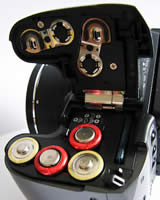 |
| Memory Card Slot | Battery Compartment |
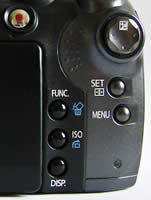
Three further buttons are ranged down the right hand side of the LCD screen, which are never far from reach of the thumb when gripping the camera. Starting at the top we have the self-explanatory function button which calls up the familiar L-shaped Canon shooting menu on screen. In full auto mode this only allows the user to choose the resolution and number of frames-per-second for the video mode, plus the stills resolution. Twist the mode dial around to program and beyond and you get additional access to manually tweak white balance settings, Canon's gimmicky 'My Colours' menu for photo effects, the chance to bracket exposures or focus, adjust the intensity of the flash, and switch between evaluative, centre weighted average or spot metering.
In playback/review mode, the same function button also acts as a useful delete button for eradicating duff shots on the fly. The second button down is a dedicated one for swapping between ISO settings � happily avoiding the need to tab through various menu screens to do so � which again serves a separate function in review mode, namely the ability to access collections of images by date, category, folder, movie, or leapfrog 10 or 100 images at a time to get where you want to be faster. The third button in the row is the display button, which either turns off the active LCD (whereby the EVF instead kicks into life), presents an info free composition screen or alternatively calls up an all-singing, all-dancing nine zone grid and histogram with a further press. The EVF also automatically activates when you flip and twist the LCD screen-in to the body.
Top right of the LCD, and far right of the camera back is the four-way controller I mentioned earlier that falls ergonomically under the thumb while your forefinger is hovering over the 'trigger'. Directly beneath is another self-explanatory button � namely 'set' � for yes, effecting any changes you've made to the settings. Finally for the Canon PowerShot S5 IS back, below this again is the menu button. Give this a press and you're presented with three easy-to-navigate folders in the typical Canon layout � the first containing capture options, the second the set up menu and the third the largely forgettable camera start up effects and sounds. In playback mode you instead get four folders � the first providing the usual slideshow options but adding in-camera red eye correction and retrospective My Colours options. Here the second folder allows you to select images for print, while you also get the same set up and camera themes and sound effects options.
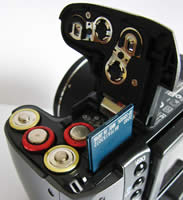
On the right flank of the Canon PowerShot S5 IS � if viewed from the back � you find rubber covers protecting DC-in, A/V out and USB ports. Flipping the camera upside down you find a familiar screw thread for a tripod. The fact that the removable SD card shares a compartment at the base with the four AAs needed for power is slightly irritating � in meaning that you can't swap cards without taking the camera off any tripod to which it is screwed, and that when operating on the hoof and removing the card you have to cup your hand over the batteries to stop them falling out or hold the camera upside down and steady. Still, this is a hindrance it shares with many competing sub-DSLRs.
For anyone used to handling a budget DSLR, the Canon PowerShot S5 IS is reasonably easy to use, sharing familiarities in its control layout. Anyone upgrading from a point-and-shoot compact will be faced with an initial learning curve, but once you've got used to the operational quirks � with my only real complaint being the fiddly on/off dial � you'll soon be confidently shooting candids and close ups thanks to the undoubted boon that long lens reach affords. But do the images themselves match the S5's level of sophistication? Read on to find out...
|
 PhotographyBLOG
is a member of the DIWA
organisation. Our test results for the Canon PowerShot S5 IS have been submitted to DIWA
for comparison with test results for different samples of
the same camera model supplied by other DIWA
member sites.
PhotographyBLOG
is a member of the DIWA
organisation. Our test results for the Canon PowerShot S5 IS have been submitted to DIWA
for comparison with test results for different samples of
the same camera model supplied by other DIWA
member sites.