
Canon Powershot SX100 IS Review
Review Date: November 15th 2007
Author: Gavin Stoker
Leave a comment about this Review
|
Introduction
Compare Prices
Support PhotographyBLOG: Buy the Canon Powershot SX100 IS from one of our affiliate retailers:Ease of Use
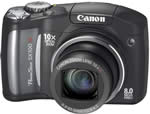
Those who prefer a little more 'substance' to their digital compacts � in terms of not only specification but also build � are directed to Canon's new 8 megapixel, 10x zoom PowerShot, the SX100 IS. The end digits indicate that, with a 35mm equivalent broad focal range of 36 to 360mm, optical (lens shift) image stabilisation is thankfully provided on board. If it doesn't quite match the 36-432mm (12x) range of the same company's Powershot S5 IS � though at �299, it's a good �100 cheaper in the UK � that 10x specification still edges the Canon Powershot SX100 IS into super zoom territory. In fact Canon believes that with the 'SX' range it's created an affordable 'family super zoom' � that lens reach just as handy for candid close ups of the kids at play, as it is to catch the wife running off with the milkman.
However, if it's pocket friendly compactness you're after, you're still better off investigating the likes of the similarly featured Panasonic Lumix DMC-TZ3, as the SX100 is reassuringly, unapologetically, chunky. Though smaller than a standard super zoom, its meatiness is thanks in part to the two AAs that slot into the base of its handgrip, plus that budget SLR-like pop-up flashgun nestling above the lens. You'll want to budget for rechargeable batteries though, as only two alkaline cells are provided. These lasted me just under a day of leisurely shooting � around 90 shots � before the battery indicator warned that it was about to give up the ghost, which is nowhere near the performance you'd hope for from a lithium ion pack (250 or 300+ images) found in rival compacts.
Still, pick up the Canon Powershot SX100 IS, play around with its firm yet responsive controls, and that price seems very fair. The camera feels impressively substantial despite its mainly plastic build, and boasts a nicely smooth and tactile finish to its body. The overriding impression before you actually turn the thing on is that here is a camera that's been built to last � which is just as well if you have young children. The front of the camera is dominated by that humungous lens, the lion's share of which is hidden flush to the body when not in use, rapidly extending (in a couple of seconds) to maximum wideangle with a press of the slightly recessed but clearly labeled on/off button. Interestingly, given that this is a PowerShot, there's no optical viewfinder or EVF � the flash being situated in the location you'd normally find one. There's no hotshoe for additional flash either, as you'd typically find on a 'proper' bridge model.
Examine the front of the camera and top right of the lens is a AF assist/self-timer lamp that glows bright orange in use, while to the other side of the lens the body curves satisfyingly to form the beginnings of the handgrip, boasting nice gun metal grey and chrome detailing. Despite the lack of sponge rubber to aid your grip, the camera's weight is such that it's easy enough to hold the Canon Powershot SX100 IS firm and steady. Continuing around the curve of the handgrip we find a 'lug' for attaching the wrist strap provided in the box, and a slide open plastic cover for the AV out, DC in and USB ports. Once opened, this dangles rather flimsily on a rubber catch, which I can unfortunately see being ripped off by mischievous fingers.
 |
 |
| Rear Controls | Top Controls |
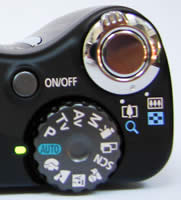
Immediately identifying itself as user friendly, atop the camera is a clean and neat control layout, with a large and nicely springy shutter release button encircled by a familiar toggle for operating the zoom. The action of the latter is smooth and responsive, though its motions are sound-tracked by an audible mechanical buzz. Left of this control is the aforementioned on/off button � the camera taking a respectable couple of seconds to get going � and just behind an equally large mode wheel � which will again be familiar to most digital compact users. There's no shutter delay as you go on to take the shot, and even full resolution images are committed to memory in around a second. Ranged around the plastic wheel, which provides a firm and solid action (clicking into place as it reaches each consecutive setting), are full auto mode, program auto, shutter priority, aperture priority and manual.
Continuing anti clockwise we get a dedicated video mode (with a long play feature), a stitch assist mode for panoramic shots, a selection of scene modes (including fireworks and snow), a dedicated children and pets mode, a night scene mode, plus landscape and portrait settings. Select portrait mode and the camera's face detection function kicks in, the box-shaped focus point dancing merrily around the screen; yet it's actually surprisingly effective at tracking faces and locking on target. Guessing that the camera will be used primarily for shooting people, there's also an auto red eye correction feature accessible in playback, while � a slight chore � the red eye reduction is activated manually in capture mode by delving into the menu settings rather than being included as an option among the flash settings.
The quality of the video � though the standard 640x480 pixels resolution � is respectably sharp, and a good enough fallback for doting dads who want to capture the 'aah' moment but don't have the camcorder to hand. A real shame though is that the optical zoom is disabled in this mode � meaning you have to zoom in and pick your framing before pressing the shutter release button to begin filming. It seems an opportunity missed seeing as the 10x zoom and overall usability is the SX100's chief selling point. Also, you don't get stereo sound like you do on the more expensive Canon Powershot S5 IS.
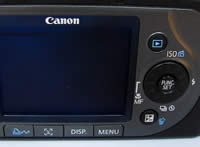
The uncluttered back of the camera features a large-ish 2.5-inch LCD screen. This provides a crisp clarity to your compositions when utilised indoors and out, though it becomes a little noisy if using the Canon Powershot SX100 IS under tungsten light or in the dim. Top right of the monitor is a button marked with the familiar arrow denoting playback, beneath which is a four-way controller that can't quite decide whether it's a scroll wheel or a touch pad � so confusingly it's both. This makes for slightly fiddly operation. As you go to access the options set at four points around the wheel it's easy for your thumb to slip round to the adjacent setting. If you're aware of this it gets easier however, especially once you get used to only using the tip of your thumb or fingernail.
 |
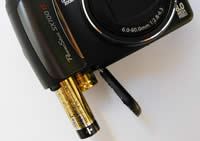 |
| Memory Card Slot | Battery Compartment |
Ranged around the control dial, which additionally features a function set button at its centre, are a means of accessing ISO speed, flash setting, self timer or continuous shooting, plus macro or manual focus � whereby you're shown an enlarged central portion of the screen to check focus. Beneath this is a dual-purpose button for the deletion of images when in playback mode, or, with the aid of the fiddly control dial, manually adjusting exposure (+/-2EV), shutter speed or aperture, depending on which of the creative modes you happen to be in at the time.
Still at the rear of the Canon Powershot SX100 IS, and sitting just beneath the LCD, is a row of four buttons. For a compact camera these are unusually large and well spaced, making for easy operation via either thumb. From right to left you have the self-explanatory menu button, a press of which in capture mode brings up two folders on screen, one with shooting options and the second with more generic set-up features. A press of 'menu' in playback gives access to both image review plus print selection folders, while the third folder is the same set up menu. If you've used a Canon camera before, the menus will be immediately familiar: they're well laid out, logical, uncluttered and easy to access.
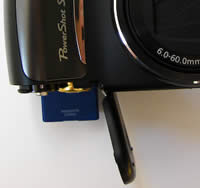
The third button beneath the LCD Is a little more unusual, being a dedicated 'face selector' button. This ties in with the neat feature on the Canon Powershot SX100 IS that lets you assign priority to one face in a frame of many faces � for example your little darling amidst the hockey squad, or the favourite of your three children. Given that this camera is aimed at the family and most of us use our camera primarily for images of family and friends, it makes perfect sense. The last button is the familiar direct print control, though this button can be assigned custom settings if so wished. Lastly, the base of the camera features a screw thread for a tripod and a compartment storing the two AAs and SD media, opened by flicking the substantial catch and sliding it proud of the unit. Incidentally � and unusually � you do get a memory card in the box, though it boasts a slightly pointless 16MB capacity. When supermarkets are branding their own 1GB cards for a tenner, it seems particularly stingy, but at least it's there.
So while the Canon Powershot SX100 IS can be used as a fairly flexible point and shoot, there are some manual features to get your teeth into. Shame about the zoom being disabled in video mode though, and that fiddly scroll wheel/control dial making for awkward operation; as other than that Canon seems to have got the camera about right. It may not look the most stylish model ever, but it's certainly no doorstop. However the SX100 IS doesn't get by on appearance alone, image quality is what counts so let's take a look at how well it gets on in practice�
|
 PhotographyBLOG
is a member of the DIWA
organisation. Our test results for the Canon Powershot SX100 IS have been submitted to DIWA
for comparison with test results for different samples of
the same camera model supplied by other DIWA
member sites.
PhotographyBLOG
is a member of the DIWA
organisation. Our test results for the Canon Powershot SX100 IS have been submitted to DIWA
for comparison with test results for different samples of
the same camera model supplied by other DIWA
member sites.