
Fujifilm S5 Pro Review
Review Date: July 19th 2007
Author: Gavin Stoker
Leave a comment about this Review
|
Introduction
Compare Prices
Support PhotographyBLOG: Buy the Fujifilm S5 Pro from one of our affiliate retailers:Ease of Use
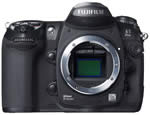
While other camera manufacturers � both with traditional photographic and electronics backgrounds � have rushed to capitalize on the growth of the DSLR market by rushing out several models spread across staggered price points, Fujifilm, like fellow photo stalwart Kodak, has apparently been content to ply its trade with good value snapshot and enthusiast-level cameras. Unusually, Fujifilm has only ever had one DSLR available at any one time � and only three in total before now (the F1, F2 and F3) � each with a shelf life that far extended the average six months afforded its competitors. The reason for this, Fujifilm has argued, is that it is aiming its product at a niche professional market: that of the social photographer � by which it means portrait and wedding specialists in particular. Its reluctance to compete directly with fellow big names may also have a lot to do with the fact that all Fujifilm's DSLRs have been based on camera bodies provided by Nikon, and the latest S5 Pro (seemingly skipping a generation from its S3 predecessor) is no exception, taking its lead from Nikon's acclaimed D200 pro-level model.
Uniquely however, Fujifilm's version features its proprietary dynamic-range increasing Super CCD SR Pro sensor. Singularly banging the drum of 'quality not quantity' when it comes to pixels, once again this comprises a honeycomb-style layout of 12 million paired photo diodes � six million larger 'S' photodiodes for capturing the lion's share of light, combined with 6.17 million smaller 'R' photo diodes for 'bright area' information claimed to be beyond the reach of conventional pixels. What this means in practice is that attention has been paid in particular to highlight detail (capturing that lacey embroidery on a bride's dress for example) and, to keep landscape photographers happy, like the S3 there are modes that ape Fujifilm's acclaimed roll film range, including the rich colours provided by the likes of Velvia. As with the Fujifilm S5 Pro's predecessors, both are key selling points.
So what else is new on the Fujifilm S5 Pro? Added this time around is what is claimed to be a new and improved low-pass filter to ensure moir� patterns and noise is kept to a minimum (needed perhaps, as the S5 offers light sensitivity up to ISO3200), plus a new Real Photo Processor Pro to reproduce colours closer to how they're seen by the human eye. Ensuring your subject's always in focus no matter where it is in the frame, you also get an 11-point AF system to play with. Added to this is the popular feature on DSLRs in this price bracket � �1000+ in the UK � namely the ability to capture JPEG and RAW files simultaneously. You therefore have the ability to quickly proof via the former and play around later with the latter. Plus there's the ability to choose from six stepped dynamic range settings, ranging between 'normal' dynamic range (100%) and 400% (dynamic range expanded by two stops). There are also three 'negative film' presets, but, as your head may by now be spinning with all this pro-level specification, more later.
 |
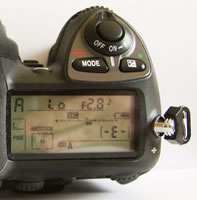 |
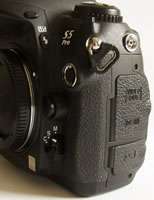
| Side Controls | Top Controls |
Pick the camera up and straightaway you have the reassurance that this is a professional model: a moisture and dust proof metal alloy body that is broad and chunky in build and, with battery and optional CompactFlash card inserted, weighty enough to require two handed operation before any optic has even been attached. You'll need to budget for that extra lens too, as Fujifilm's RRP is for body only. Though Fujifilm doesn't make or brand any of its own optics, its Nikon F-mount is unsurprisingly compatible with a wide range of Nikon lenses (all Nikkor AF-D/G and AF-S optics). That's just as well; as Fujifilm's PR hadn't provided us with one for review, Nikon UK kindly stepped in with a AF-S DX Zoom-Nikkor 18-70mm f/3.5-4.5G IF ED for the duration of our test (thanks also to Nigel Atherton at What Digital Camera for the short term loan!). Another gripe � our review sample hadn't been properly cleaned at the outset, meaning that an initial batch of our test shots revealed dust marks on the sensor that transferred to our images. Still, this gave us an opportunity to test the Fujifilm S5 Pro's self cleaning functionality (it immediately solved the problem as it happens).
Starting atop the camera, the highest point plays host to a hot shoe for an additional flashgun, in front of which sits the bulb for the built in pop up flash, obviously hidden when not in use. To the right of this is a chewing gum stick-sized LCD status display, which Fujifilm refers to as its control panel. This reveals essential shooting information such as file size and quality, metering, white balance, remaining battery life, number of shots remaining, aperture, shutter speed and selected shooting mode � the latter altered by pressing down the 'mode' button in front of the screen and spinning the main command dial at the rear with your thumb. To the right of this is an exposure compensation button that is controlled in an identical manner. Portrait photographers used to shooting with the camera turned on its side may miss the lack of any secondary control dial near the base of the camera, but in truth if you've never had use of one before it won't be a deal breaker. The two that are provided (there's a second, sub command dial just in front of the shutter release) fall neatly under forefinger and thumb, and so are quickly accessed in the heat of the action (handy for those candid portraits).
The shutter release button itself is encircled by the on/off switch so that you can be up and shooting rapidly � in around a second or so, basically less time than it takes you to blink. AF is fast and accurate, though the 11-point AF darts all over the shop if faced with a busy scene; no matter, just re-frame and you've got what you want sharp in a jiffy. Top left of the hot shoe (if the camera is viewed from the rear) is a cluster of shooting options, with dedicated buttons for image quality, white balance and ISO most prominent. To select your chosen setting, hold these down with your left hand thumb and use the thumb on your right hand to turn the command dial to tab through the options in the aforementioned display panel. Beneath this trio of buttons is the mode dial, a rotating disk with serrated edge plus an adjacent catch to lock your chosen mode firmly in place. The options here are single frame shooting, continuous low speed shooting (average of between one and two frames per second), continuous high speed (3fps), self-timer, or Mirror Up to minimize the effects of camera shake. Incidentally, you can record up to 100 sequential frames in continuous mode (depending of course on the available memory).
 |
 |
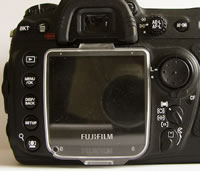
| Rear Controls | Main Menu |
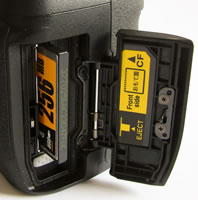
Moving down the left hand flank of the camera, there's a shiny silver flash sync terminal, followed by a spongy rubber cover protecting both video out and DC in sockets, plus a second identical cover for USB cable socket. Swapping over to the right flank of the camera � with the camera still viewed from the back � we find a spring loaded cover for the memory card � here CompactFlash � opened via catch on the back itself, located bottom right of the main LCD. Moving round to the Fujifilm S5 Pro's back then, you come face to face with the greatest volume of buttons dials and switches, clustered around that LCD monitor. Directly above this sits the optical viewfinder with springy rubber eyepiece for comfort when shooting, plus a diopter control for spectacle wearers to adjust viewing to suit. Right of this is the small AE/AF lock button, surrounded with an equally teeny switch for alternating between the differing metering options � matrix, centre weighted or spot � that's easily overlooked at first. Immediate right again, there's a screw-head sized AF-on button, which has the same effect as pressing the shutter button halfway.
Top left of the viewfinder is a dedicated delete/format button. Achieving the latter involves holding down the trashcan button and mode button simultaneously for two seconds, and then pressing both a second time to completely refresh the card. Moving down the left hand flank of the LCD screen, you're faced with a vertical row of five buttons. From the top, the first is � handily � the playback button for reviewing shots, with equally self-explanatory menu/OK button next on the list. Press this and you're rewarded with a three-folder shooting menu onscreen, which is bright, clear, logically and simply laid out and readable even under oppressive sunlight. In the first you get access to the aforementioned film simulation modes that signal the Fujifilm S5 Pro is very much Fujifilm's own camera, despite the backbone of Nikon's D200 � plus the ability to adjust dynamic range, colour, tone, sharpness, and colour space (sRGB or Adobe RGB). The options contained within the second folder allow the adjustment of ISO once again, plus white balance (with the ability to further fine tune the setting), image quality and pixel count � the third folder adding the ability to shoot multiple exposures, switch on an Olympus-like 'live view' option in manual focus mode (with the choice of either a colour or B&W LCD view), reset the shooting menu to default settings or apply noise reduction settings.
 |
 |
| Battery Compartment | Memory Card Slot |
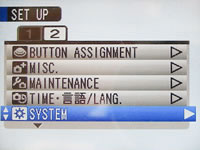
Below the menu button is the display/back button, then a fourth for jumping straight to the set up menus that comprise a two-folder selection on-screen. The first of these set up folders affords selection of further shooting and display options, such as switching the shooting speed between one and two seconds or calling up a grid display, plus additional settings for controlling the minutae of AF, exposure and flash. The second set up folder comprises the ability to alter the tasks various buttons are assigned to, perform routine maintenance (such as the mirror lock up cleaning option) plus change the duration of the auto power-down, energy saving option. The fifth and final button to the left of the screen is perhaps one of the most interesting, despite being rather clumsily named 'the face zoom in button'. As it sounds, this new function on the Fujifilm S5 Pro detects a human face in the frame and zooms straight in so that you can quickly check focus and exposure before firing off a shot � handy when the bride and groom have already reached the altar you haven't got time to mess about.
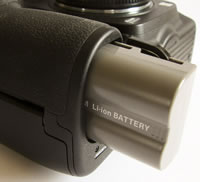
While all of the above options confirm the Fujifilm S5 Pro as a camera with considerable creative heft, that's not to say using it is a daunting experience. It's fast to respond to what you ask of it � which is as it should be � and, if required, there's the option to shoot fully auto or utilise the program mode while you familiarize yourself with its myriad features. Moving next to the front � or 'business end' of the S5 � with that Nikon F mount and whatever compatible lens you choose to attach taking centre stage, this is surrounded top left by the AF illuminator and self timer lamp window, and to the immediate left by a depth of field preview and function button. To the right of the lens mount are the flash sync mode button/flash compensation button, a ten pin remote terminal, the lens release button, and just below, the focus mode selector. Here you are given a choice of manual, single servo AF (the camera focuses when the shutter button is pressed halfway), and continuous-servo AF (the camera continually adjusts focus while the shutter button is pressed). Moving to the chunky camera base, you get a cover for the lithium ion battery stored in the handgrip and a familiar screw thread for attaching the S5 to a tripod.
I have to say that, with the exception of a machine gun-like continuous capture mode, just about everything you'd conceivably want from a DSLR has been crammed into the Fujifilm S5 Pro. Arguably though, its target market is going to be carefully composing each frame, not blazing away. Speed concerns aside then, how does it fare when it comes to the true test � image quality? Read on and find out�
|
 PhotographyBLOG
is a member of the DIWA
organisation. Our test results for the Fujifilm S5 Pro have been submitted to DIWA
for comparison with test results for different samples of
the same camera model supplied by other DIWA
member sites.
PhotographyBLOG
is a member of the DIWA
organisation. Our test results for the Fujifilm S5 Pro have been submitted to DIWA
for comparison with test results for different samples of
the same camera model supplied by other DIWA
member sites.