
Kodak Easyshare V610 Review
Review Date: May 10th 2006
Leave a Comment about this Review
|
Ease of Use
The Kodak Easyshare V610 narrowly beats the older 5 megapixel V570 as one of the most stylish digital cameras currently available. With its ultra-slim, mainly black all-metal body, very impressive 2.8 inch LCD screen and rock-solid build quality, the V610 will certainly gain admiring glances from your friends. It has a pleasingly minimalist design, with a row of buttons across the top, a column of buttons down the rear, and the zoom and navigation buttons. At 11cm it's quite wide for a compact digital camera, but at the same time it's also a light camera at just 160g without the battery and memory card fitted. Kodak have tweaked the design of the V570 and come up with a very distinctive looking camera in the V610 that is quite unlike anything else on the market. The main design differences between the two cameras are the replacement of the joystick on the V570 with a navigation pad on the V610, moving the SD card slot into the battery compartment, and a slightly refined interface on the rear of the camera (smaller buttons, different zoom lever). Otherwise they are very similar, even in physical dimensions.
Kodak have managed to fit two lenses and two 6 megapixel sensors into the V610, a pretty amazing feat of engineering given that it is only 2.3cms thick. Other models of this size typically have a 3x zoom lens. Kodak have used their unique dual-lens technology to achieve an incredible zoom range of 38-380mm, making it the slimmest camera in the world with this focal length. Even when set to 380mm telephoto, the lens doesn't extend at all from the front of the camera, which means that the Kodak V610 is always 2.3cms deep. The 10x zoom lens obviously makes this one of the most versatile compacts in terms of focal range, and if you're used to a standard 3x zoom lens, then the 10x zoom will be like a breath of fresh air.
There is a small drawback of the dual-lens system as it's implemented on the V610, and that's the jump between the two lenses from 114mm to 130mm. Thankfully this isn't as noticeable as on the V570, which jumps from 23mm to 39mm. You can turn the digital zoom on so that the camera provides the missing 114-130mm setting digitally, but this comes at the expense of reduced image quality. Much more annoying is the transfer from one lens to the other. This was instantaneous on the V570, but on the V610 you actually have to release the zoom button when it reaches the end of the first lens' focal length, and then press it again to zoom the second lens, otherwise nothing actually happens. It's a strange sensation as the camera "pauses" in what is effectively the middle of the zoom range, and will definitely take a while to get used to. The Kodak V610 always starts with the 38mm wide-angle setting selected, and a small icon appears on-screen to show you which lens is selected as you zoom.
| Scene / Delete / Menu / Review / Share Buttons | Navigation Pad / Select Button |
 |
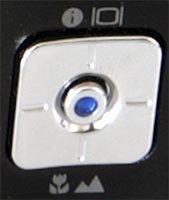 |
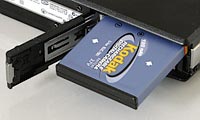
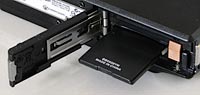
The Kodak Easyshare V610 is a very well-built camera, with a high quality metal body and controls. The camera's design is dominated by the 10x lens on the front and the massive 2.8 inch LCD screen on the rear. As this is purely a point and shoot camera with no manual controls, the Kodak Easyshare V610 is not overly complex in terms of the number of external controls that it has. I counted 14 in total. The majority of the controls are clearly labeled and found on most cameras, although a few, such as the Review, Share and Favorites buttons, are not very common. Instead of the small joystick found on the older V570, Kodak have reverted to a more traditional navigation pad and center button combination to control the display mode, macro and landscape modes, and to change the exposure compensation. It's also used for things like zooming and selecting pictures during playback, and overall works very well. Thankfully Kodak have fixed the fragile cover for the SD card slot that was on the V570 and moved it into the battery compartment on the V610. The printer docking port and power socket are still exposed to the elements, but mostly the Kodak Easyshare V610 has a very substantial, quality feel about it.
If you have never used a digital camera before, or you're upgrading from a more basic model, reading the excellent manual before you start is a good idea. Thankfully Kodak have chosen to supply it in printed format, rather than as a PDF on a CD, so you can also carry it with you. The large 2.8 inch LCD screen is the only way of framing your shots, so if you have to have an optical viewfinder, look elsewhere now. It's not too much of a loss, however, as the V610's screen is one of the best that I've ever seen, with 230,00 pixels and a bright, vibrant, glossy display. Having such a large and high-quality screen is a great way to show off your photos. The various icons used to represent the camera settings on the LCD screen are clear and legible, and there is a handy warning icon which indicates if the photo is blurred or not (although it's only shown after the shot has been taken). The main menu system on the Kodak Easyshare V610 is straight-forward to use and is accessed by pressing the Menu button on the left of the rear of the camera. There is a single main menu, with the Setup submenu at the bottom of the list of 14 options. Most of the camera's main options, such as white balance, image quality, auto-focus mode and ISO speed, are accessed here. It would have been good to see the more commonly used options, such as ISO speed, available via the press of a button, rather than having to go into the menu system. Due to the large LCD screen and restricting the number of on-screen choices to four, the various options and icons are clear and legible.
| Battery Compartment | Memory Card Slot |
 |
 |
The start-up time from turning the Kodak Easyshare V610 on to being ready to take a photo is quite quick at around 2 seconds. Zooming from the widest focal length to the longest is very slow at around 7 seconds, and there are 10 zoom steps from 38mm-380mm. Focusing is quick in good light and the camera achieves focus most of the time indoors or in low-light situations, helped by the focus-assist lamp, even at the tele-photo end of the lens. The visibility and refresh rate of the 2.8 inch LCD screen is excellent. It takes about 1 second to store an image, allowing you to keep shooting as they are being recorded onto the memory card - there is a brief 0.25 second LCD blackout after taking each image. The Kodak Easyshare V610 has a poor Continuous mode which enables you to take 1.6 frames per second at the highest JPEG image quality, up to a maximum of 8 images. Overall the Kodak Easyshare V610 is below average in terms of operational speed, with the zooming speed (or lack-of) being the most annoying factor.
Once you have captured a photo, the Kodak Easyshare V610 has an excellent range of options when it comes to playing, reviewing and managing your images. Press the Review button and you can instantly scroll through the images that you have taken, view by date or album, sort images into albums, view thumbnails, zoom in and out up to 8x magnification, watch a slideshow with transition effects, delete, protect, crop and copy an image. A new option on the V610 is Perfect Touch Technology - this is similar to HP's Adaptive Lighting and Nikon's D-Lighting, where the camera improves the image by lightening the shadows without affecting the highlights (either to the original image or a copy). Press the Share button to print and email and to make an image one of your favourites, which can then be viewed via the Favourites button on top of the camera. Pressing up on the navigation pad toggles detailed settings information about each picture on and off, such as the filename and date, and there is a small histogram available during both shooting and playback. When taking a photo, pressing up toggles between the information view, no icons, the histogram and gridlines to aid composition.
You can also send and receive images via Bluetooth through the Share menu (accessed by a dedicated button on the rear of the camera). After completing some simple initial configuration settings in the Setup menu, I was able to transfer images to my Bluetooth enabled laptop, with a full-sized 6 megapixel image taking less than 5 seconds to copy across, and also transfer images back to the camera. The V610 offers the ability to send smaller versions of your photos (QVGA for fastest transfer, XGA for 4x6" print quality), perfect for sending them to Bluetooth-enabled mobile camera-phones and sharing with friends and family. You can also save your favourite devices so that you don't have to repeatedly enter the same information.
The Kodak Easyshare V610 is an easy-to-use, very stylish and well-built camera that offers an amazing 10x focal length in an ultra-thin body via the innovative dual-lens system.
|
 PhotographyBLOG
is a member of the DIWA
organisation. Our test results for the Kodak Easyshare V610
have been submitted to DIWA
for comparison with test results for different samples of
the same camera model supplied by other DIWA
member sites.
PhotographyBLOG
is a member of the DIWA
organisation. Our test results for the Kodak Easyshare V610
have been submitted to DIWA
for comparison with test results for different samples of
the same camera model supplied by other DIWA
member sites.