
Pentax K200D Review
Review Date: July 3rd 2008
Author: Mark Goldstein
Leave a comment about this Review
|
Introduction

The announcement of the Pentax K200D DSLR camera back in January was somewhat overshadowed by its bigger brother, the K20D, and its class-leading 14 megapixel resolution. The more affordable entry-level K200D model certainly shouldn't be overlooked, however, especially as its predecessor, the K100D Super, was a great camera that we awarded an Essential rating in October 2007. The K200D retains virtually the same exterior design as the K100D Super, but adds quite a few important improvements to make sure that it can compete in what is a fast-evolving market. The main new features are a 10.2 megapixel sensor taken from the K10D, dust-proof and water-resistant weather-sealed body, a larger 2.7 inch LCD screen, additional Green mode and RAW buttons, ISO 100, Sv exposure mode and the option to add a vertical grip. The K200D retains the Dust Removal system, support for SDM (Supersonic Drive Motor) lenses, Shake Reduction system, Dust Alert System, 11 point auto-focus and compact design with metal body from the K100D Super. There have been some significant entry-level cameras released since the Pentax K200D was unveiled at the PMA show, most notably from Sony and Canon, so with an official price at launch of �579.99 / $799.95, should you still consider it?
Compare Prices
Support PhotographyBLOG: Buy the Pentax K200D from one of our affiliate retailers:Ease of Use
The Pentax K200D is virtually identical to the older K100D and K100D Super camera in terms of its design, so a lot of the comments that we made in our review of the K100D Super will be repeated here. Unfortunately we've got to start off our review on a slightly negative note. The Pentax K100D Super, bundled with a 18-55mm standard lens, had an asking price of just �400 / $599.95 in the UK when it was launched, which makes the �579.99 / $799.95 recommended retail price of the new K200D somewhat hard to bear. We're well aware of effects of the credit crunch and general worldwide economic downturn, but a near �200 / $200 price hike is going to put a lot of people off, especially as it puts the K200D directly in the firing line of cameras like the Canon Digital Rebel XSi / EOS 450D and Sony A350. Thankfully retailers seem to have realised that the K200D needs a more economical price in order to succeed - at the time of writing, the K200D was available for a slightly more reasonable street price of around �450 / $600.
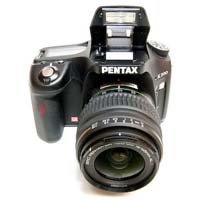
Pick the K200D up for the first time, attach the supplied 18-55mm kit lens, and this DSLR impresses from the off. Despite the budget pricing nothing about the K200D build quality feels compromised, with the weight and heft transcending its entry-level status. It's just a little larger than the Nikon D60 or E-420 from Olympus and in fact feels a more fully rounded and sturdier camera for it. The Pentax K200D is dust and water resistant, thanks to a system of 60 different seals used throughout the design. The camera has a deep, contoured handgrip on the right-hand side, coated in a rubberized compound to aid grip, that enabled me to use three fingers to hold it and my right forefinger to operate the shutter button. There is a generous contoured area where your right thumb sits, with the rest of the body finished in a textured matt black.
The shutter release action on the Pentax K200D is quite loud and mechanical, something that you will either love or hate. I liked it, although it isn't great for close-up candid photography as your subject will probably hear you if you get too close. The Pentax K200D lightweight enough for you to carry around over your shoulder all day and not feel like you've been lugging bricks, even with the four AA batteries that power it inserted. The camera managed an impressive 500+ shots using a set of high-powered rechargeable Ni-MH batteries, a significant improvement on the older K100D Super, and back-up supplies can be easily found and replaced in whichever country you're in. The much-improved battery life is one of the principal reasons for choosing the K200D over the older K100D series.
Also rare at this price level � and very welcome � is the Pentax K200D's 11-point auto focus system, which is quick to determine subject matter, though unusually busy scenes can cause it confusion. Focusing is quite quick and consistent in good light with the standard 18-55mm kit lens, with the 11 point AF system offering fairly generous scene coverage, and the camera happily achieves focus indoors and in low-light situations. The camera is also quick to get going. Flick the on/off switch that handily encircles the main shutter button and you're up and shooting in around a second, and with no noticeable shutter delay. This ensured it was rare that I missed a shot. Note that the 18-55mm lens has an annoyingly loud focusing mechanism though, and the powerful AF Assist lamp can only be used if the built-in flash is raised.
The large 2.7 inch LCD screen is bright, clear and has a perfectly acceptable refresh rate and pixel count. It takes less than a second to store a single JPEG image at the highest quality setting with no discernible lockup between taking shots, allowing you to keep shooting as they are being recorded onto the memory card. For single RAW images the Pentax K200D is just as fast, again with no lockup between shots. In the continuous shooting mode you can hold down the shutter button and take 2.8 frames per second for up to 4 JPEGS or 4 RAW files, or there's a slower 1.1fps mode available which allows you to shoot JPEGs until the memory card becomes full (there's still a limit of 4 RAW files in this mode though).
 |
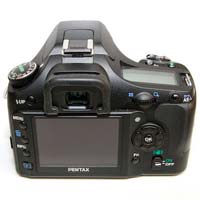 |
| Front | Rear |
The K200D features the same dust removal system as its predecessor. Although there may be nothing particularly revolutionary about it, the system works in three stages: first, an anti static coating on the CCD helps repel dust and other nasties, while secondly, any that do settle are shaken free by a high speed, vibrating CCD-shift mechanism. Lastly, a sticky pad at the base of the CCD collects any stray particles to prevent them from attacking the sensor a second time round. If you've had a bad experience with DSLRs and dust in the past, then the K200D offers a neat new feature called Dust Alert which is designed to show exactly where the dust is on the image sensor. A vertically and laterally correct image of the sensor shot at f/16 is shown on the LCD screen, indicate exactly where any stubborn dust particles may be lurking. While this feature won't prevent dust from getting onto the sensor, it does provide a quick and easy way of checking for it. In addition Dust Removal can be set to activate whenever the camera is turned on, and you can also use the built-in Sensor Cleaning function to lift the mirror and clean the image sensor with a blower brush or third-party cleaning solution.
Dust removal is twinned with a shake reduction feature, meaning that any attached Pentax KAF mount lens immediately becomes stabilized. Turn it on via the switch on the rear of the camera and the K200D automatically compensates for camera shake, which is a slight blurring of the image that typically occurs at slow shutter speeds. In practice I found that it does make a noticeable difference, as shown in the examples on the Image Quality page. You don't notice that the camera is actually doing anything different when Shake Reduction is turned on, just that you can use slower shutter speeds than normal and still take sharp photos. Of course, it could be argued that the Pentax K200D's family market aren't going to be changing lenses or shooting under particularly testing conditions with any regularity, but both dust removal and shake reduction undeniably offer the camera a certain edge.
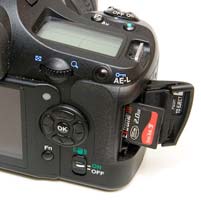
Keeping things beginner-friendly, images are saved to SD card, the most common media format currently available � a slot for which is accessed via the right hand side of the DSLR, if viewed from the back. The batteries are stored in a separate compartment at the base of the handgrip. Up top the main controls have been given room to breathe, meaning that they're uncluttered and feel ergonomically placed, readily falling under forefinger or thumb. Basically you feel as though you can pick the K200D up and get shooting straight away, with no fiddly or strange control positioning to hamper or slow down operation. Plus, unusually for an entry-level DSLR, there's also an LCD status display window provided in addition to the main LCD at the rear � just like you'd find on higher end models.
New to the K200D are the Green Mode and RAW buttons. The former is a rather innocuous looking button with a small green dot - when shooting in Manual mode a single push allows you to instantly set the correct exposure for the subject, as calculated by the camera, useful if you need a starting point for your own exposure. The latter instantly sets the image quality to whichever RAW format is selected in the menu system, useful if you are shooting in JPEG and want to quickly switch to RAW mode for a specific image. Both are useful additions inherited from the K10D that make a subtle but effective contribution to the overall ease-of-use.
 |
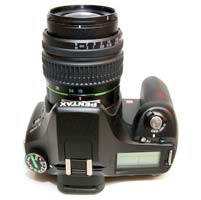 |
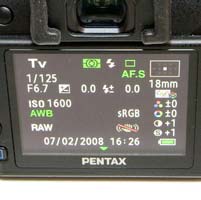
| Info Screen | Top |
The Off/On switch around the shutter button has a third setting, which either activates the traditional Optical Preview (Pentax's name for Depth of Field Preview), stopping down the lens so that you can see the effect of your chosen aperture, or Digital Preview, which takes a picture, displays a preview on the LCD screen and then optionally allows you to save it. You can use the Digital Preview to check the effects of altering the white balance - simply activate Digital Preview, choose White Balance from the Function menu, then scroll through the options to see how they affect the image shown on the LCD screen. It's a very intuitive way of finding the right white balance for the scene that you're shooting. The Preview method can be set using Custom menu setting 18. There is no Live View mode on the K200D, something which the more expensive K20D offers, but as the K20D's Live View system is one of the most clunky on the market, I didn't miss not having it available on the K200D.
Also positioned next to the shutter release button is a dedicated button for aperture and exposure compensation adjustment (+/- 2EV), performed in tandem with the command dial that falls under your thumb at the back of the camera. Next to the dial is an AE-lock button that also doubles up as means of protecting images from accidental deletion when in playback mode. Next to the aforementioned status display window is a hump that houses the built-in pop up flash, and as expected you also get a hot shoe for additional illumination via an external flashgun, should it be desired. Just behind this, and above the optical viewfinder � which in itself is large and clear � is a large slider for diopter adjustment.
Lastly, and allowing DSLR novices to point and shoot from the off, there's a large, reassuringly chunky mode dial atop the Pentax K200D. Ranged around this are dedicated modes for moving subjects, close ups and night portraits, flash off, macro, landscape and portraits � alongside the more creative likes of program, aperture priority, shutter priority, manual and, unusually, a bulb mode for subjects requiring a slow shutter speed. These are backed up by full auto (the Auto Pict mode) and scene mode settings. The latter includes a night scene setting, a surf and snow setting, a text mode, food, sunset, kids, pet, candlelight and 'flash prohibited' museum modes. All are indicated via the rear screen by unthreatening cartoon icons. Pentax have also included the Sv mode from the K10D/K20D on the K200D. Sensitivity-Priority automatically selects the best combination of aperture and shutter speed for your chosen ISO speed. The sensitivity can be shifted instantly (in 1/2 or 1/3 steps) by turning the rear control dial. This allows you to quickly select an ISO speed, without having to access the menu system, which is very useful in rapidly changing light conditions.
As regards the new larger rear LCD screen, visibility is good even in bright sunlight � more often than not the conditions I was using the Pentax K200D in � and, as you'd expect, the on screen menus are legible and easy to navigate. To the right of the screen is a four way control pad with central OK button � a similar set up to that found on most digital compacts that will be familiar to those trading up. Just below the four-way controller is the slider switch for activating shake reduction, which I tended to leave permanently switched on � a choice that provided fairly consistent results when shooting without flash.
 |
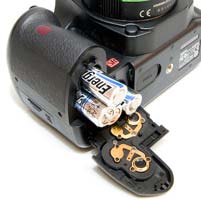 |
| Memory Card Slot | Battery Compartment |
Switching over to the left hand side of the rear LCD we find an array of five buttons running down the left hand side. The top control is for manually activating the pop up flash, while below � and in order � are the familiar menu, delete, info and playback buttons. Press 'Menu' and you're given the choice of four brightly detailed folders � image record/capture mode and playback settings displayed next to each other so you can make decisions and adjustments on the fly. The third folder contains the familiar set up options, with the fourth affording access to custom settings if so wished.
The menu system hasn't changed from the K100D Super, and its something which I'm still rather unenthusiastic about. Pentax have split the various menu settings into two, accessed by separate buttons on the rear of the camera. The Fn button allows you to set white balance, drive mode, ISO speed and the flash mode. This grouping of a few features has allowed the Pentax designers to keep the body as uncluttered as possible, but at the same time key controls like the white balance are a two-step process to access (a button press and a menu selection), rather than one as on many DSLRs. Thankfully the ISO speed can at least be alternatively set by using the Sensitivity-Priority shooting mode. The Menu button then accesses all of the other menu options that the camera offers. I would personally prefer to see all the menu options consolidated in one place, so that I don't have to remember which specific option is in which of the two menus. Pressing the 'Info' button when in capture mode instantly displays a summary of all the current settings you have activated on one screen.
Once you have captured a photo, the Pentax K200D has an above average range of options for playing, reviewing and managing your images. You can instantly scroll through the images that you have taken, view thumbnails (up to 16 images), compare two image onscreen, zoom in and out up to a magnification of 16x, and see detailed information about each image by pressing the Info button. You can also delete single or multiple images, rotate an image, view a slideshow, protect images so that they cannot be deleted, and set various printing options. There are also an expanded range of digital effects available which can be applied to JPEGs - Black and White, Sepia, Color, Soft, Illustration, High Dynamic Range, Slim and Brightness. The camera shows you a preview of what the effect will look like when applied, and the effect is applied to a copy of your image, thus preserving the original intact. You can even convert a RAW file into a JPEG in-camera, with 11 different parameters available - impressive functionality for an entry-level DSLR.
Importantly the Pentax K200D can display a histogram after taking a photo (just press the Info button) which is a great help in evaluating the exposure, plus any areas that are over-exposed flash on and off in the LCD preview to show you want you should be compensating for with your next attempt. If you have never used a digital camera before, or you're upgrading from a more basic model, reading the comprehensive and easy-to-follow manual before you start is a good idea. Thankfully Pentax have chosen to supply it in printed format, rather than as a PDF on a CD, so you can also carry it with you.
In summary the Pentax K200D is very similar to the previous K100D Super model - a well-built, repsonsive and beginner-friendly DSLR - with some thoughtful improvements that make an already intuitive camera even easier to use.
|
 PhotographyBLOG
is a member of the DIWA
organisation. Our test results for the Pentax K200D have been submitted to DIWA
for comparison with test results for different samples of
the same camera model supplied by other DIWA
member sites.
PhotographyBLOG
is a member of the DIWA
organisation. Our test results for the Pentax K200D have been submitted to DIWA
for comparison with test results for different samples of
the same camera model supplied by other DIWA
member sites.