
Ricoh Caplio GX100 Review
Review Date: June 20th 2007
Author: Mark Goldstein
Leave a comment about this Review
|
Introduction
Ease of Use
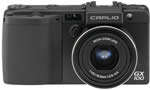
The Ricoh Caplio GX100 is a wide and fairly slim compact digital camera that just about fits into the palm of my average sized hands, measuring 111.6 mm (W) x 58.0 mm (H) x 25.0 mm (D) and weighing around 220g. Utilising an aluminium alloy body, it's bigger and heavier than previous Ricoh cameras that I've reviewed, and also exceedingly well built - the GX100 is definitely the most well-constructed Ricoh that I've seen, and is up there with the best that the other manufacturers have to offer. It has an under-stated, all-black appearance, and together with the slightly heavier weight this lends the camera a professional feel. Despite its small dimensions, the Ricoh GX100 has a chunky rubberized handgrip that allows you to get a good grip, and there's a small area of the same material acting as a thumb rest on the rear of the body. The all-metal, central tripod mount is the final giveaway sign that this is intended to be a serious camera (most compacts have a plastic mount squeezed into one of the corners).
The GX100 features a 24-72mm, f2.5(W)-4.4(T), 3x wide-angle optical zoom lens. There has been a welcome recent trend to widen the usual standard zoom lens on compacts from 35mm or more to 28mm, with Panasonic in particular leading the way. Ricoh have taken things one step further, offering a fairly bright 24mm focal length that really opens up the possibilities for subjects like landscapes and urban environments. The Ricoh GX100's 72mm telephoto length will still be adequate for head and shoulders portrait shots, but the aperture of f/4.4 isn't very bright for such a short focal setting. Still, street and landscape photographers will love the true wide-angle setting, especially when they discover that Ricoh also offer the optional DW-6 wide conversion lens which provides an even wider 19mm focal length! As a nod to its film predecessors, the Caplio GX100 has a Step Zoom option that fixes the lens' focal length at 24/28/35/50 and 72mm, emulating the prime lenses that many photographers are used to.
In line with most other new cameras released in the last 3 months, the GX100 features a 10 megapixel sensor, the first Ricoh camera to do so. Perhaps more important than the megapixel count are the image types that are on offer. There's the usual choice of Fine and Normal JPEGs, but Ricoh have stolen a march on their competition by providing a RAW mode setting. At a time when other manufacturers are removing this functionality from their compacts (most notably Canon with the Powershot G7), Ricoh have added it to the GX100. Even better, the RAW format that they have chosen is not a proprietary one, but Adobe's DNG format, which means that the Ricoh GX100's files are instantly available in any RAW software that supports DNG (virtually every one). This is an excellent move by Ricoh.
 |
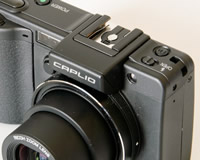 |
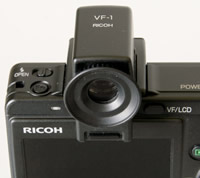
| VF-1 Electronic Viewfinder | Flash Hotshoe |
Unlike the R6 model that I recently reviewed, the GX100 uses an up/down rocker switch on the back of the camera for zooming the 24-72mm lens. This isn't quite as intuitive as the pull/push lever on top of the R6, but Ricoh can be forgiven because the reason for the change is the three external controls which form the creative heart of the GX100. Located on the top right of the camera are the Mode dial and what Ricoh refer to as the Up-down dial, and on the back is the Adj. button. These controls allow you to choose which shooting mode you want to use, with a choice of full auto, program shift, aperture-priority, shutter-priority and fully manual, and to control the settings of the particular mode that you have picked. For example, in Manual mode, the Up-down dial sets the aperture and the Adj. button sets the shutter speed, providing quick and intuitive access.
Furthermore, pressing he Adj. button allows you to quickly adjust 3 different settings that are commonly used - Exposure Compensation, White Balance and ISO Speed. Even better, the Adj. menu is fully customisable - you can add another setting to it and also choose what all four settings do, allowing you to control exactly what you want quick access to. Continuing the customisation theme, you can configure the GX100 and save the current settings as one of two My Settings modes, which are accessible by setting the Mode dial to either the MY1 or MY2 option. This allows you to configure the GX100 for different uses and allows quick access to each configuration (the camera remembers the settings when it's turned off). Finally, the Function (Fn) button on the top-left of the camera can also be customised. By default it toggles between auto and manual focus, but it can be changed to control one of eleven other settings.
As the Ricoh Caplio GX100 offers a full range of advanced exposure controls, it's quite complex in terms of its design. There are 17 external controls in total, leaving just enough room for the 2.5 inch LCD screen on the back of the camera. The GX100 dispenses with the design of previous Ricoh cameras, which traditionally have a vertical row of buttons on the rear to the right of the LCD. Instead the GX100 offers a slightly more spread out arrangement of the controls. Further appealing to the avid photographer in you, the Ricoh GX100 has a range of focusing and metering modes that should cover most situations. On the focusing side, the multi AF system has 17 separate auto focus points, and there's also center spot auto focusing and manual spot focusing. In terms of metering, the multi metering mode is 256 segment, and there's also center weighted average metering and spot metering.
 |
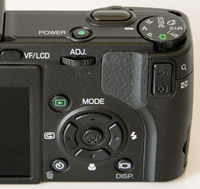 |
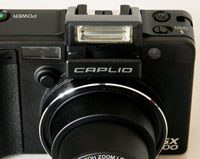
| Pop-up Flash | Rear Controls |
There is an innovative feature on the Ricoh Caplio GX100 that aims to make life easier for you. This camera has an optical-based anti-shake system called Camera Shake Correction. Turn it on and the Ricoh Caplio GX100 automatically compensates for camera shake, which is a slight blurring of the image that typically occurs at slow shutter speeds. You don't notice that the camera is actually doing anything different when anti-shake is turned on, just that you can use slower shutter speeds than normal and still take sharp photos. Ricoh seem to have realised the importance of this system, as it is turned on by default in the menu system. You can see some example of the Camera Shake Correction system in action on the Image Quality page. Thankfully leaving the anti-shake system on didn't negatively affect the battery-life, with the camera managing over 350 shots before the battery needed to be recharged.
If you have never used a digital camera before, or you're upgrading from a more basic model, reading the comprehensive and easy-to-follow 200+ page manual before you start is a must. Thankfully Ricoh have chosen to supply it in printed format, rather than as a PDF on a CD, so you can also carry it with you for easy reference in the field. The 2.5 inch, 230,000 pixel LCD screen is joined by a completely new way of framing your shots - an optional, completely removable electronic viewfinder with 100% field of view. Sold as part of the GX100 VF Kit, the EVF slots into the hot-shoe on top of the camera, allowing you to hold the camera up to your eye and instantly giving the GX100 the feel of a single-lens reflex camera.
Even better, the EVF has a tilt mechanism with 90 degrees of movement, so that you can effectively use it as a waist level viewfinder. Finally, all of the shooting information is displayed in the same manner as on the LCD monitor, so you can use the GX100 without using the LCD screen if you wish. On the downside, you obviously can't use an external flashgun at the same time as the EVF, and you can't use the built-in pop-up flash when the EVF is tilted. Thankfully it's one of the better quality EVF that I've ever used, and in a world where true optical viewfinders are few and far between, it's definitely a welcome addition and one that I'd strongly recommend choosing if you decide that the GX100 is the camera for you. The various icons used to represent the camera settings are clear and legible on both the EVF and the LCD screen.
The main menu system on the Ricoh Caplio GX100 is straight-forward to use and is accessed by pressing the Menu button in the middle of the navigation pad. There are two main menus, Shooting Settings and Setup. Quite a lot of the camera's main options, such as image size, sharpness, metering mode and continuous mode, are accessed here, so the Shooting Settings menu has 13 options spread over 3 screens. Due to the large LCD screen and restricting the number of on-screen choices to 5, the various options and icons are very clear and legible.
 |
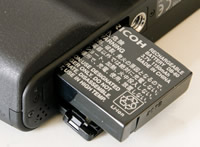 |
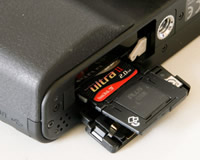
| Memory Card Slot | Battery Compartment |
Ricoh are well known for delivering responsive cameras, and the Caplio GX100 continues that tradition. The start-up time from turning the Ricoh Caplio GX100 on to being ready to take a photo is very quick at around 0.75 second, and it takes just over 1 second to zoom from the widest focal length to the longest. Focusing is very quick in good light and the camera happily achieves focus most of the time indoors or in low-light situations. The visibility, refresh rate and pixel count of the 2.5 inch LCD screen are very good. It takes about 0.5 second to store a JPEG image, allowing you to keep shooting as they are being recorded onto the memory card - there is a very short LCD blackout between each image. As you'd perhaps expect for a compact digicam, shooting in RAW mode slows things down considerably, with the GX100 taking around 6 seconds to store a RAW image, during which you can't take another shot. In the fastest Continuous mode the camera takes 2 frames per second for an unlimited number of images at the highest JPEG image quality, which is very good for this class of camera. As it takes the camera so long to record a RAW image, there is effectively no Continuous option when shooting in RAW mode. Overall the Ricoh Caplio GX100 is very quick in terms of operational speed when shooting JPEGs, and just about acceptable for RAW files.
Once you have captured a photo, the Ricoh Caplio GX100 has an average range of options when it comes to playing, reviewing and managing your images. You can instantly scroll through the images that you have taken, view thumbnails, zoom in and out up to 16x magnification, view slideshows with audio, set the print order, delete, protect and resize an image. The Display button toggles detailed settings information about each picture on and off, such as the ISO rating and aperture / shutter speed, and there is a small histogram available during both shooting and playback. The White Saturation display mode during image playback indicates over-exposed highlights by flashing those areas on and off. When taking a photo, pressing the Display button toggles between the detailed information, the histogram and gridlines to aid composition.
In summary the Ricoh Caplio GX100 is a unique digital camera with a host of features that will appeal to the enthusiast photographer, and despite the wealth of options on offer, it's thankfully still easy to use.
|
 PhotographyBLOG
is a member of the DIWA
organisation. Our test results for the Ricoh Caplio GX100 have been submitted to DIWA
for comparison with test results for different samples of
the same camera model supplied by other DIWA
member sites.
PhotographyBLOG
is a member of the DIWA
organisation. Our test results for the Ricoh Caplio GX100 have been submitted to DIWA
for comparison with test results for different samples of
the same camera model supplied by other DIWA
member sites.