
Ricoh Caplio R6 Review
Review Date: May 10th 2007
Author: Mark Goldstein
Leave a comment about this Review
|
Introduction
Compare Prices
Support PhotographyBLOG: Buy the Ricoh Caplio R6 from one of our affiliate retailers:Ease of Use
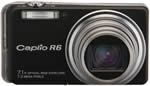
The Ricoh Caplio R6 is a very compact digital camera that easily fits in the palm of your hand, measuring 99.6(W) x 55.0 (H) x 23.3mm (D) and weighing around 135g. This is one camera that you truly won't notice carrying in a trouser/shirt pocket or a handbag. It has an under-stated appearance that is fairly attractive, but which isn't going to really wow anyone either. A sticker on front of my review sample proudly proclaims that the Ricoh Caplio R6 has a 28-200mm zoom range, a truly amazing feat of engineering in such a small camera. When the lens is fully extended, the camera measures over 7cm in depth, but thankfully it retracts fully back into the body when it is turned off.
Ricoh have changed the body design of the R6 in comparison with the previous R5 model, which had a gradual 15 degree bend in the camera body on the right hand side (looking from the back), making the corner of the small flash unit protrude a lot from the front of the camera. There is still a bend on the R6, but it's much less pronounced, and the flash unit only slightly protrudes. Instead of the crazy bend, the defining design aspect of the Ricoh R6 is the metal band which runs around the camera. On the right hand side, it extends about 0.5cms past the main body of the camera, and the AV/Out and USB ports and camera strap eyelet are located here. Ricoh refer to it as a "distinctive strap attachment", but it's a strange design that doesn't really add anything to the camera.
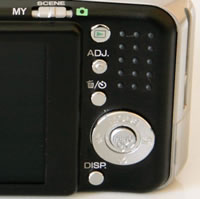
A more welcome change is the new zoom lever, which now sits on top of the camera around the shutter button. The Ricoh R6 now uses a lever that you push left to zoom out, and pull right to zoom in, which I found much easier to use than the up/down rocker switch on the back of the R5 model. The Scene mode switch has also been moved, now located above the LCD screen. The Ricoh Caplio R6 is a point and shoot camera with no advanced exposure controls, so it's not particularly complex in terms of its design. There are 10 external controls in total, leaving plenty of room for the large 2.7 inch LCD screen that dominates the back of the camera. The R6 follows the design of previous Ricoh cameras by having a vertical row of buttons on the rear, to the right of the LCD, along with the navigation pad and thumb grip.
 |
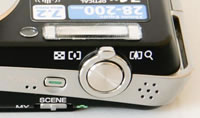 |
| Rear Controls | Top Controls |
One of these vertical buttons is the Adj. button, a particularly nice feature that allows you to quickly adjust 3 different settings that are commonly used. Press it to alter Exposure Compensation, White Balance and ISO Speed. Even better, the Adj. menu is customisable - you can add another setting to it and also choose what all four settings do, allowing you to control exactly what you want quick access to. Continuing the customisation theme, you can now configure the camera and save the current settings as one of two My Settings modes, which are accessible by setting the Scene switch to the MY option. This allows you to configure the R6 for different uses and allows quick access to each configuration (the camera remembers the settings when it's turned off).
There is an innovative feature on the Ricoh Caplio R6 that aims to make life easier for you. This camera has an anti-shake system, now called Camera Shake Correction - turn it on and the Ricoh Caplio R6 automatically compensates for camera shake, which is a slight blurring of the image that typically occurs at slow shutter speeds. You don't notice that the camera is actually doing anything different when anti-shake is turned on, just that you can use slower shutter speeds than normal and still take sharp photos. Ricoh seem to have realised the importance of this system, as it is turned on by default. Thankfully leaving the anti-shake system on didn't negatively affect the battery-life, with the camera managing over 325 shots before the battery needed to be recharged.
If you have never used a digital camera before, or you're upgrading from a more basic model, reading the comprehensive and easy-to-follow manual before you start is a must. Thankfully Ricoh have chosen to supply it in printed format, rather than as a PDF on a CD, so you can also carry it with you. The large 2.7 inch LCD screen is the only way of framing your shots, so if you have to have an optical viewfinder, look elsewhere now. Ricoh have maintained the resolution of the LCD screen on the R6, which still has 230,000 pixels. The various icons used to represent the camera settings are clear and legible, although I was slightly annoyed by the LCD brightness message along the bottom of the screen, which is displayed whenever you press the Display button.
The main menu system on the Ricoh Caplio R6 is straight-forward to use and is accessed by pressing the Menu button in the middle of the navigation pad. There are two main menus, Shooting Settings and Setup. Quite a lot of the camera's main options, such as image size, sharpness, metering mode and continuous mode, are accessed here, so the Shooting Settings menu has 18 options spread over 4 screens. Due to the large LCD screen and restricting the number of on-screen choices to 5, the various options and icons are very clear and legible.
 |
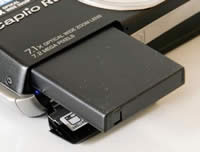 |
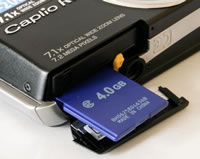
| Memory Card Slot | Battery Compartment |
The new face recognition feature offered by the Ricoh R6 didn't make a great deal of difference if I'm being honest, as there's the tendency of the user to pre-focus on the subject � and obviously a face if taking a portrait � before fully pressing the shutter button anyway. Ricoh have also chosen to make it a specific scene mode, rather than a general setting that applies to whichever shooting mode is currently selected, which rather limits its usefulness. Face recognition does work if the subjects are looking directly at the camera, but the R6 takes a while to lock onto the subject, and I think that the tried and trusted method of half-pressing the shutter button to focus and then recomposing the shot is a quicker and more reliable method.
Ricoh are well known for delivering responsive cameras, and the Caplio R6 continues that tradition. The start-up time from turning the Ricoh Caplio R6 on to being ready to take a photo is very quick at around 0.5 second, and it only takes just over 1 second to zoom from the widest focal length to the longest, impressive given the focal range. Focusing is very quick in good light and the camera happily achieves focus most of the time indoors or in low-light situations. Note that the camera does struggle to lock onto the subject sometimes at the tele-photo end of the lens. The visibility and refresh rate of the 2.7 inch LCD screen are very good. It takes about 0.5 second to store a JPEG image, allowing you to keep shooting as they are being recorded onto the memory card - there is no LCD blackout between each image. In the fastest Continuous mode the camera takes 2.5 frames per second for an unlimited number of images at the highest JPEG image quality, which is excellent for this class of camera. Overall the Ricoh Caplio R6 is extremely quick in terms of operational speed.
Once you have captured a photo, the Ricoh Caplio R6 has an average range of options when it comes to playing, reviewing and managing your images. You can instantly scroll through the images that you have taken, view thumbnails, zoom in and out up to 16x magnification, view slideshows with audio, set the print order, delete, protect and resize an image. There's also a new Recover File option which will rescue deleted images, just so long as you don't turn the camera off first. The Display button toggles detailed settings information about each picture on and off, such as the ISO rating and aperture / shutter speed, and there is a small histogram available during both shooting and playback. A new White Saturation display mode during image playback indicates over-exposed highlights by flashing those areas on and off. When taking a photo, pressing the Display button toggles between the detailed information, the histogram and gridlines to aid composition.
In summary the Ricoh Caplio R6 is an intuitive, unassuming, very responsive point and shoot compact camera with the obvious attraction of the 7x zoom lens.
|
 PhotographyBLOG
is a member of the DIWA
organisation. Our test results for the Ricoh Caplio R6 have been submitted to DIWA
for comparison with test results for different samples of
the same camera model supplied by other DIWA
member sites.
PhotographyBLOG
is a member of the DIWA
organisation. Our test results for the Ricoh Caplio R6 have been submitted to DIWA
for comparison with test results for different samples of
the same camera model supplied by other DIWA
member sites.